
Typing.com Review
Product by Typing.com
Facts checked: Not yet checked
Our take (not a Learning Standard rating). This label applies to learning-science judgments throughout this overview.
Our take (not a Learning Standard rating)
Typing.com offers typing lessons, tests and games with free and paid school editions. The vendor's plan comparison distinguishes advertising, data retention and teacher controls. Choose the edition around the practice and reporting you need, then check typing accuracy as well as speed.
Product information: Typing.com teacher features and Free/Plus comparison
Research review. About this review
Keep the Typing.com decision brief
Share the two-metric explanation, comparison questions and a goal-setting message so another caregiver can encourage progress without making speed the only measure that matters. Subscribe to future TLS research updates and download the one-page PDF here immediately.
Pros
- Breaks keyboarding into discrete motor skills with immediate corrective feedback.
- Uses mastery-based progression to ensure students achieve accuracy before advancing to speed.
- Incorporates gamification elements that maintain engagement during repetitive drill practice.
Cons
- Digital literacy modules lack meaningful retrieval practice, relying instead on passive reading.
- Gamified elements occasionally distract from the core instructional goals with unnecessary visual clutter.
- Does not consistently employ spaced repetition to review previously mastered keys.
What Do We Know About Typing.com?
Typing.com effectively builds basic keyboarding skills through rote practice, but its broader digital literacy lessons lack rigorous instructional design. The platform uses a clear, mastery-based approach to teach typing, requiring your child to hit specific accuracy benchmarks before moving on to new keys. This builds automaticity, transferring cognitive load away from finding letters and allowing students to focus on writing. The system provides immediate corrective feedback, which is crucial for motor skill acquisition. However, the non-typing content, such as internet safety and coding basics, relies too heavily on passive reading rather than active engagement. Without built-in retrieval practice or spaced review, your child is unlikely to retain these complex concepts long-term. Parents should use this tool primarily as a keyboarding drill platform rather than a comprehensive computer science curriculum. Because The Learning Standard has not yet evaluated this app, parents should actively monitor whether their child is maintaining proper hand placement, as the software cannot correct physical posture.
How Does Typing.com Work?
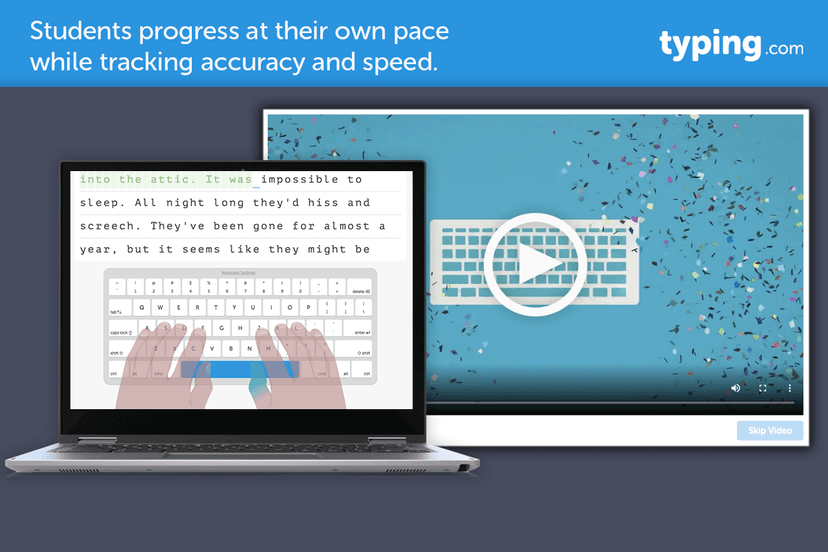
Typing.com uses a mastery-based progression model with discrete motor skill drills followed by gamified practice sets. The instructional sequence introduces one or two new keys at a time, displaying a virtual keyboard with color-coded finger placements to guide the user. Students complete short typing exercises and receive immediate, on-screen visual feedback when an error occurs. The software prevents the user from advancing until the correct key is pressed, forcing immediate error correction. As accuracy improves, the drills shift focus to speed, measured in words per minute. To reinforce learning, the platform incorporates mini-games where typing speed and accuracy dictate success. For classroom settings, educators have access to dashboards that track student metrics, allowing for targeted intervention when a student struggles with specific letter combinations.
Strengths and tradeoffs of Typing.com
Typing.com's biggest strength is its systematic breakdown of motor skills, while its biggest weakness is the passive nature of its digital literacy instruction. The platform excels at automaticity development. By isolating individual keystrokes and requiring high accuracy rates before advancing, the app ensures that foundational motor pathways are solidified. This aligns well with learning science principles regarding motor skill acquisition, where immediate feedback and repeated execution are paramount. However, the app falls short in its approach to conceptual learning. The digital literacy and coding modules present information through dense text blocks with minimal interactive elements. Without incorporating retrieval practice such as low-stakes quizzing or self-explanation prompts, students are unlikely to transfer this knowledge to long-term memory. Additionally, the typing curriculum lacks a structured spaced repetition algorithm. Once a key is mastered, the system does not systematically retest it at increasing intervals to ensure long-term retention. Despite these flaws, the gamified practice environments successfully maintain student motivation during highly repetitive tasks.
Who Might Benefit From Typing.com?
Best for elementary and middle school students who need structured, repetitive drills to build touch-typing automaticity. The core typing modules are highly effective for users ranging from late kindergarten through eighth grade, providing a low-barrier entry point for developing essential keyboarding skills. While it includes content for high schoolers and adults, older learners may find the interface and gamified elements too juvenile. It serves best as a supplemental tool for educators and parents who want a free, accessible platform to handle the rote mechanics of typing instruction, freeing up instructional time for higher-level computer science concepts.
What does Typing.com cost?
Free
Pricing and included features can change. Confirm the plan, renewal terms and any school-provided access on Typing.com's website.
Questions to ask before choosing Typing.com
Use these with a teacher, during a trial, or when comparing another option.
- Is the goal accurate touch typing, greater speed or broader digital-literacy lessons?
- Which ads and teacher controls apply to the edition your learner will actually use?
- Can you keep or export the progress history you need under that edition's retention rules?
- Does the learner maintain accuracy when typing an unfamiliar passage?
Sources and review method
TLS combines product information and editorial analysis to explain how Typing.com works, its tradeoffs, and the questions to ask before choosing it. Product features, an instructional rationale and evidence of learning outcomes are different kinds of information.
Formal Learning Standard assessment: not yet completed. Data Transparency findings are reported separately and do not establish learning effectiveness. Read our methodology.
The sources below support the opening take and decision questions. Provider descriptions establish advertised features, not independently measured learning outcomes.
- Typing.com teacher features and Free/Plus comparisonProduct information · Source checked 2026-09-04
Source-check dates apply to these links, not to every statement in the existing editorial or to a new formal assessment.
Frequently Asked Questions About Typing.com
Is Typing.com free?
Yes, the core platform is entirely free for both individual and classroom use. The developer monetizes the free version through display advertisements, though schools and parents can purchase premium subscriptions to remove these ads and access advanced reporting features.
Is Typing.com good for elementary students?
Yes, the platform is highly appropriate for elementary students. The lessons are chunked into short, manageable tasks that prevent cognitive overload, and the gamified rewards system effectively sustains attention during the repetitive drills required for motor skill development.
What does Typing.com teach?
Typing.com primarily teaches touch-typing and keyboarding automaticity. It also includes secondary modules covering digital literacy, online safety, basic coding, and career preparation, though these non-typing subjects lack the rigorous instructional design found in the core keyboarding lessons.
How does Typing.com compare to Nitro Type?
Typing.com focuses on initial skill acquisition and mastery-based progression, whereas Nitro Type is purely a competitive racing game designed for fluency practice. Students should learn foundational keyboarding on Typing.com before using Nitro Type to build speed.
Has The Learning Standard evaluated Typing.com?
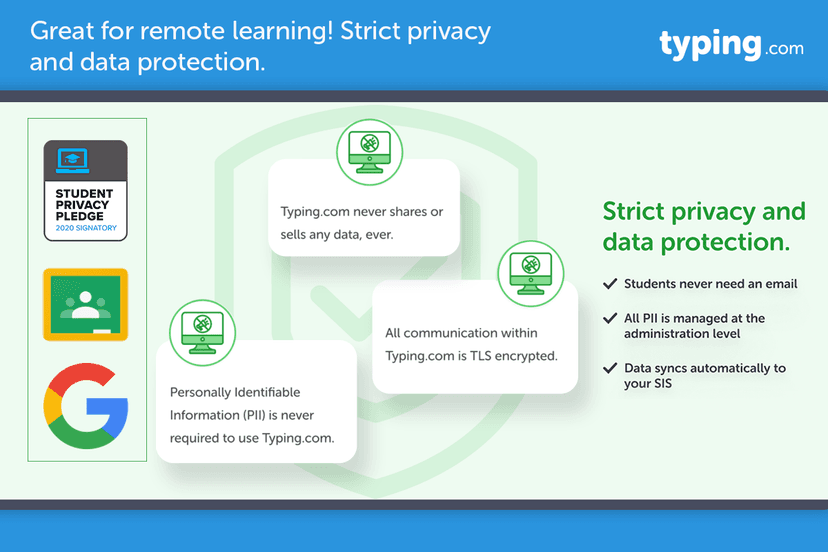
TLS has not yet completed a Learning Standard evaluation of how well Typing.com teaches. TLS has not published a Data Transparency result for its privacy policy.
Keep the Typing.com decision brief
Share the two-metric explanation, comparison questions and a goal-setting message so another caregiver can encourage progress without making speed the only measure that matters. Subscribe to future TLS research updates and download the one-page PDF here immediately.
Screenshots


Take Action
For Typing.com
If you represent Typing.com and have a correction or new evidence, send the relevant source so we can review and update this page.
Submit a correctionDetails
- Pricing
- Free
- Platforms
- iOS (Apple mobile), iPadOS (Apple tablet), Android (Google mobile), Windows (Microsoft), macOS (Apple), Chrome OS (Google)
- Grade Levels
- Kindergarten, 1st Grade, 2nd Grade, 3rd Grade, 4th Grade, 5th Grade, 6th Grade, 7th Grade, 8th Grade, 9th Grade, 10th Grade, 11th Grade, 12th Grade, Adult Education, Professional or Technical Credential
- Website
- Visit site