Type to Learn
Product by Sunburst Digital
Facts checked: Not yet checked
Our take (not a Learning Standard rating). This label applies to learning-science judgments throughout this overview.
Our take (not a Learning Standard rating)
Type to Learn effectively builds typing automaticity through spaced repetition and immediate feedback, but its interface feels dated compared to modern alternatives. While it relies on proven drill-and-practice mechanics for muscle memory acquisition, its engagement strategies rely heavily on extrinsic gamification rather than intrinsic learning motivation.
Pros
- Uses immediate corrective feedback to prevent the formation of incorrect muscle memory during typing drills.
- Employs spaced repetition to revisit difficult keystrokes until automaticity is achieved.
- Provides detailed progress reports for parents and educators to track accuracy and words-per-minute growth over time.
- Scaffolds instruction by introducing new keys incrementally before combining them in complex typing passages.
Cons
- Relies on extrinsic gamification features that can distract learners from the core typing tasks.
- Features an aging user interface that fails to match the polish of contemporary educational software.
- Lacks advanced adaptive algorithms to individualize the pacing for exceptionally fast or slow learners.
What Do We Know About Type to Learn ?
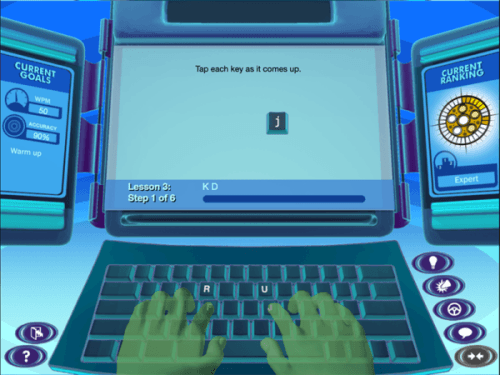
Type to Learn effectively builds essential keyboarding skills through structured, repetitive practice, though it relies on older software design principles. Your child will work through a highly structured sequence of lessons designed to build finger-key associations and muscle memory. The program relies heavily on drill-and-practice methodology, which learning science confirms is necessary for developing physical automaticity like touch-typing. Because the app immediately highlights incorrect keystrokes, your child cannot practice mistakes, preventing bad habits from taking root. However, you should monitor how your child interacts with the game-based elements. While the app frames lessons around a secret agent theme to maintain attention, this extrinsic motivation sometimes overshadows the actual skill development. The interface can feel clunky, and the graphics are not as modern as newer typing applications. Despite these aesthetic drawbacks, the underlying pedagogical structure remains sound. If your child needs a distraction-free, sequential path to touch-typing proficiency, this program provides the necessary repetition and scaffolding required for physical skill success.
How Does Type to Learn Work?
Type to Learn uses a sequential, drill-and-practice pedagogy wrapped in a game-based narrative to build keyboarding automaticity. The platform introduces keys in small, manageable clusters. First, a visual demonstration shows proper hand placement and finger movement. Next, your child completes guided drills focusing strictly on those new keys. As accuracy improves, the system integrates previously learned keys using interleaved practice. This prevents the forgetting curve and solidifies muscle memory. The software actively measures both words per minute and accuracy, requiring students to meet specific benchmarks before unlocking the next lesson. During practice sets, immediate corrective feedback pauses the learner when they make a mistake, forcing them to hit the correct key before moving forward. Interspersed throughout the curriculum are formative assessments and mini-games designed to test speed and accuracy under simulated pressure.
Strengths and tradeoffs of Type to Learn
The biggest strength of Type to Learn is its strict adherence to incremental scaffolding, while its biggest weakness is an outdated interface that relies too heavily on extrinsic gamification. Scaffolded progression ensures that learners never face cognitive overload. Keys are introduced logically, and students must prove mastery through high accuracy rates before advancing. This aligns perfectly with the learning science principle of automaticity; physical skills require mastery of isolated components before complex integration. Immediate corrective feedback is another significant strength. By forcing learners to correct typos instantly, the program prevents the encoding of incorrect motor pathways. However, the app struggles with extraneous cognitive load. The secret agent narrative and mini-games, while intended to boost engagement, sometimes distract from the core learning objective. Furthermore, the user interface feels outdated. Compared to modern web-based applications, the visual presentation can fail to capture the attention of students accustomed to highly polished digital environments. Finally, while it offers robust tracking, its adaptivity is somewhat rigid, pushing most students through the exact same sequence regardless of prior knowledge.
Who Might Benefit From Type to Learn ?
Best for elementary and middle school students who need structured, repetitive typing drills to build foundational keyboarding skills. The secret agent theme resonates most strongly with children in grades three through six. While the developer lists applicability through adult education, the gamified elements feel distinctly juvenile for high schoolers or adults. It serves well as a supplemental tool for homeschoolers or as a station activity in traditional classrooms where educators need to easily monitor progress. Students who struggle with fine motor skills will benefit from the slow, deliberate pacing of the early lessons.
Data Transparency
Does Not Meet Data Transparency Standard
Type to Learn does not meet our data transparency standard. Its privacy policy does not document basic protections, including a commitment against targeted advertising, limits on sharing children's data and parents' right to see their child's data.
10 of 35 checks passed
Evaluated September 2026
Sunburst Digital's Privacy Policy →Level 1 · Basic protections
Does not sell data or target ads at students, limits sharing, and lets parents see and delete their child's data.
Not documented: a commitment against targeted advertising, limits on sharing children's data, parents' right to see their child's data, parents' right to delete their child's data, account deletion
Level 2 · Parent control (meets the standard)
Families can get their data out, know who processes it, and know how long it is kept.
Not documented: users' right to access their data, data export, a data retention timeline, named service providers, self-service deletion
Level 3 · Direct data access
Families or schools can pull their own data through an API, in a stated format.
Not documented: an API for retrieving their own data, a named export format
View all 35 checks
Parent Access5/8
Does the policy mention parents specifically?
“We do not collect personally identifiable information from teachers, administrators, parents or other adults who may use this site, unless they voluntarily provide such information to us.”
Can parents view their child's data?
The policy does not say parents can view their child's data.
Can parents modify their child's data?
The policy does not say parents can modify their child's data.
Can parents delete their child's account?
The policy only says staff will delete information collected from a child under 13 without parental consent, and gives parents no right to request deletion.
Is there a dedicated Children's Privacy section?
“COPPA Sunburst Digital adheres to the Children’s Online Privacy Protection Act (COPPA).”
Does it reference COPPA compliance?
“Sunburst Digital adheres to the Children’s Online Privacy Protection Act (COPPA).”
Does it reference FERPA compliance?
“Sunburst Digital operates in compliance with FERPA and takes every measure to ensure the confidentiality of students attending our subscribing schools.”
Is parental consent required for child accounts?
“If the Site staff becomes aware that personal information has been collected from a child under 13 without such child’s parent or guardian’s consent, we will use reasonable efforts to delete such information from our database.”
Data Portability0/5
Can users access their personal data?
The policy does not give users a right to access their personal data.
Can users download/export their data?
The policy does not address downloading or exporting data.
Is there a self-service data access tool?
The policy does not describe a self-service data access tool.
Is a specific data format mentioned for export?
The policy does not mention an export format.
Is there an API for data access?
The policy does not mention an API for data access.
Data Minimization2/6
Is data collection itemized?
“Rather, the subscribing school may need to provide Sunburst Digital with a student’s full name, grade, and the address and telephone number of the school in which the student is enrolled for proper functionality or our solutions.”
Can the app be used without a real name?
The policy says the school may provide the student's full name, though it may choose a fictitious one.
Can the app be used without an email?
The policy does not explicitly say that student email addresses are never collected.
Does it state collection is limited to what is necessary?
“We collect and use only as much personal information as necessary for the solution being used, and do not condition participation in any on-line activity on the disclosure of more personal information than is reasonable necessary.”
Is IP address anonymized or truncated?
The policy says IP addresses may be collected but does not say they are anonymized or truncated.
Is location tracking explicitly excluded?
The policy does not address location tracking.
Third-Party Protection3/7
Does it explicitly state no selling of data?
“We do not sell any personally identifying information collected on the Site or through the Program to third parties or mass marketers.”
Are third-party providers named?
The policy describes categories of third parties but names none.
Are providers contractually restricted?
“only we and our affiliates, our technical consultants, third party auditors and other third parties who make our Site available, or enhance its functionality, have access to this information, and we require them to agree that they are covered by this policy.”
No-targeted-advertising commitment?
The policy does not address targeted advertising.
Is AI/ML data sharing addressed?
The policy does not address AI or machine learning.
Child-specific sharing restriction?
The policy has no sharing restriction specific to children.
Cookies/tracking limited or opt-out?
“Sunburst Digital uses cookies solely for the purpose of holding information during on-line sessions (for example, to hold answers to on-line quizzes for short-term storage, or to create an ID for use in a multiple-session assessment).”
Deletion & Retention0/5
Can users delete their account?
The policy does not give users a right to request deletion of their account or data.
Self-service deletion mechanism?
The policy does not describe a self-service deletion mechanism.
Specific data retention timeline?
The policy gives no specific retention timeline.
Auto-deletion of inactive accounts?
The policy does not address auto-deletion of inactive accounts.
Post-deletion handling described?
The policy does not describe what happens to data after deletion.
Advertising0/4
Advertising model explicitly disclosed?
The policy does not address advertising.
Free from third-party advertisements?
The policy does not address third-party advertisements.
Children excluded from ad targeting?
The policy does not address ad targeting of children.
Ad-free option available?
The policy does not address advertising or an ad-free option.
What This Means
The policy review did not meet our data transparency standard. The checks above show the documented findings and unknowns. A missing statement does not establish how the app handles data in practice.
About this evaluation: Based on automated analysis of Sunburst Digital's Privacy Policy against 35 policy-disclosure questions, including questions adapted from the Common Sense Privacy Program's published evaluation questions. TLS is not affiliated with Common Sense Media, and this is not a Common Sense rating. Quoted text is copied from the policy; unquoted notes are our summary. Results describe what the policy documents, not the company's actual practices. Privacy policies can change: this review reflects the version we analyzed and does not determine legal compliance.
Sources and review method
TLS combines product information and editorial analysis to explain how Type to Learn works, its tradeoffs, and the questions to ask before choosing it. Product features, an instructional rationale and evidence of learning outcomes are different kinds of information.
Formal Learning Standard assessment: not yet completed. Data Transparency findings are reported separately and do not establish learning effectiveness. Read our methodology.
Frequently Asked Questions About Type to Learn
Is Type to Learn free?
No, Type to Learn is not a free application; it requires a paid annual subscription to access its typing curriculum. School districts typically purchase bulk licenses for broad classroom use, but individual families can also buy direct access. The current rate for a single homeschool account is $39.95 per year. This subscription provides full access to all typing lessons, mini-games, and the parental dashboard for tracking accuracy and speed metrics.
What does Type to Learn teach?
Type to Learn strictly teaches touch-typing and keyboarding proficiency through repetitive practice. It focuses initially on correct finger placement on the home row and gradually builds muscle memory for the entire keyboard. As students progress, the system continues to emphasize typing accuracy before focusing on increasing words per minute. The curriculum also reinforces basic grammar and punctuation by having students type full sentences and paragraphs in later stages.
Is Type to Learn good for elementary students?
Yes, the program is ideal for elementary and middle school students who are just beginning to learn keyboarding. The sequential instruction prevents frustration, and the overarching secret agent narrative is specifically designed to maintain the attention of younger learners during repetitive typing drills. While the developer lists the app as suitable for high school and adult education, older learners will likely find the gamified elements and visual design too juvenile.
How does Type to Learn compare to Typing.com?
Type to Learn offers a more narrative-driven, gamified experience wrapped in a secret agent theme, making it appealing to younger children who need external motivation. Typing.com provides a cleaner, more modern interface with a broader range of free lessons that appeal to all ages. Both platforms utilize similar drill-and-practice mechanics and immediate corrective feedback, but Typing.com relies less on childish aesthetics and more on straightforward skill acquisition.
Has The Learning Standard evaluated Type to Learn?
TLS has not yet completed a Learning Standard evaluation of how well Type to Learn teaches. Its privacy policy has been reviewed for Data Transparency and does not yet document the basic protections (Level 1).
Is Type to Learn COPPA compliant?
The reviewed privacy policy references COPPA. A policy reference alone does not establish COPPA compliance. Policy review note: The policy says the company adheres to COPPA.
Is Type to Learn FERPA compliant?
The reviewed privacy policy references FERPA. A policy reference alone does not establish FERPA compliance. Policy review note: The policy says the company complies with FERPA.
Does Type to Learn have a children's privacy policy?
The reviewed policy includes a dedicated children's privacy section. Policy review note: The policy has a section headed COPPA.
Does Type to Learn sell student data?
The reviewed policy states that the app does not sell data. This is a policy statement; actual data practices were not verified. Policy review note: The policy states the company does not sell personal information.
Can you delete your data from Type to Learn ?
Account deletion was not documented in the reviewed privacy policy. This does not establish whether deletion is available. Policy review note: The policy does not give users a right to request deletion of their account or data.
Follow TLS Research
Subscribe to future TLS research updates: app reviews, findings, and what the evidence shows.
Screenshots
Take Action
For Type to Learn
If you represent Sunburst Digital and have a correction or new evidence, send the relevant source so we can review and update this page.
Submit a correctionDetails
- Pricing
- Price per license. Please contact us for pricing options. Homeschool subscription for only $39.95/year.
- Platforms
- Web Browser, Tizen (Samsung mobile), Windows (Microsoft), macOS (Apple), Chrome OS (Google), Other
- Grade Levels
- Preschool, Prekindergarten, Transitional Kindergarten, Kindergarten, 1st Grade, 2nd Grade, 3rd Grade, 4th Grade, 5th Grade, 6th Grade, 7th Grade, 8th Grade, 9th Grade, 10th Grade, 11th Grade, 12th Grade, Associate's degree, Bachelor's degree, Post-baccalaureate certificate, Doctoral Degree, Post-doctoral certificate, Adult Education, Professional or Technical Credential
- Website
- Visit site