TouchMath Pro™
Product by TouchMath
Facts checked: Not yet checked
Our take (not a Learning Standard rating). This label applies to learning-science judgments throughout this overview.
Our take (not a Learning Standard rating)
TouchMath Pro provides structured, multisensory math practice that benefits students with specific learning disabilities, but its heavy reliance on the proprietary touch-point counting method may impede automaticity for neurotypical learners. The diagnostic tools and personalized pacing support mastery-based progression effectively.
Pros
- Uses a multisensory instructional method to make abstract numerical concepts concrete.
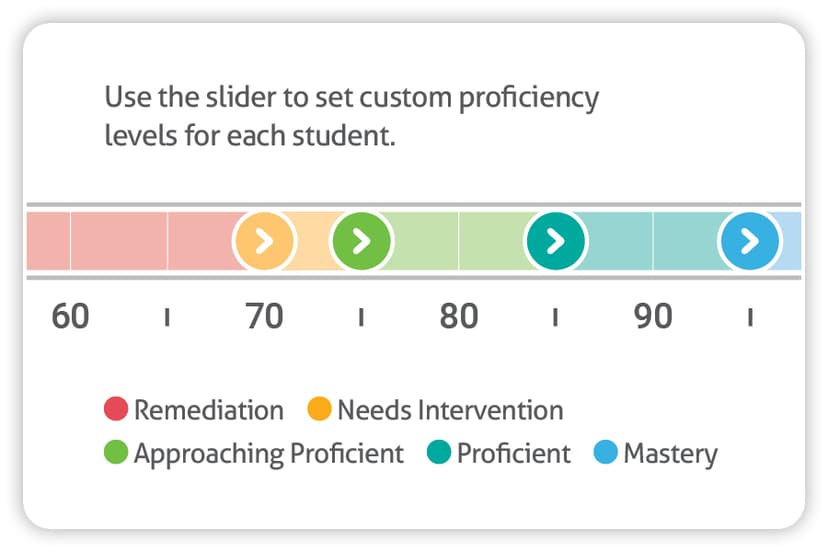
- Offers built-in diagnostic assessments to identify specific mathematical skill gaps.
- Adapts difficulty in real-time based on student accuracy to prevent frustration.
- Provides printable offline materials to support traditional paper-and-pencil transfer.
Cons
- Relies heavily on a proprietary counting strategy that can delay direct fact fluency if not faded properly.
- Lacks transparent consumer pricing since it targets institutional school district purchases.
- May feel overly repetitive for students who do not require highly structured, incremental instruction.
What Do We Know About TouchMath Pro™?
TouchMath Pro is highly effective for students who struggle with abstract math concepts, but it may slow down learning for children who easily grasp traditional number sense. Your child will use a specific multisensory method that places physical touchpoints on numbers to represent their value. This concrete representation reduces working memory load and helps children solve addition and subtraction problems without relying on mental counting alone. However, learning science shows that students must eventually transition from counting strategies to direct fact retrieval to achieve math fluency. If your child relies on this app too long without fading the visual cues, they may struggle to memorize math facts. The program excels in its diagnostic capabilities, pinpointing exact skill gaps and adjusting the difficulty of practice sessions automatically. This personalized pacing aligns well with mastery learning principles, ensuring your child only moves forward when they are truly ready. Because the app is primarily designed for schools and special education programs, you will need to coordinate with your child's teachers to align the digital practice with their individualized education program goals.
How Does TouchMath Pro™ Work?
TouchMath Pro uses an adaptive, mastery-based progression combined with a multisensory instructional framework. Your child begins by taking a diagnostic assessment that identifies their current operational fluency and conceptual gaps. Based on these results, the software generates a personalized learning path. The core mechanic requires your child to interact with numbers by touching specific points drawn on the numerals themselves, visually and physically reinforcing the concept of quantity. As they progress through addition, subtraction, multiplication, and division, the app's algorithm monitors their real-time responses. If your child answers correctly, the system introduces more complex problems. If they make errors, the algorithm scales back the difficulty and provides corrective practice sets. Educators and parents can also manually assign specific modules to target individual goals. The program bridges digital and physical learning by allowing adults to print corresponding activity sheets, which encourages the transfer of skills from the screen to traditional paper formats.
Strengths and tradeoffs of TouchMath Pro™
The biggest strength of TouchMath Pro is its ability to reduce cognitive overload for struggling learners, while its biggest weakness is the risk of creating dependency on a proprietary counting strategy. Concrete Representation: By assigning physical points to abstract symbols, the app effectively scaffolds early number sense. This aligns with the principles of cognitive load theory, as it gives working memory a tangible anchor during complex calculations. Targeted Remediation: The diagnostic tools isolate specific skill deficits, allowing the algorithm to deliver highly targeted practice rather than generic grade-level repetition. Risk of Dependency: Cognitive science dictates that true math fluency requires direct retrieval from long-term memory. The touch-point method is an excellent bridge, but the app relies heavily on this scaffold. If the visual cues are not systematically faded out, your child may continue counting rather than memorizing their math facts. Engagement: The interface is functional and structured, which minimizes distraction but lacks the intrinsic motivational elements found in gamified learning platforms.
Who Might Benefit From TouchMath Pro™?
Best for elementary students and special education learners who require structured, multisensory interventions to grasp foundational math concepts. The highly scaffolded approach makes it an excellent fit for children in Kindergarten through 6th grade who have dyscalculia, individualized education programs, or significant gaps in number sense. It serves as a powerful remediation tool for educators and parents who need precise diagnostic data and targeted practice sets. However, it is not ideal for neurotypical students who are already developing traditional fact fluency and simply need fast-paced retrieval practice.
Data Transparency
Does Not Meet Data Transparency Standard
TouchMath Pro™ reaches Level 1 of 3 (Basic protections), below our data transparency standard. Reaching Level 2 needs the policy to document data export, a data retention timeline and self-service deletion.
19 of 35 checks passed
Level 1 · Basic protections
Does not sell data or target ads at students, limits sharing, and lets parents see and delete their child's data.
Level 2 · Parent control (meets the standard)
Families can get their data out, know who processes it, and know how long it is kept.
Not documented: data export, a data retention timeline, self-service deletion
Level 3 · Direct data access
Families or schools can pull their own data through an API, in a stated format.
Not documented: an API for retrieving their own data, a named export format
View all 35 checks
Parent Access6/8
Does the policy mention parents specifically?
“Parents and guardians can contact their child’s school to review, correct, or update the student data we hold.”
Can parents view their child's data?
“If you are a parent or guardian and would like to review, correct or update your child’s data stored in our Products, contact your School District.”
Can parents modify their child's data?
“If you are a parent or guardian and would like to review, correct or update your child’s data stored in our Products, contact your School District.”
Can parents delete their child's account?
The policy gives deletion to the School Customer and sends parents' questions to the school, but never says parents can ask for their child's data or account to be deleted.
Is there a dedicated Children's Privacy section?
“We do not knowingly collect personal information from a child under 13 unless and until a School Customer has authorized us to collect such information through the provision of Products on the School Customer’s behalf.”
Does it reference COPPA compliance?
“We comply with all applicable provisions of the Children’s Online Privacy Protection Act (“COPPA”).”
Does it reference FERPA compliance?
“With respect to FERPA, TMA receives Student Data as a “school official” under Section 99.31 of FERPA for the purpose of providing its Products, and such Student Data is owned and controlled by the School Customer.”
Is parental consent required for child accounts?
The policy relies on consent from the school, and the website policy lets schools either get parental consent or use an exception, so parental consent is not required.
Data Portability1/5
Can users access their personal data?
“Residents of California may be entitled to certain rights with respect to personal information that we collect about them under the CCPA: the Right to Know, the Right to Request Deletion and the Right to Opt-Out of Personal Information Sales.”
Can users download/export their data?
The policy does not offer any way to download or export data.
Is there a self-service data access tool?
Access requests go through the school or by email; the policy describes no self-service data access tool.
Is a specific data format mentioned for export?
The policy does not name any export format.
Is there an API for data access?
The policy does not mention an API for data access.
Data Minimization1/6
Is data collection itemized?
“This roster information, including name, email address, grade level, and school ID numbers, is provided to TouchMath by our School Customers either directly from the School Customer’s student information system or via a third party with whom the School Customer contracts to provide that information.”
Can the app be used without a real name?
The policy says schools supply roster information that includes the student's name.
Can the app be used without an email?
The policy says schools supply roster information that includes the student's email address.
Does it state collection is limited to what is necessary?
The policy limits the purposes and retention of data but never says collection is limited to what is necessary.
Is IP address anonymized or truncated?
The policy says IP addresses are collected and does not mention anonymizing or truncating them.
Is location tracking explicitly excluded?
The policy says the company may collect geolocation from the device or estimate location from the IP address.
Third-Party Protection7/7
Does it explicitly state no selling of data?
“We do not sell student data to third parties or use it for targeted advertising.”
Are third-party providers named?
“Third-party Generative AI Model: We use the Anthropic Claude LLM, a third-party model.”
Are providers contractually restricted?
“We contractually bind such parties to protect Student Data in a manner consistent with those practices set forth in this Policy;”
No-targeted-advertising commitment?
“TouchMath will never use Student Data for targeted advertising.”
Is AI/ML data sharing addressed?
“Data Sharing: We do not share any personally identifiable information with the Anthropic Claude, except for the student’s first name and grade level, which is used for personalization.”
Child-specific sharing restriction?
“TouchMath does not permit third party advertising networks to collect information from or about Students using TouchMath educational Products for the purpose of serving targeted advertising across websites and over time”
Cookies/tracking limited or opt-out?
“With respect to cookies, you may be able to reject cookies through your browser or device controls, but doing so may negatively impact your experience as some features may not work properly.”
Deletion & Retention2/5
Can users delete their account?
“Residents of California may be entitled to certain rights with respect to personal information that we collect about them under the CCPA: the Right to Know, the Right to Request Deletion and the Right to Opt-Out of Personal Information Sales.”
Self-service deletion mechanism?
Deletion happens by request to the school or company; the policy describes no self-service deletion tool.
Specific data retention timeline?
The policy keeps data as long as necessary and deletes it after the school's agreement ends, without giving a specific time period.
Auto-deletion of inactive accounts?
The policy does not address automatic deletion of inactive accounts.
Post-deletion handling described?
“We may not be able to fully delete all data in all circumstances, such as information retained in technical support records, customer service records, back-ups and similar business records.”
Advertising2/4
Advertising model explicitly disclosed?
“TouchMath may, from time to time, provide customized content, advertising, and commercial messages to School Customers, teachers, school administrators or other non-student users, provided that such advertisements shall not be based on Student Data.”
Free from third-party advertisements?
The policy allows advertising to non-student users and never says the product is free of third-party ads.
Children excluded from ad targeting?
“use or disclose Student Data to inform, influence, or enable targeted advertising to a student based on Student Data or information or data inferred over time from the student’s usage of the Products;”
Ad-free option available?
The policy does not say the product has no advertising or offer an ad-free option.
What This Means
The policy review did not meet our data transparency standard. The checks above show the documented findings and unknowns. A missing statement does not establish how the app handles data in practice.
About this evaluation: Based on automated analysis of TouchMath Privacy Policy and Privacy Policy against 35 policy-disclosure questions, including questions adapted from the Common Sense Privacy Program's published evaluation questions. TLS is not affiliated with Common Sense Media, and this is not a Common Sense rating. Quoted text is copied from the policy; unquoted notes are our summary. Results describe what the policy documents, not the company's actual practices. Privacy policies can change: this review reflects the version we analyzed and does not determine legal compliance.
Sources and review method
TLS combines product information and editorial analysis to explain how TouchMath Pro™ works, its tradeoffs, and the questions to ask before choosing it. Product features, an instructional rationale and evidence of learning outcomes are different kinds of information.
Formal Learning Standard assessment: not yet completed. Data Transparency findings are reported separately and do not establish learning effectiveness. Read our methodology.
Frequently Asked Questions About TouchMath Pro™
Is TouchMath Pro free?
No, TouchMath Pro is not free, and pricing is fully customized based on the specific needs of individual classrooms, schools, or districts. Because it is primarily designed as an institutional tool for special education and general education interventions, parents cannot easily purchase a standard monthly subscription. School administrators must contact the developer directly to negotiate a license that covers the required number of student seats and teacher accounts.
Is TouchMath Pro good for Kindergarteners?
Yes, the multisensory touch-point method is highly effective for introducing Kindergarteners and early childhood learners to basic number sense. Young children often struggle with the abstract nature of numerals. By placing physical counting points directly on the numbers, the program makes the concept of quantity concrete and observable. This physical interaction bridges the gap between counting actual objects and understanding written math symbols, providing a strong foundation for future addition and subtraction skills.
What does TouchMath Pro teach?
TouchMath Pro teaches foundational mathematics starting from early number recognition up through sixth-grade operational fluency. Your child will learn core arithmetic skills including addition, subtraction, multiplication, and division. The curriculum also covers more advanced elementary concepts like fractions, decimals, and basic word problems. Every topic is taught using the proprietary touch-point counting method, ensuring that students always have a concrete strategy to fall back on when working through complex multi-step equations.
Does TouchMath Pro work for special education?
Yes, the app is specifically designed to support individualized education programs by breaking down mathematical operations into highly concrete, scaffolded steps. Students with dyscalculia or cognitive delays benefit immensely from the program's ability to reduce working memory load. The diagnostic tools allow educators to set precise skill goals and track progress over time, ensuring that the personalized learning path strictly aligns with the accommodations and legal requirements outlined in a student's special education plan.
How does TouchMath Pro compare to Khan Academy Kids?
TouchMath Pro offers highly targeted remediation using a proprietary multisensory counting method, whereas Khan Academy Kids provides a broader, standard curriculum for general early learning. TouchMath Pro is best utilized as an intensive intervention tool for students who are genuinely struggling to grasp abstract math concepts. Khan Academy Kids is a better fit for neurotypical learners who need comprehensive exposure to math, reading, and logic using traditional instructional methods without the reliance on a specific counting scaffold.
Has The Learning Standard evaluated TouchMath Pro™?
TLS has not yet completed a Learning Standard evaluation of how well TouchMath Pro™ teaches. Its privacy policy has been reviewed for Data Transparency and reaches Level 1, Basic protections.
Is TouchMath Pro™ COPPA compliant?
The reviewed privacy policy references COPPA. A policy reference alone does not establish COPPA compliance. Policy review note: The policy states that it complies with COPPA.
Is TouchMath Pro™ FERPA compliant?
The reviewed privacy policy references FERPA. A policy reference alone does not establish FERPA compliance. Policy review note: The policy says the company acts as a school official under FERPA.
Does TouchMath Pro™ have a children's privacy policy?
The reviewed policy includes a dedicated children's privacy section. Policy review note: The policy has its own section headed "COPPA".
Does TouchMath Pro™ sell student data?
The reviewed policy states that the app does not sell data. This is a policy statement; actual data practices were not verified. Policy review note: The policy states outright that the company does not sell student data.
Can you delete your data from TouchMath Pro™?
The reviewed privacy policy describes account deletion. We have not tested the deletion process. Policy review note: California users can ask for deletion, and students do this through their school.
Follow TLS Research
Subscribe to future TLS research updates: app reviews, findings, and what the evidence shows.
Screenshots


Take Action
For TouchMath Pro™
If you represent TouchMath and have a correction or new evidence, send the relevant source so we can review and update this page.
Submit a correctionDetails
- Pricing
- Pricing is customized to meet the needs of individual classrooms in each school and/or district.
- Platforms
- Web Browser, iPadOS (Apple tablet), Windows (Microsoft), macOS (Apple), Chrome OS (Google)
- Grade Levels
- Kindergarten, 1st Grade, 2nd Grade, 3rd Grade, 4th Grade, 5th Grade, 6th Grade
- Website
- Visit site