thinkLaw's Digital Curriculum Library
Product by thinkLaw
Facts checked: Not yet checked
Our take (not a Learning Standard rating). This label applies to learning-science judgments throughout this overview.
Our take (not a Learning Standard rating)
ThinkLaw effectively uses case studies and inquiry-based learning to build critical thinking skills in students by analyzing real-world legal scenarios. However, because we have not yet evaluated this program, we cannot definitively confirm its long-term learning outcomes against our standard rubrics.
Pros
- Integrates inquiry-based learning by prompting students to analyze real-world legal cases and construct evidence-based arguments.
- Provides structured teacher facilitation guides that reduce cognitive load for educators during complex lesson delivery.
- Promotes active engagement through collaborative classroom discussion and debate rather than passive digital content consumption.
Cons
- High institutional cost completely restricts access for individual educators or homeschooling parents.
- Heavy reliance on educator facilitation means the curriculum requires significant teacher preparation to implement effectively.
- Lacks built-in adaptive technology to automatically adjust difficulty for diverse learner reading levels.
What Do We Know About thinkLaw's Digital Curriculum Library?
thinkLaw serves as an effective supplementary tool for developing critical thinking, provided your school commits to strong teacher facilitation. This digital library is not an independent learning app for your child to use at home, but rather a comprehensive curriculum designed for classroom educators. It applies the Socratic method and case study analysis, asking students to evaluate real legal scenarios, identify logical fallacies, and build arguments. Learning science shows that this type of active retrieval and elaboration deepens cognitive processing compared to rote memorization. Educators receive slide decks, facilitation guides, and student recording sheets to guide these discussions. Because the curriculum relies heavily on teacher-led instruction, its effectiveness depends entirely on the educator's ability to facilitate debate and guide inquiry. Parents should know that thinkLaw targets higher-order thinking skills like analysis and evaluation rather than foundational fact fluency. While The Learning Standard has not yet officially evaluated the platform's efficacy, the pedagogical framework aligns with established best practices for collaborative learning and complex problem-solving. It is best viewed as a robust instructional framework for schools rather than a standalone consumer application.
How Does thinkLaw's Digital Curriculum Library Work?
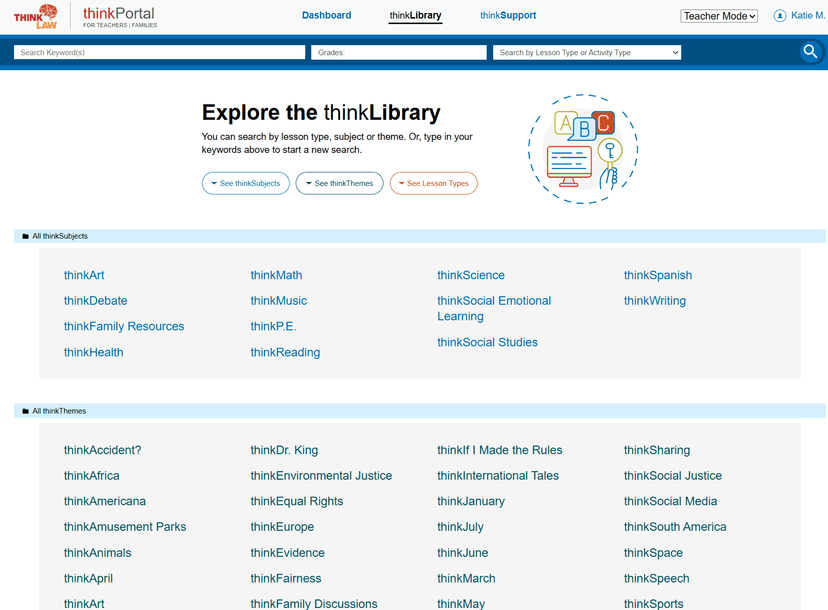
thinkLaw uses an inquiry-based pedagogical approach centered on the Socratic method and legal case analysis. Educators log into the digital library to access over 500 ready-to-teach lessons designed for advisory periods, social-emotional learning blocks, or core subject integration. Each lesson presents students with a complex, real-world legal scenario. Teachers use the provided slide decks and facilitation guides to lead students through a structured analysis of the case. Students use recording sheets to document their thought processes, organize evidence, and construct logical arguments. The curriculum forces learners to evaluate multiple perspectives and justify their conclusions, which actively engages their working memory and promotes deeper cognitive elaboration. The platform does not involve interactive software or adaptive student-facing technology; instead, it provides digital materials to power live classroom instruction. Administrators and teachers also receive virtual onboarding and ongoing implementation support to ensure the materials are delivered effectively across the school or district.
Strengths and tradeoffs of thinkLaw's Digital Curriculum Library
thinkLaw's biggest strength is its use of authentic case studies to drive higher-order cognitive processing, while its biggest weakness is the high institutional cost that completely excludes individual educators. Strengths: The curriculum leverages the science of elaboration by forcing students to explain their reasoning and connect new evidence to existing knowledge. By grappling with actual legal cases, learners practice evaluating sources, identifying bias, and structuring logical arguments. The inclusion of comprehensive teacher guides also helps standardize the delivery of complex topics, ensuring educators ask the right scaffolding questions. Weaknesses: Because the platform relies entirely on teacher facilitation, the learning experience is not standardized or adaptive. If an educator lacks the time to properly prepare or struggles to manage classroom debates, the instructional value drops significantly. There is no built-in mechanism for spaced repetition or automated retrieval practice to ensure students retain the critical thinking frameworks over time. Furthermore, the pricing model requires a minimum school-level commitment starting at $6,500, making it inaccessible for single classrooms or parents seeking enrichment tools at home.
Who Might Benefit From thinkLaw's Digital Curriculum Library?
thinkLaw is best for school districts and campus administrators seeking to embed structured critical thinking and debate into their advisory, enrichment, or intervention blocks. It serves educators who want ready-made, high-rigor lesson plans that push students beyond basic recall into complex analysis and argumentation. Because the material scales across all ages and multiple subjects, it fits well into social-emotional learning programs or humanities courses. It is not suitable for individual parents or solo teachers, given the enterprise pricing model and the heavy reliance on classroom-based collaborative discussion.
Data Transparency
Does Not Meet Data Transparency Standard
thinkLaw's Digital Curriculum Library does not meet our data transparency standard. Its privacy policy does not document basic protections, including limits on sharing children's data, a COPPA or FERPA commitment and parents' right to see their child's data.
13 of 35 checks passed
Evaluated September 2026
thinklawportal.com →Level 1 · Basic protections
Does not sell data or target ads at students, limits sharing, and lets parents see and delete their child's data.
Not documented: limits on sharing children's data, a COPPA or FERPA commitment, parents' right to see their child's data, parents' right to delete their child's data
Level 2 · Parent control (meets the standard)
Families can get their data out, know who processes it, and know how long it is kept.
Level 3 · Direct data access
Families or schools can pull their own data through an API, in a stated format.
Not documented: an API for retrieving their own data, a named export format
View all 35 checks
Parent Access1/8
Does the policy mention parents specifically?
The policy does not mention parents.
Can parents view their child's data?
The policy does not give parents any right to view their child's data.
Can parents modify their child's data?
The policy does not give parents any right to modify their child's data.
Can parents delete their child's account?
The policy does not give parents any right to delete their child's data or account.
Is there a dedicated Children's Privacy section?
“The Platform is not intended for use by individuals under the age of thirteen (13), and we request that they not provide Personal Data through the Platform.”
Does it reference COPPA compliance?
The policy names GDPR and CCPA but does not mention COPPA.
Does it reference FERPA compliance?
The policy does not mention FERPA.
Is parental consent required for child accounts?
The policy does not require parental consent; it only says the Platform is not intended for users under 13.
Data Portability3/5
Can users access their personal data?
“In general, you may log into your thinkLaw account in order to: (i) obtain a copy of your Personal Data, or (ii) rectify, edit or update your Personal Data.”
Can users download/export their data?
“The right to request that we export to another company, where technically feasible, your Personal Data that we hold in order to provide services to you; and”
Is there a self-service data access tool?
“In general, you may log into your thinkLaw account in order to: (i) obtain a copy of your Personal Data, or (ii) rectify, edit or update your Personal Data.”
Is a specific data format mentioned for export?
The policy does not name any export format.
Is there an API for data access?
The policy does not mention an API for data access.
Data Minimization1/6
Is data collection itemized?
“We collect your full name, email address, and account log-in credentials when you create a thinkLaw account.”
Can the app be used without a real name?
The policy says it collects users' full names.
Can the app be used without an email?
The policy says it collects users' email addresses.
Does it state collection is limited to what is necessary?
The policy says data is used for legitimate and lawful purposes but does not say collection is limited to what is necessary.
Is IP address anonymized or truncated?
The policy says it collects IP addresses and does not say they are anonymized or truncated.
Is location tracking explicitly excluded?
The policy says it collects location as part of browser and device data.
Third-Party Protection4/7
Does it explicitly state no selling of data?
“thinkLaw does not sell or rent Personal Data to marketers or unaffiliated third parties.”
Are third-party providers named?
“We use Google Analytics on our websites to help us analyze your use of our websites and diagnose technical issues.”
Are providers contractually restricted?
“We require such service providers to contractually commit to protect the security and confidentiality of Personal Data they process on our behalf.”
No-targeted-advertising commitment?
“As described in Advertising, we do not use, share, rent or sell the Personal Data of our Members for interest-based advertising.”
Is AI/ML data sharing addressed?
The policy does not address AI or machine learning.
Child-specific sharing restriction?
The policy has no sharing restriction specific to children.
Cookies/tracking limited or opt-out?
The policy describes cookies and Google Analytics but offers no way to limit or opt out of tracking.
Deletion & Retention4/5
Can users delete their account?
“You may have your Personal Data about your thinkLaw Account removed from our database by logging into your account, navigating to the Settings section, and clicking on “Delete Account”.”
Self-service deletion mechanism?
“You may have your Personal Data about your thinkLaw Account removed from our database by logging into your account, navigating to the Settings section, and clicking on “Delete Account”.”
Specific data retention timeline?
“This will remove your profile from the thinkLaw Platform within 30 days after that request is initiated.”
Auto-deletion of inactive accounts?
The policy does not mention automatically deleting inactive accounts.
Post-deletion handling described?
“We may retain Personal Data after we stop providing services to you, even if you close your thinkLaw account, in order to comply with our legal obligations.”
Advertising0/4
Advertising model explicitly disclosed?
The policy only says Member data is not used or shared for interest-based advertising; it does not describe whether the product has advertising.
Free from third-party advertisements?
The policy does not say the product is free of third-party ads.
Children excluded from ad targeting?
The policy does not specifically exclude children from ad targeting.
Ad-free option available?
The policy does not say the product has no ads or offer an ad-free option.
What This Means
The policy review did not meet our data transparency standard. The checks above show the documented findings and unknowns. A missing statement does not establish how the app handles data in practice.
About this evaluation: Based on automated analysis of thinklawportal.com against 35 policy-disclosure questions, including questions adapted from the Common Sense Privacy Program's published evaluation questions. TLS is not affiliated with Common Sense Media, and this is not a Common Sense rating. Quoted text is copied from the policy; unquoted notes are our summary. Results describe what the policy documents, not the company's actual practices. Privacy policies can change: this review reflects the version we analyzed and does not determine legal compliance.
Sources and review method
TLS combines product information and editorial analysis to explain how thinkLaw's Digital Curriculum Library works, its tradeoffs, and the questions to ask before choosing it. Product features, an instructional rationale and evidence of learning outcomes are different kinds of information.
Formal Learning Standard assessment: not yet completed. Data Transparency findings are reported separately and do not establish learning effectiveness. Read our methodology.
Frequently Asked Questions About thinkLaw's Digital Curriculum Library
Is thinkLaw free?
No, thinkLaw is not free. It operates on a school-based enterprise pricing model designed for district or campus-wide implementation. Packages start at $6,500 for up to 10 teacher licenses, with the cost per user decreasing as more teachers are added to the platform.
Is thinkLaw good for early childhood education?
Yes, thinkLaw includes materials adapted for early childhood education alongside its older student content. However, the complexity of legal case analysis requires heavy scaffolding by teachers to ensure younger learners can grasp the foundational concepts of fairness, evidence, and logical reasoning without experiencing cognitive overload.
What does thinkLaw teach?
thinkLaw teaches critical thinking, argumentation, and problem-solving skills. Students learn how to analyze complex situations, evaluate evidence from multiple perspectives, identify logical fallacies, and construct well-reasoned arguments using frameworks derived from legal education and real-world case studies.
How does thinkLaw compare to other critical thinking programs?
Unlike supplemental apps that use isolated logic puzzles or brain games, thinkLaw embeds critical thinking into authentic contexts using real legal cases. This application of the Socratic method requires active classroom discussion, whereas many digital competitors rely on solitary, screen-based activities.
Has The Learning Standard evaluated thinkLaw's Digital Curriculum Library?
TLS has not yet completed a Learning Standard evaluation of how well thinkLaw's Digital Curriculum Library teaches. Its privacy policy has been reviewed for Data Transparency and does not yet document the basic protections (Level 1).
Is thinkLaw's Digital Curriculum Library COPPA compliant?
A COPPA reference was not found in the reviewed privacy policy. This does not determine whether the app complies with COPPA. Policy review note: The policy names GDPR and CCPA but does not mention COPPA.
Is thinkLaw's Digital Curriculum Library FERPA compliant?
A FERPA reference was not found in the reviewed privacy policy. This does not determine whether the app complies with FERPA. Policy review note: The policy does not mention FERPA.
Does thinkLaw's Digital Curriculum Library have a children's privacy policy?
The reviewed policy includes a dedicated children's privacy section. Policy review note: Section 8, "Use by Minors," is a separate section about children under 13.
Does thinkLaw's Digital Curriculum Library sell student data?
The reviewed policy states that the app does not sell data. This is a policy statement; actual data practices were not verified. Policy review note: The policy says thinkLaw does not sell personal data.
Can you delete your data from thinkLaw's Digital Curriculum Library?
The reviewed privacy policy describes account deletion. We have not tested the deletion process. Policy review note: Users can delete their account.
Follow TLS Research
Subscribe to future TLS research updates: app reviews, findings, and what the evidence shows.
Screenshots


Take Action
For thinkLaw's Digital Curriculum Library
If you represent thinkLaw and have a correction or new evidence, send the relevant source so we can review and update this page.
Submit a correctionDetails
- Pricing
- Our model is designed to support teachers to not just use these tools in their own spaces, but to help spread a critical thinking revolution across the department, campus, or district. This means our curriculum model is based on school access rather than individual teacher access, with packages starting at $6,500 for up to 10 teacher users, and prices decrease as the number of users increase.
- Platforms
- Web Browser
- Website
- Visit site