
StudyMate Campus
Product by Respondus
Facts checked: Not yet checked
Our take (not a Learning Standard rating). This label applies to learning-science judgments throughout this overview.
Our take (not a Learning Standard rating)
StudyMate Campus facilitates effective retrieval practice through flashcards and quizzes, but its educational value depends entirely on the quality of the manually entered content. It lacks built-in spaced repetition algorithms, making it a functional but basic study tool rather than an intelligent tutoring system.
Pros
- Facilitates active recall through eleven diverse quiz and flashcard formats.
- Integrates seamlessly into existing learning management systems to reduce technical friction.
- Allows educators to track student participation and identify study patterns.
Cons
- Lacks algorithmic spaced repetition to optimize long-term memory retention.
- Relies completely on user-generated content with no pre-validated curriculum.
- Provides basic correct/incorrect feedback without detailed explanations for wrong answers.
What Do We Know About StudyMate Campus?
StudyMate Campus is only as effective for learning as the content your child or their teacher manually enters into the system. It functions as a digital wrapper for traditional study methods, turning class notes into flashcards, crosswords, and quizzes directly within learning management systems like Canvas or Schoology. While active recall is a scientifically proven study method, this app does not supply any instructional material or adapt to your child's specific learning pace. Your child will spend time formatting and inputting data before the actual studying begins. If teachers pre-load the content, students can immediately leverage the tool for self-testing, which strengthens memory retrieval. However, parents should know that the software lacks advanced adaptive learning features, such as spaced repetition algorithms that automatically resurface difficult concepts just as your child is about to forget them. It operates strictly as an organizational tool for study materials rather than a comprehensive educational program.
How Does StudyMate Campus Work?
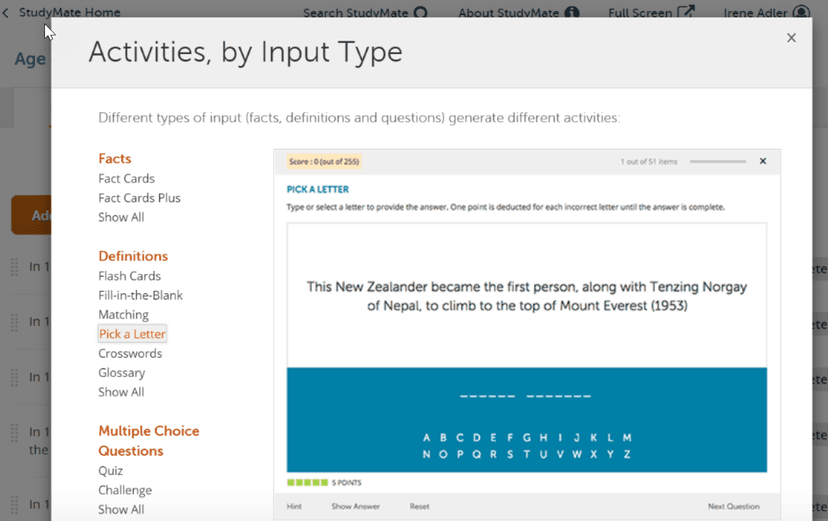
StudyMate Campus uses a tool-based pedagogical approach that relies on active learning and retrieval practice through user-generated assessments. Teachers or students input glossary terms, facts, or multiple-choice questions into the platform. The software then automatically generates eleven different types of interactive activities, including traditional flashcards, matching games, and practice quizzes. Because it embeds directly into the school's existing learning management system, students access these activities within the context of their specific course modules. The platform tracks user interactions, allowing educators to view analytics on how often and how long students engage with the study materials. It does not teach new concepts or dynamically adjust difficulty based on student performance. Instead, it serves as a flexible assessment engine that requires the learner to actively pull information from their memory, which strengthens neural pathways and improves factual recall over time.
Strengths and tradeoffs of StudyMate Campus
The biggest strength of StudyMate Campus is its seamless integration with major learning management systems, while its biggest weakness is the absence of an adaptive spaced repetition system. Integration and Accessibility: By living inside platforms like Canvas or Blackboard, the app removes barriers to entry and keeps your child focused on course-specific materials. Retrieval Practice: Converting static notes into interactive quizzes forces students to practice active recall, a highly effective method for memorizing foundational facts. Lack of Adaptive Sequencing: Unlike modern intelligent study tools, this app does not track which specific items a student struggles with over time to schedule optimal review sessions. Content Dependency: The tool provides no worked examples or instructional scaffolding. If a student misunderstands a concept while creating their flashcards, they will repeatedly study incorrect information. The platform is excellent for rote memorization of vocabulary or historical dates but falls short in teaching complex, multi-step problem-solving skills.
Who Might Benefit From StudyMate Campus?
Best for middle school through college students who need structured memorization tools for vocabulary-heavy subjects alongside formal classroom instruction. Because it requires users to input their own study material or rely on teacher-generated lists, it suits highly organized learners or classrooms where educators actively build and share review games. It is highly practical for schools already using major learning management systems, providing an easily accessible study aid for factual recall in humanities, sciences, and foreign languages.
Data Transparency
Does Not Meet Data Transparency Standard
StudyMate Campus does not meet our data transparency standard. Its privacy policy does not document basic protections, including limits on sharing children's data, a COPPA or FERPA commitment and parents' right to see their child's data.
12 of 35 checks passed
Level 1 · Basic protections
Does not sell data or target ads at students, limits sharing, and lets parents see and delete their child's data.
Not documented: limits on sharing children's data, a COPPA or FERPA commitment, parents' right to see their child's data, parents' right to delete their child's data
Level 2 · Parent control (meets the standard)
Families can get their data out, know who processes it, and know how long it is kept.
Not documented: a data retention timeline, named service providers, self-service deletion
Level 3 · Direct data access
Families or schools can pull their own data through an API, in a stated format.
Not documented: an API for retrieving their own data, a named export format
View all 35 checks
Parent Access3/8
Does the policy mention parents specifically?
“Respondus’ Software is only provided to children with parental or guardian consent in accordance with applicable law.”
Can parents view their child's data?
The policy does not give parents a right to view their child's data; access rights are given to users generally or exercised through the Institution.
Can parents modify their child's data?
The policy does not give parents a right to modify their child's data.
Can parents delete their child's account?
The policy does not give parents a right to delete their child's data or account.
Is there a dedicated Children's Privacy section?
“### **Children’s Data** Respondus’ Software is only provided to children with parental or guardian consent in accordance with applicable law.”
Does it reference COPPA compliance?
The policy does not mention COPPA.
Does it reference FERPA compliance?
The policy does not mention FERPA.
Is parental consent required for child accounts?
“Respondus’ Software is only provided to children with parental or guardian consent in accordance with applicable law. Otherwise, Respondus’ Services are not intended for or directed to children.”
Data Portability2/5
Can users access their personal data?
“Subject to certain requirements and exceptions, you have the following rights: - Confirm Whether We Process Your Personal Information - Access Certain Personal Information - Obtain a Copy of Your Personal Information”
Can users download/export their data?
“Subject to certain requirements and exceptions, you have the following rights: - Confirm Whether We Process Your Personal Information - Access Certain Personal Information - Obtain a Copy of Your Personal Information”
Is there a self-service data access tool?
The policy says rights requests go through the Institution or in writing through the Privacy Contact, not a self-service tool.
Is a specific data format mentioned for export?
The policy does not name a format for data copies.
Is there an API for data access?
The policy does not mention an API for data access.
Data Minimization1/6
Is data collection itemized?
“- **Identifiers,** including name, address, email address, phone number, Internet Protocol address, and username and credentials (if you are an Administrator).”
Can the app be used without a real name?
The policy lists name among the identifiers collected, including from customers who enroll users.
Can the app be used without an email?
The policy lists email address among the identifiers collected.
Does it state collection is limited to what is necessary?
The policy limits how long data is kept to what is necessary but does not say collection is limited to what is necessary.
Is IP address anonymized or truncated?
The policy says it collects IP addresses and does not say they are anonymized or truncated.
Is location tracking explicitly excluded?
The policy does not explicitly rule out location tracking.
Third-Party Protection4/7
Does it explicitly state no selling of data?
“Respondus does not sell or share your Personal Information, as those terms are defined under the CCPA. In the preceding twelve months, we have not sold or shared any Personal Information of consumers.”
Are third-party providers named?
The policy describes service providers only by category and does not name them.
Are providers contractually restricted?
“We disclose your information to service providers we use to support our business and which are bound by contractual obligations to keep Personal Information confidential and secure and use it only for the purposes for which we disclose it to them.”
No-targeted-advertising commitment?
“We market our services only to current, past and potential Instructors and Administrators. We do not use Student information for marketing.”
Is AI/ML data sharing addressed?
The policy does not address sharing data for AI or machine learning.
Child-specific sharing restriction?
The Children’s Data section covers consent only and sets no sharing restriction specific to children.
Cookies/tracking limited or opt-out?
“We explain how you may exercise control over the information automatically collected through cookies in our [Cookie Policy](https://web.respondus.com/privacy-cookies/).”
Deletion & Retention1/5
Can users delete their account?
“Subject to certain requirements and exceptions, you have the following rights: - Confirm Whether We Process Your Personal Information - Access Certain Personal Information - Obtain a Copy of Your Personal Information - Delete Certain Personal Information”
Self-service deletion mechanism?
The policy does not describe a self-service deletion mechanism.
Specific data retention timeline?
The policy says data is kept as long as necessary or as the Institution sets, with no specific timeline.
Auto-deletion of inactive accounts?
The policy does not address automatic deletion of inactive accounts.
Post-deletion handling described?
The policy does not describe how data is handled after deletion.
Advertising1/4
Advertising model explicitly disclosed?
The policy does not explicitly describe an advertising model or say the product has no advertising.
Free from third-party advertisements?
The policy does not state that the product has no third-party advertisements.
Children excluded from ad targeting?
“We market our services only to current, past and potential Instructors and Administrators. We do not use Student information for marketing.”
Ad-free option available?
The policy does not state that the product has no ads or offer an ad-free option.
What This Means
The policy review did not meet our data transparency standard. The checks above show the documented findings and unknowns. A missing statement does not establish how the app handles data in practice.
About this evaluation: Based on automated analysis of Privacy Policy and Additional Privacy Information for California Consumers against 35 policy-disclosure questions, including questions adapted from the Common Sense Privacy Program's published evaluation questions. TLS is not affiliated with Common Sense Media, and this is not a Common Sense rating. Quoted text is copied from the policy; unquoted notes are our summary. Results describe what the policy documents, not the company's actual practices. Privacy policies can change: this review reflects the version we analyzed and does not determine legal compliance.
Sources and review method
TLS combines product information and editorial analysis to explain how StudyMate Campus works, its tradeoffs, and the questions to ask before choosing it. Product features, an instructional rationale and evidence of learning outcomes are different kinds of information.
Formal Learning Standard assessment: not yet completed. Data Transparency findings are reported separately and do not establish learning effectiveness. Read our methodology.
Frequently Asked Questions About StudyMate Campus
Is StudyMate Campus free?
StudyMate Campus is not free for individual users, but it is typically free for students to access if their school or district purchases a site license. Schools that use Canvas, Schoology, Moodle, Blackboard, or Brightspace can access a free two-month pilot. This enables educational institutions to evaluate the software's effectiveness and integration capabilities before committing to a paid plan.
Is StudyMate Campus good for middle schoolers?
Yes, it is highly appropriate for students in grades six and up. Middle schoolers often struggle with basic study habits, and they benefit from the varied game formats like crosswords and matching activities. These interactive elements make rote memorization and retrieval practice significantly more engaging than staring at static notes, helping young adolescents build foundational study skills in a structured environment.
What does StudyMate Campus teach?
StudyMate Campus does not teach any inherent subject matter or provide a pre-built curriculum. It is entirely a blank-slate study tool used to practice terminology, facts, and concepts for any subject ranging from early childhood education to higher education math and science. The quality of the education depends completely on the accuracy and depth of the materials that teachers or students manually enter.
How does StudyMate Campus compare to Quizlet?
Quizlet offers a massive global library of user-generated flashcards and features robust algorithmic spaced repetition to optimize study time by resurfacing difficult concepts. StudyMate Campus lacks these adaptive algorithms and a global library, making it less advanced pedagogically. However, StudyMate offers superior integration directly into school learning management systems, creating a safer, closed-loop environment that prevents students from clicking away to unrelated content.
Has The Learning Standard evaluated StudyMate Campus?
TLS has not yet completed a Learning Standard evaluation of how well StudyMate Campus teaches. Its privacy policy has been reviewed for Data Transparency and does not yet document the basic protections (Level 1).
Is StudyMate Campus COPPA compliant?
A COPPA reference was not found in the reviewed privacy policy. This does not determine whether the app complies with COPPA. Policy review note: The policy does not mention COPPA.
Is StudyMate Campus FERPA compliant?
A FERPA reference was not found in the reviewed privacy policy. This does not determine whether the app complies with FERPA. Policy review note: The policy does not mention FERPA.
Does StudyMate Campus have a children's privacy policy?
The reviewed policy includes a dedicated children's privacy section. Policy review note: The policy has a section headed "Children’s Data."
Does StudyMate Campus sell student data?
The reviewed policy states that the app does not sell data. This is a policy statement; actual data practices were not verified. Policy review note: Respondus states it does not sell personal information.
Can you delete your data from StudyMate Campus?
The reviewed privacy policy describes account deletion. We have not tested the deletion process. Policy review note: A CCPA-style deletion right that can be requested through the Institution or the Privacy Contact. Borderline: the text says 'Certain Personal Information', not all of it.
Follow TLS Research
Subscribe to future TLS research updates: app reviews, findings, and what the evidence shows.
Screenshots

Take Action
For StudyMate Campus
If you represent Respondus and have a correction or new evidence, send the relevant source so we can review and update this page.
Submit a correctionDetails
- Pricing
- StudyMate Campus is available to K-12 schools as a site license, and includes LockDown Browser as a “Buy One, Get One Free” suite. A free, 2-month pilot of Studymate Campus is available to schools that use Canvas, Schoology, Moodle, Blackboard, or Brightspace. This is the best way for a school or district to try all features and functionality with their learning management system. Pricing is found at https://web.respondus.com/k12/studymate/pricing/
- Platforms
- iOS (Apple mobile), iPadOS (Apple tablet), Android (Google mobile), Windows (Microsoft), macOS (Apple), Chrome OS (Google)
- Grade Levels
- 6th Grade, 7th Grade, 8th Grade, 9th Grade, 10th Grade, 11th Grade, 12th Grade, Associate's degree, Bachelor's degree
- Website
- Visit site