STEM Fuse - STEM:IT Elementary
Product by STEM Fuse
Facts checked: Not yet checked
Our take (not a Learning Standard rating). This label applies to learning-science judgments throughout this overview.
Our take (not a Learning Standard rating)
While STEM Fuse - STEM:IT Elementary offers a vast repository of hands-on projects, its effectiveness remains pending evaluation by The Learning Standard. It provides schools with structured project-based learning materials for coding and 3D printing, but requires significant teacher facilitation to bridge the gap between activity and cognitive retention.
Pros
- Uses project-based learning to contextualize abstract coding and circuitry concepts into concrete tasks.
- Integrates cross-curricular subjects like math and humanities into technical STEAM projects to promote dual-coding.
- Provides structured worked examples for 3D printing and coding to reduce early cognitive overload.
- Offers a diverse modality of hands-on tasks that encourage active problem solving rather than passive screen consumption.
Cons
- Relies heavily on educator facilitation and lacks built-in adaptive feedback for struggling students.
- Does not demonstrate the use of spaced repetition to ensure long-term retention of technical skills.
- Features a high institutional price point that makes it completely inaccessible for individual parent or home use.
- Assessment mechanics appear limited to final project completion rather than targeted retrieval practice of core engineering concepts.
What Do We Know About STEM Fuse - STEM:IT Elementary?
STEM Fuse - STEM:IT Elementary functions primarily as an institutional curriculum rather than a standalone app, meaning its effectiveness depends entirely on your child's classroom teacher. Because The Learning Standard has not yet evaluated this program, we cannot definitively rate its pedagogical success. However, the structure relies heavily on project-based learning. Your child will engage in 3D printing, coding, and circuitry through hands-on tasks rather than screen-based drilling. This approach is excellent for building active problem-solving skills and contextualizing abstract math or science concepts. Parents should know this is not an app your child can simply download and play at home. It is a school-wide platform costing thousands of dollars per site. If your child's school uses this curriculum, you can expect them to bring home completed digital or physical projects rather than typical homework worksheets. The primary limitation of this model is the lack of independent, software-driven retrieval practice. Without a teacher guiding the reflection process, students may complete a 3D printing project without actually retaining the underlying geometric or engineering principles. Therefore, parental involvement should focus on asking your child to explain how they built their projects to encourage active recall of the core concepts.
How Does STEM Fuse - STEM:IT Elementary Work?
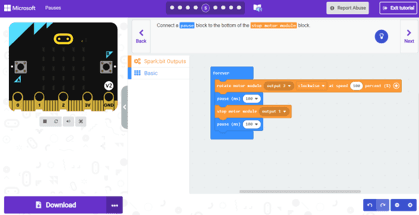
STEM Fuse - STEM:IT Elementary uses a project-based learning pedagogy where students build physical and digital artifacts to master STEAM concepts. The platform acts as a digital library of lesson plans and project templates for educators. Rather than clicking through adaptive software, students are given a specific challenge, such as designing a 3D object or coding a basic sequence. They are then provided with worked examples and step-by-step scaffolding to complete the task. For example, a circuitry lesson introduces the basic components before asking students to physically or digitally assemble a working circuit. The learning mechanics rely on active construction rather than passive recall. Teachers use the provided materials to introduce a concept, guide the students through a hands-on activity, and assess their understanding based on the final project. Because the software itself does not adapt to individual student performance, pacing and mastery checks are entirely managed by the classroom instructor.
Strengths and tradeoffs of STEM Fuse - STEM:IT Elementary
The biggest strength of STEM Fuse - STEM:IT Elementary is its comprehensive project-based approach that forces active construction of knowledge, while its biggest weakness is the total reliance on teacher delivery rather than providing individualized, adaptive feedback. Strengths: By incorporating over a hundred specific projects across coding, 3D printing, and circuitry, the program excels at contextualizing learning. Cognitive science shows that students retain abstract concepts better when applied to concrete tasks. The platform provides teachers with strong worked examples, reducing the cognitive load for students encountering complex technical software for the first time. Weaknesses: The platform is not an independent learning tool. It lacks built-in retrieval practice or spaced repetition schedules, which are critical for moving new skills from short-term to long-term memory. If a student struggles with a coding concept, the software will not automatically adjust the difficulty or provide targeted remediation. Additionally, because it is an institutional product pending formal evaluation, data on its efficacy in diverse classroom environments remains unverified by The Learning Standard.
Who Might Benefit From STEM Fuse - STEM:IT Elementary?
This program is best for elementary schools and districts looking for a ready-to-use, comprehensive STEAM curriculum to integrate into their classrooms. It is specifically designed for K-5 educators who want structured project plans for 3D printing, coding, and circuitry but lack the time to build these lessons from scratch. It is not designed for individual parents, homeschoolers, or students seeking independent, self-paced learning at home due to its enterprise pricing and heavy reliance on teacher facilitation. Its implementation requires a classroom setting where guided instruction supports the hands-on project work.
Data Transparency
Does Not Meet Data Transparency Standard
STEM Fuse - STEM:IT Elementary does not meet our data transparency standard. Its privacy policy does not document basic protections, including a statement that it does not sell data and a commitment against targeted advertising.
11 of 35 checks passed
Evaluated September 2026
Privacy Policy →Level 1 · Basic protections
Does not sell data or target ads at students, limits sharing, and lets parents see and delete their child's data.
Not documented: a statement that it does not sell data, a commitment against targeted advertising
Level 2 · Parent control (meets the standard)
Families can get their data out, know who processes it, and know how long it is kept.
Not documented: data export, a data retention timeline, named service providers, self-service deletion
Level 3 · Direct data access
Families or schools can pull their own data through an API, in a stated format.
Not documented: an API for retrieving their own data, a named export format
View all 35 checks
Parent Access6/8
Does the policy mention parents specifically?
“Parents have the ability to request information, access, or removal of student accounts, by communicating with the school / district, or contacting STEM Fuse directly at customerservice@stemfuse.com”
Can parents view their child's data?
“Parents have the ability to request information, access, or removal of student accounts, by communicating with the school / district, or contacting STEM Fuse directly at customerservice@stemfuse.com”
Can parents modify their child's data?
The policy lets parents request information, access or removal, but it does not mention modifying or correcting data.
Can parents delete their child's account?
“Parents have the ability to request information, access, or removal of student accounts, by communicating with the school / district, or contacting STEM Fuse directly at customerservice@stemfuse.com”
Is there a dedicated Children's Privacy section?
“COPPA & FERPA Compliance”
Does it reference COPPA compliance?
“COPPA & FERPA Compliance”
Does it reference FERPA compliance?
“COPPA & FERPA Compliance”
Is parental consent required for child accounts?
The policy says schools set up student accounts and does not mention parental consent.
Data Portability1/5
Can users access their personal data?
“Parents have the ability to request information, access, or removal of student accounts, by communicating with the school / district, or contacting STEM Fuse directly at customerservice@stemfuse.com”
Can users download/export their data?
The policy does not address downloading or exporting data.
Is there a self-service data access tool?
The policy offers access only by request and describes no self-service tool.
Is a specific data format mentioned for export?
The policy does not mention any export format.
Is there an API for data access?
The policy does not mention an API.
Data Minimization1/6
Is data collection itemized?
“STEM Fuse may collect and use the following kinds of personal information: - Your Name - Your Email Address - Your Billing Address - Credit Card Information”
Can the app be used without a real name?
The policy says students must provide their full name to create accounts.
Can the app be used without an email?
The policy says students must provide their email address to create accounts.
Does it state collection is limited to what is necessary?
The policy limits how student data is used, but it does not say collection is limited to what is necessary.
Is IP address anonymized or truncated?
The policy does not address IP addresses.
Is location tracking explicitly excluded?
The policy does not address location tracking.
Third-Party Protection2/7
Does it explicitly state no selling of data?
The policy says student information is not disclosed to outside parties, but it never explicitly says data is not sold.
Are third-party providers named?
The policy mentions agents and sub-contractors but does not name any third-party providers.
Are providers contractually restricted?
“When STEM Fuse discloses your personal information to its agents or sub-contractors for these purposes, the agent or sub-contractor in question will be obligated to use that personal information in accordance with the terms of this privacy statement.”
No-targeted-advertising commitment?
The policy does not address targeted advertising.
Is AI/ML data sharing addressed?
The policy does not address AI or machine learning.
Child-specific sharing restriction?
“Any communication with or sharing of student personal information is prohibited.”
Cookies/tracking limited or opt-out?
The policy does not address cookies or tracking.
Deletion & Retention1/5
Can users delete their account?
“Parents have the ability to request information, access, or removal of student accounts, by communicating with the school / district, or contacting STEM Fuse directly at customerservice@stemfuse.com”
Self-service deletion mechanism?
The policy offers account removal only by request and describes no self-service deletion.
Specific data retention timeline?
The policy does not state a data retention timeline.
Auto-deletion of inactive accounts?
The policy does not address deleting inactive accounts.
Post-deletion handling described?
The policy does not describe what happens to data after deletion.
Advertising0/4
Advertising model explicitly disclosed?
The policy does not address advertising.
Free from third-party advertisements?
The policy does not address third-party advertisements.
Children excluded from ad targeting?
The policy does not address ad targeting of children.
Ad-free option available?
The policy does not address advertising or an ad-free option.
What This Means
The policy review did not meet our data transparency standard. The checks above show the documented findings and unknowns. A missing statement does not establish how the app handles data in practice.
About this evaluation: Based on automated analysis of Privacy Policy against 35 policy-disclosure questions, including questions adapted from the Common Sense Privacy Program's published evaluation questions. TLS is not affiliated with Common Sense Media, and this is not a Common Sense rating. Quoted text is copied from the policy; unquoted notes are our summary. Results describe what the policy documents, not the company's actual practices. Privacy policies can change: this review reflects the version we analyzed and does not determine legal compliance.
Sources and review method
TLS combines product information and editorial analysis to explain how STEM Fuse - STEM:IT Elementary works, its tradeoffs, and the questions to ask before choosing it. Product features, an instructional rationale and evidence of learning outcomes are different kinds of information.
Formal Learning Standard assessment: not yet completed. Data Transparency findings are reported separately and do not establish learning effectiveness. Read our methodology.
Frequently Asked Questions About STEM Fuse - STEM:IT Elementary
Is STEM Fuse - STEM:IT Elementary free?
No, STEM Fuse - STEM:IT Elementary is not free. It is an enterprise-level educational platform designed specifically for schools and districts. The curriculum costs approximately $2,000 per site, per year for an unlimited number of users. While bundled pricing is available for multiple schools or multi-year district subscriptions, there is absolutely no individual consumer subscription available for parents to purchase for home use.
Is STEM Fuse - STEM:IT Elementary good for elementary students?
Yes, the curriculum is designed specifically for K-5 students. It breaks down complex technical topics like 3D printing, basic coding, and circuitry into age-appropriate, hands-on projects that encourage active problem-solving. However, its effectiveness relies entirely on the quality of the classroom teacher's instruction and facilitation, as the platform itself is currently pending evaluation by The Learning Standard and does not provide independent, software-driven tutoring for young learners.
What does STEM Fuse - STEM:IT Elementary teach?
STEM Fuse - STEM:IT Elementary teaches cross-curricular STEAM subjects entirely through project-based learning. The content includes 32 hands-on STEAM lessons, 44 3D printing projects, 28 coding lessons, and 15 circuitry lessons. Rather than teaching these topics in isolation, the program integrates foundational math, science, humanities, and social science concepts into the technical career and technical education tasks, forcing students to apply multiple disciplines to solve a single problem.
How does STEM Fuse - STEM:IT Elementary compare to Tynker?
STEM Fuse - STEM:IT Elementary provides teacher-led, cross-curricular lesson plans including physical 3D printing and circuitry projects, while Tynker is primarily a self-paced, adaptive software platform focused exclusively on coding. Tynker offers individual parent subscriptions with instant software-based feedback to correct student errors. In contrast, STEM Fuse requires an expensive school-wide license and relies entirely on human teacher facilitation to guide students through the learning and troubleshooting process.
Has The Learning Standard evaluated STEM Fuse - STEM:IT Elementary?
TLS has not yet completed a Learning Standard evaluation of how well STEM Fuse - STEM:IT Elementary teaches. Its privacy policy has been reviewed for Data Transparency and does not yet document the basic protections (Level 1).
Is STEM Fuse - STEM:IT Elementary COPPA compliant?
The reviewed privacy policy references COPPA. A policy reference alone does not establish COPPA compliance. Policy review note: The policy names COPPA compliance in a section heading.
Is STEM Fuse - STEM:IT Elementary FERPA compliant?
The reviewed privacy policy references FERPA. A policy reference alone does not establish FERPA compliance. Policy review note: The policy names FERPA compliance in a section heading.
Does STEM Fuse - STEM:IT Elementary have a children's privacy policy?
The reviewed policy includes a dedicated children's privacy section. Policy review note: The policy has a section headed COPPA & FERPA Compliance that covers student data.
Does STEM Fuse - STEM:IT Elementary sell student data?
A statement ruling out data selling was not found in the reviewed policy. This does not establish that the app sells student data. Policy review note: The policy says student information is not disclosed to outside parties, but it never explicitly says data is not sold.
Can you delete your data from STEM Fuse - STEM:IT Elementary?
The reviewed privacy policy describes account deletion. We have not tested the deletion process. Policy review note: Removal of student accounts can be requested.
Follow TLS Research
Subscribe to future TLS research updates: app reviews, findings, and what the evidence shows.
Screenshots
Take Action
For STEM Fuse - STEM:IT Elementary
If you represent STEM Fuse and have a correction or new evidence, send the relevant source so we can review and update this page.
Submit a correctionDetails
- Pricing
- $2000 per site/per year for unlimited users. Bundled pricing is available for multiple schools and or multiple year subscriptions.
- Platforms
- Web Browser, iOS (Apple mobile), iPadOS (Apple tablet), Android (Google mobile), Tizen (Samsung mobile), Windows (Microsoft), macOS (Apple), Chrome OS (Google)
- Website
- Visit site