
Seesaw
Product by Seesaw
Facts checked: Not yet checked
Our take (not a Learning Standard rating). This label applies to learning-science judgments throughout this overview.
Our take (not a Learning Standard rating)
Seesaw functions primarily as a robust digital portfolio and communication tool rather than a standalone instructional engine. While it excels at making student thinking visible through multimodal inputs like audio and drawing, its teaching effectiveness depends entirely on the quality of the curriculum provided by the classroom teacher.
Pros
- Allows multimodal expression like voice and drawing which supports dual coding theory and reduces cognitive load for early writers.
- Provides an authentic audience for student work by connecting parents directly to the digital portfolio.
- Enables teachers to give targeted asynchronous audio or visual feedback on specific assignments.
- Scaffolds independent learning by allowing teachers to embed voice instructions directly into activity templates.
Cons
- Lacks an underlying adaptive algorithm to automatically adjust difficulty based on student performance.
- Does not provide automatic corrective feedback for complex open-ended tasks without direct teacher intervention.
- Instructional effectiveness relies entirely on the external curriculum or teacher-created content rather than built-in learning progressions.
- Can become visually overwhelming for young students if teachers do not strictly organize the activity feed.
What Do We Know About Seesaw?
Seesaw is effective for learning only when paired with strong teacher-led instruction, as it is a portfolio tool rather than a standalone teaching program. Instead of feeding your child a series of automated math or reading drills, Seesaw acts as a digital canvas where your child can demonstrate what they know. The platform uses multimodal tools like voice recording, drawing, and video, which aligns well with cognitive science principles like dual coding. When your child explains a math problem out loud while drawing the solution, they strengthen their memory and understanding of the concept. Your child's teacher will push assignments to the app, and your child will complete them using these interactive tools. You can then view their work and see teacher feedback in real time. Because the app does not teach new concepts independently, its value depends entirely on how your child's school uses it. It will not automatically adapt to your child's skill level or provide instant corrective feedback on mistakes unless the teacher has specifically designed an activity to do so.
How Does Seesaw Work?
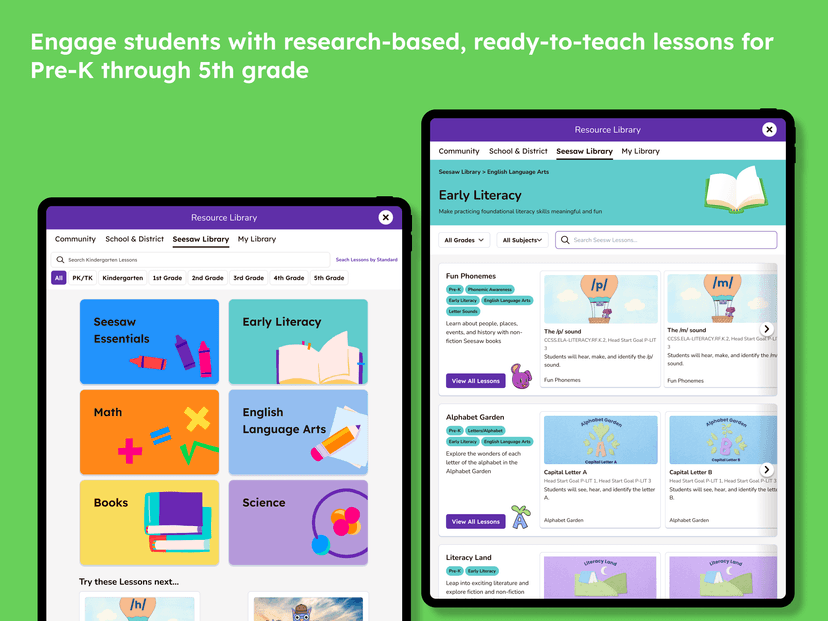
Seesaw utilizes a constructivist, inquiry-based learning approach by providing an open-ended digital workspace where students build and document their own knowledge. Teachers assign activities from a library or create custom templates. Students respond using a variety of built-in tools including a drawing canvas, text labels, shapes, voice recording, and camera integration. This multimodal input system allows students to show their thinking processes rather than just submitting a final answer. For example, a student can take a photo of a science experiment and record an audio overlay explaining their hypothesis. Once submitted, the work enters a digital portfolio. Teachers review the submission, approve it, and leave text or voice feedback. Parents are then notified and can view the artifact. The mechanics rely heavily on active generation rather than passive consumption, meaning students must create a product to demonstrate mastery.
Strengths and tradeoffs of Seesaw
Seesaw's biggest strength is its ability to make student thinking visible through multimodal tools, while its biggest weakness is its complete reliance on teacher-generated content rather than built-in, adaptive instruction. Making thinking visible is a core component of effective learning. By allowing early elementary students to use voice recordings and drawing tools, Seesaw removes the mechanical barrier of typing or handwriting. This reduces cognitive load, letting students focus entirely on explaining the concept. The platform also leverages the generation effect, as students remember material better when they actively produce an answer rather than passively selecting it from a multiple-choice list. However, because Seesaw is a platform rather than a curriculum, it lacks built-in spaced repetition or retrieval practice schedules. If a student struggles with a concept, the app will not automatically route them to prerequisite skills. Feedback loops are also entirely manual. Unless a teacher intervenes quickly, a student may practice a misconception repeatedly without automatic corrective feedback. The app is an excellent blank slate, but the learning outcomes depend entirely on the teacher's instructional design.
Who Might Benefit From Seesaw?
Seesaw is best for PreK through early elementary students who need developmentally appropriate ways to demonstrate their learning without relying on typing. The interface is highly visual, making it ideal for early childhood and primary grade classrooms where students are still developing foundational literacy skills. It serves as an excellent bridge between the classroom and home, giving parents a literal window into daily schoolwork. It is most effective in schools that value project-based learning, inquiry, and student reflection over standardized drill-and-practice routines.
Data Transparency
Meets Data Transparency Standard
Seesaw meets our data transparency standard at Level 2 of 3 (Parent control). Level 3 needs the policy to document an API for retrieving their own data and a named export format.
28 of 35 checks passed
Evaluated September 2026
Service Privacy Policy →Children’s Privacy Policy →International Privacy Policy →Level 1 · Basic protections
Does not sell data or target ads at students, limits sharing, and lets parents see and delete their child's data.
Level 2 · Parent control (meets the standard)
Families can get their data out, know who processes it, and know how long it is kept.
Level 3 · Direct data access
Families or schools can pull their own data through an API, in a stated format.
Not documented: an API for retrieving their own data, a named export format
View all 35 checks
Parent Access8/8
Does the policy mention parents specifically?
“If you are a parent or guardian and want to correct, edit, download, or update information about your child, or to access or inspect the child’s personal information or educational records maintained by Seesaw, please direct your request to your teacher or school, or you can contact us at privacy@seesaw.me if you need additional assistance.”
Can parents view their child's data?
“If you are a parent or guardian and want to correct, edit, download, or update information about your child, or to access or inspect the child’s personal information or educational records maintained by Seesaw, please direct your request to your teacher or school, or you can contact us at privacy@seesaw.me if you need additional assistance.”
Can parents modify their child's data?
“If you are a parent or guardian and want to correct, edit, download, or update information about your child, or to access or inspect the child’s personal information or educational records maintained by Seesaw, please direct your request to your teacher or school, or you can contact us at privacy@seesaw.me if you need additional assistance.”
Can parents delete their child's account?
“If you are a parent or guardian and would like to delete your child’s Seesaw account, please work directly with your teacher or school to request deletion.”
Is there a dedicated Children's Privacy section?
“**3\. Seesaw and COPPA**”
Does it reference COPPA compliance?
“Seesaw complies with the Children’s Online Privacy Protection Act (“COPPA”).”
Does it reference FERPA compliance?
“Seesaw agrees to work with our School partners to jointly ensure compliance with FERPA.”
Is parental consent required for child accounts?
“Before allowing a student to use the Seesaw Service you, as a teacher or school administrator (as determined in accordance with your school’s policies) must obtain parental or guardian approval for that student (i.e. their child) to use the Seesaw Service.”
Data Portability2/5
Can users access their personal data?
“You have the right to access, correct, or download for transport to a similar service any of your Personal Information collected by Seesaw, where permitted under applicable law.”
Can users download/export their data?
“You have the right to access, correct, or download for transport to a similar service any of your Personal Information collected by Seesaw, where permitted under applicable law.”
Is there a self-service data access tool?
The policy describes Account Settings only for updating account information, not a self-service tool for accessing or exporting data.
Is a specific data format mentioned for export?
The policy says only "structured, commonly used, machine-readable format" and names no specific format.
Is there an API for data access?
The policy does not mention any API for users or schools to retrieve their data.
Data Minimization2/6
Is data collection itemized?
“When you create an account on Seesaw we collect your name, email address, password, and optional profile picture.”
Can the app be used without a real name?
The policy states that Seesaw collects the student's name and/or username.
Can the app be used without an email?
The policy states that Seesaw collects the student's email address.
Does it state collection is limited to what is necessary?
“We intentionally limit our data collection to only what we need to provide the Seesaw service for you.”
Is IP address anonymized or truncated?
The policy says IP addresses are collected and does not say they are anonymized or truncated.
Is location tracking explicitly excluded?
The policy says Seesaw collects approximate location derived from the IP address.
Third-Party Protection7/7
Does it explicitly state no selling of data?
“We will never sell Student Data to third parties, unless the sale is part of a corporate transaction, such as a merger, acquisition, bankruptcy, or other sale of assets, and the successor entity is subject to these same commitments for the previously collected Student Data.”
Are third-party providers named?
“To help us analyze this data, we use a small number of third-party services such as Google Analytics.”
Are providers contractually restricted?
“These services need access to your Personal Information in order to work (i.e. your email address is required to send you an email), but are contractually obligated to meet our strict security standards, maintain the accuracy of the data they collect, and must only use Personal Information in identifiable form for purposes of providing or supporting the Seesaw Service.”
No-targeted-advertising commitment?
“We do not use or disclose Student Data for behavioral or targeted advertising purposes.”
Is AI/ML data sharing addressed?
“If you submit support questions to Ada, our AI in-product support chatbot, we will use the transcript of your interaction with the chatbot to train and improve the chatbot.”
Child-specific sharing restriction?
“We share children’s personal information with these third parties only as necessary to perform their services to Seesaw, and they are contractually obligated to meet our strict security standards, maintain the accuracy of the data they process, and only use personal information for purposes of providing or supporting the Seesaw service.”
Cookies/tracking limited or opt-out?
“We do not use third party cookies within the Seesaw Service for targeted advertising purposes. You can choose to remove or disable cookies via your browser settings.”
Deletion & Retention5/5
Can users delete their account?
“Adult users may close or request to delete their accounts through App settings or by contacting privacy@seesaw.me.”
Self-service deletion mechanism?
“Adult users may close or request to delete their accounts through App settings or by contacting privacy@seesaw.me.”
Specific data retention timeline?
“We will delete or de-identify Student Data within 60 days of receipt of a request from the School.”
Auto-deletion of inactive accounts?
“Until the closure of the account on the Seesaw Service. An account may be closed and deleted by you, the relevant school or school administration, or by us if the account is inactive for 18 months.”
Post-deletion handling described?
“If you request that your account or any content submitted to Seesaw be deleted, Seesaw may still retain information for a limited period as needed to provide customer support and prevent accidental deletion, or as required or permitted by law.”
Advertising4/4
Advertising model explicitly disclosed?
“No. Our business model is straightforward: we charge for optional, additional features that enhance our free product and we have no interest in advertising third-party products or services within the Seesaw Service.”
Free from third-party advertisements?
“No. Our business model is straightforward: we charge for optional, additional features that enhance our free product and we have no interest in advertising third-party products or services within the Seesaw Service.”
Children excluded from ad targeting?
“We do not use or disclose personal information of a child for targeted advertising purposes or to create a profile of a child other than to support the school’s authorized educational purpose.”
Ad-free option available?
“No. Our business model is straightforward: we charge for optional, additional features that enhance our free product and we have no interest in advertising third-party products or services within the Seesaw Service.”
Meets Data Transparency Standard
The reviewed policy met our data transparency standard. This result describes the policy disclosures we assessed. Actual practices and legal compliance were not verified.
About this evaluation: Based on automated analysis of Service Privacy Policy, Children’s Privacy Policy and International Privacy Policy against 35 policy-disclosure questions, including questions adapted from the Common Sense Privacy Program's published evaluation questions. TLS is not affiliated with Common Sense Media, and this is not a Common Sense rating. Quoted text is copied from the policy; unquoted notes are our summary. Results describe what the policy documents, not the company's actual practices. Privacy policies can change: this review reflects the version we analyzed and does not determine legal compliance.
Sources and review method
TLS combines product information and editorial analysis to explain how Seesaw works, its tradeoffs, and the questions to ask before choosing it. Product features, an instructional rationale and evidence of learning outcomes are different kinds of information.
Formal Learning Standard assessment: not yet completed. Data Transparency findings are reported separately and do not establish learning effectiveness. Read our methodology.
Frequently Asked Questions About Seesaw
Is Seesaw free?
Seesaw offers a basic free version for individual teachers, but comprehensive school-wide features require a paid subscription. Parents do not pay to use the family app to view their child's work. Schools must request a custom quote for the premium Seesaw for Schools tier.
Is Seesaw good for elementary students?
Yes, Seesaw is specifically designed for PreK through 5th-grade students. The interface relies on large icons, visual cues, and voice instructions, which makes it highly accessible for young learners who cannot yet read complex directions or type fluently.
What does Seesaw teach?
Seesaw does not teach a specific subject on its own. It is a digital portfolio and activity platform that teachers use to deliver their own curriculum across all subjects, including math, science, reading, and social studies.
How does Seesaw compare to Google Classroom?
Seesaw is generally better suited for early elementary students due to its visual interface and built-in drawing and voice tools. Google Classroom is better for upper elementary and middle school students who are primarily typing documents and managing complex, multi-step text assignments.
Has The Learning Standard evaluated Seesaw?
TLS has not yet completed a Learning Standard evaluation of how well Seesaw teaches. Its privacy policy has been reviewed for Data Transparency and reaches Level 2, Parent control.
Is Seesaw COPPA compliant?
The reviewed privacy policy references COPPA. A policy reference alone does not establish COPPA compliance. Policy review note: The policy states that Seesaw complies with COPPA.
Is Seesaw FERPA compliant?
The reviewed privacy policy references FERPA. A policy reference alone does not establish FERPA compliance. Policy review note: The policy commits to FERPA compliance together with schools.
Does Seesaw have a children's privacy policy?
The reviewed policy includes a dedicated children's privacy section. Policy review note: The policy has a section headed "Seesaw and COPPA", and Document 2 is a separate Children's Privacy Policy.
Does Seesaw sell student data?
The reviewed policy states that the app does not sell data. This is a policy statement; actual data practices were not verified. Policy review note: Seesaw commits not to sell Student Data, except in a corporate transaction.
Can you delete your data from Seesaw?
The reviewed privacy policy describes account deletion. We have not tested the deletion process. Policy review note: Users can delete their accounts.
Follow TLS Research
Subscribe to future TLS research updates: app reviews, findings, and what the evidence shows.
Screenshots


Latest News
All Seesaw NewsClassroom Tech Awards Highlight the Need to Put Teachers Before Tools
As Toddle sponsors the Best Use of Technology Award, learn how parents and educators can evaluate whether new classroom AI tools actually help students.
Why Seesaw’s Best of Show Award Matters for Elementary Classrooms
Discover why Seesaw Learning’s 2026 award highlights a broader educational shift to reduce classroom app fatigue and improve student digital portfolios.
Seesaw Pushes District-Wide Growth with Differentiated Learning
Seesaw shifts focus to district-wide differentiated learning. Discover the research behind multimodal digital portfolios and student data privacy implications.
Take Action
For Seesaw
If you represent Seesaw and have a correction or new evidence, send the relevant source so we can review and update this page.
Submit a correctionDetails
- Pricing
- Please submit a request for quote: https://page.seesaw.me/request-quote
- Platforms
- Web Browser, iOS (Apple mobile), iPadOS (Apple tablet), Android (Google mobile), Windows (Microsoft), macOS (Apple), Chrome OS (Google)
- Grade Levels
- Preschool, Prekindergarten, Transitional Kindergarten, Kindergarten, 1st Grade, 2nd Grade, 3rd Grade, 4th Grade, 5th Grade, 6th Grade
- Website
- Visit site