
Reflex
Product by ExploreLearning
Facts checked: Not yet checked
Our take (not a Learning Standard rating). This label applies to learning-science judgments throughout this overview.
Our take (not a Learning Standard rating)
Reflex effectively builds foundational math fact fluency through targeted retrieval practice and spaced repetition. While it excels at automating basic arithmetic, it focuses strictly on memorization and speed rather than conceptual understanding. The Learning Standard has not yet formally evaluated this app.
Pros
- Uses spaced repetition to ensure long-term retention of basic addition, subtraction, multiplication, and division facts.
- Adapts game difficulty in real-time based on your child's response speed and accuracy.
- Employs retrieval practice to build automaticity, reducing cognitive load for higher-level math.
- Provides detailed data dashboards for educators to track fluency progress.
Cons
- Prioritizes speed and memorization over deep conceptual understanding of math operations.
- Requires a minimum purchase of 10 seats, making it inaccessible for individual home use without a school account.
- Relies heavily on extrinsic gamification rewards which may distract from intrinsic learning goals.
What Do We Know About Reflex?
Reflex is highly effective for building rapid recall of basic math facts, but it does not teach the underlying concepts behind those numbers. If your child understands how multiplication works but struggles to remember that 6 times 7 is 42, this app provides the necessary retrieval practice to build automaticity. By turning repetitive drill work into fast-paced games, Reflex motivates students to practice longer than they would with traditional flashcards. The system continuously measures response times to ensure facts are committed to long-term memory. Once a student answers quickly and consistently, the app spaces out that specific fact and introduces new ones. This spaced repetition lowers the cognitive load required for future, more complex math tasks like long division or algebra. However, parents should know that Reflex is primarily sold to schools and requires a minimum 10-seat teacher license. You will likely need to access this through your child's school district rather than purchasing a single subscription at home. Note: The Learning Standard has not yet fully evaluated Reflex against our rubric.
How Does Reflex Work?
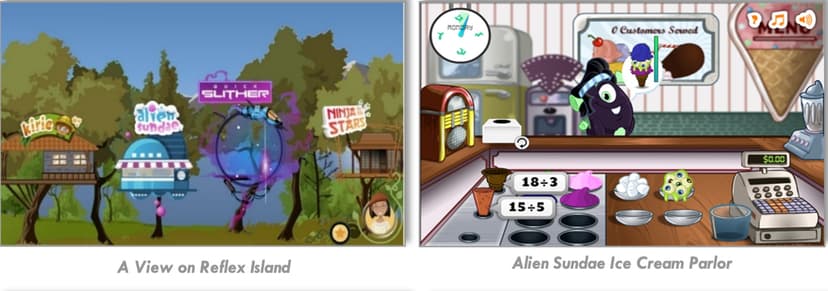
Reflex uses adaptive, mastery-based game mechanics to drill arithmetic facts until they are recalled automatically. The app begins with an initial assessment to determine your child's baseline typing speed and current fact knowledge. It then places the student into various mini-games where they must solve equations to power a spaceship, navigate a maze, or complete other arcade-style objectives. Behind the scenes, the algorithm tracks every keystroke. It measures the milliseconds it takes to answer, distinguishing between a fact a student knows instantly and one they have to calculate manually. As accuracy and speed improve, the app introduces new fact families while occasionally reviewing older ones to prevent forgetting. Students earn virtual tokens for effort and mastery, which they can spend to customize an in-game avatar or decorate a virtual treehouse.
Strengths and tradeoffs of Reflex
Reflex's biggest strength is its use of algorithmically timed spaced repetition to guarantee automaticity, while its biggest weakness is the complete absence of conceptual math instruction. Mastery through Retrieval Practice: Reflex forces active recall under a time constraint, which is a proven method for moving facts from working memory to long-term memory. By ensuring students can retrieve basic facts instantly, the app frees up working memory for multi-step problem solving later on. Highly Granular Adaptation: The software does not just track right or wrong answers; it tracks response latency to ensure true fluency. Lack of Conceptual Grounding: Reflex assumes the student already understands the operations. It provides no worked examples, visual fraction models, or number lines to explain why 8 times 4 is 32. Extrinsic Motivation: The app relies heavily on token economies and avatar customization. While this gamification keeps engagement high during repetitive drills, it risks teaching students to value the virtual rewards over the learning itself.
Who Might Benefit From Reflex?
Reflex is best for elementary and middle school students who understand basic math concepts but lack the rapid fact fluency needed for higher-level math. It is specifically designed for classroom implementations where teachers want an automated, data-rich tool to replace traditional flashcards or timed worksheets. Because it requires a minimum seat purchase, the ideal use case is a school-wide or classroom-level deployment. It serves as an excellent supplementary drill tool, provided it is paired with strong, concept-based classroom instruction.
Data Transparency
Does Not Meet Data Transparency Standard
Reflex reaches Level 1 of 3 (Basic protections), below our data transparency standard. Reaching Level 2 needs the policy to document data export, named service providers and self-service deletion.
19 of 35 checks passed
Evaluated September 2026
Privacy Policy →Level 1 · Basic protections
Does not sell data or target ads at students, limits sharing, and lets parents see and delete their child's data.
Level 2 · Parent control (meets the standard)
Families can get their data out, know who processes it, and know how long it is kept.
Not documented: data export, named service providers, self-service deletion
Level 3 · Direct data access
Families or schools can pull their own data through an API, in a stated format.
Not documented: an API for retrieving their own data, a named export format
View all 35 checks
Parent Access7/8
Does the policy mention parents specifically?
“When a parent or guardian signs up to provide our _Learning Platform Services at Home_ to a child under 13, we will seek the appropriate consent directly from the parent or guardian before collecting any personal information from the child.”
Can parents view their child's data?
“For _Enterprise Platform Services_ and _Direct Platform Services_, we support access to, correction, and deletion of Student Data by our educational institution customer and/or teachers by cooperating and assisting the school and teachers to meet their requirements for access, correction, and deletion, or by responding to requests we receive from schools. If we receive such a request directly from a student or parent, we will advise the corresponding educational institution or teacher customer of the request and we will follow all lawful instructions from the institutions and teachers.”
Can parents modify their child's data?
“For _Enterprise Platform Services_ and _Direct Platform Services_, we support access to, correction, and deletion of Student Data by our educational institution customer and/or teachers by cooperating and assisting the school and teachers to meet their requirements for access, correction, and deletion, or by responding to requests we receive from schools. If we receive such a request directly from a student or parent, we will advise the corresponding educational institution or teacher customer of the request and we will follow all lawful instructions from the institutions and teachers.”
Can parents delete their child's account?
“For _Enterprise Platform Services_ and _Direct Platform Services_, we support access to, correction, and deletion of Student Data by our educational institution customer and/or teachers by cooperating and assisting the school and teachers to meet their requirements for access, correction, and deletion, or by responding to requests we receive from schools. If we receive such a request directly from a student or parent, we will advise the corresponding educational institution or teacher customer of the request and we will follow all lawful instructions from the institutions and teachers.”
Is there a dedicated Children's Privacy section?
The policy covers COPPA and children under 13 in paragraphs that have no dedicated Children's Privacy heading.
Does it reference COPPA compliance?
“This Privacy Policy and our Services are designed to comply with COPPA.”
Does it reference FERPA compliance?
“We provide the Learning Application Services as a “School Official” under the provisions of the Family Educational Rights and Privacy Act (“FERPA”).”
Is parental consent required for child accounts?
“When a parent or guardian signs up to provide our _Learning Platform Services at Home_ to a child under 13, we will seek the appropriate consent directly from the parent or guardian before collecting any personal information from the child.”
Data Portability1/5
Can users access their personal data?
“The right to know what personal information we process about you, including categories of data, sources of it, the business purposes for collecting, selling, or sharing it, and the categories of third-party service providers to which it may be disclosed.”
Can users download/export their data?
The policy does not offer a way to download or export data.
Is there a self-service data access tool?
The policy handles access only through requests to the vendor or the school, not through a self-service tool.
Is a specific data format mentioned for export?
The policy does not name any export format.
Is there an API for data access?
The policy lists student API calls as data it collects but offers no API for users to access their data.
Data Minimization2/6
Is data collection itemized?
“We may collect and process the following types of student personal information as part of the Services:”
Can the app be used without a real name?
The policy lists student first and last name as collected data (optional, but required for autorostered students).
Can the app be used without an email?
The policy's list of student data leaves out student email, but the policy never states that student email is not collected.
Does it state collection is limited to what is necessary?
“In providing our Services we strive to only collect and process data elements which are reasonably necessary, proportionate, and not excessive for the uses for which we need to process that data.”
Is IP address anonymized or truncated?
The policy says it collects IP addresses and does not mention anonymizing or truncating them.
Is location tracking explicitly excluded?
The policy does not address location tracking.
Third-Party Protection4/7
Does it explicitly state no selling of data?
“We do not sell or process personal information of students arising from the use of our Services to target marketing or advertising to them.”
Are third-party providers named?
The policy links to outside sub-processor pages but does not name any third-party providers itself.
Are providers contractually restricted?
The policy only suggests service providers work under agreements and does not explicitly describe contractual limits on them.
No-targeted-advertising commitment?
“We do not sell or process personal information of students arising from the use of our Services to target marketing or advertising to them.”
Is AI/ML data sharing addressed?
The policy does not address AI or machine learning.
Child-specific sharing restriction?
“We will not provide Student Data to these third parties without express consent of the educational institution, parent, or guardian.”
Cookies/tracking limited or opt-out?
“We collect and use this information only within our company in order to operate and improve our products.”
Deletion & Retention4/5
Can users delete their account?
“The right to request that we delete personal information we have collected about you, subject to certain exceptions.”
Self-service deletion mechanism?
The policy handles deletion only through requests, not through a self-service tool.
Specific data retention timeline?
“For _Direct Platform Services_, student data is processed during the term an active licensing agreement is in place and is deleted within 45 days after the end of that licensing agreement”
Auto-deletion of inactive accounts?
“If educational institutions do not instruct us to delete data, or our contracts do not specify time periods for retention, we reserve the right to delete inactive account information, including Student Data, in a reasonable period of time, which will not exceed one year from the last activity in an account.”
Post-deletion handling described?
“however, depending upon our back-up systems retention times such information may be maintained in backups for up to 180 days after termination of the Learning Platform Services.”
Advertising1/4
Advertising model explicitly disclosed?
The policy only says student data is not used for targeted ads; it does not describe an advertising model or say the product has no ads.
Free from third-party advertisements?
The policy does not say the product is free of third-party ads.
Children excluded from ad targeting?
“We do not sell or process personal information of students arising from the use of our Services to target marketing or advertising to them.”
Ad-free option available?
The policy does not say the product has no advertising or offer an ad-free option.
What This Means
The policy review did not meet our data transparency standard. The checks above show the documented findings and unknowns. A missing statement does not establish how the app handles data in practice.
About this evaluation: Based on automated analysis of Privacy Policy against 35 policy-disclosure questions, including questions adapted from the Common Sense Privacy Program's published evaluation questions. TLS is not affiliated with Common Sense Media, and this is not a Common Sense rating. Quoted text is copied from the policy; unquoted notes are our summary. Results describe what the policy documents, not the company's actual practices. Privacy policies can change: this review reflects the version we analyzed and does not determine legal compliance.
Sources and review method
TLS combines product information and editorial analysis to explain how Reflex works, its tradeoffs, and the questions to ask before choosing it. Product features, an instructional rationale and evidence of learning outcomes are different kinds of information.
Formal Learning Standard assessment: not yet completed. Data Transparency findings are reported separately and do not establish learning effectiveness. Read our methodology.
Frequently Asked Questions About Reflex
Is Reflex free?
No, Reflex is a paid institutional platform. ExploreLearning sells site licenses for entire schools or teacher licenses that require a minimum purchase of 10 student seats. Volume discounts are available for larger districts, but there is no straightforward single-user consumer subscription for individual parents to buy at home.
Is Reflex good for elementary students?
Yes, Reflex is highly effective for elementary students who need to memorize their math facts. It uses game-based retrieval practice to make repetitive drilling engaging. However, it should only be used after a child has been taught the underlying concepts of addition, subtraction, multiplication, and division in the classroom.
What does Reflex teach?
Reflex teaches basic math fact fluency, covering addition, subtraction, multiplication, and division. It does not teach conceptual math, word problems, or multi-step equations. The sole focus is on building automaticity, which is the ability to recall arithmetic facts instantly without having to count on fingers or calculate manually.
Reflex vs. Khan Academy: Which is better?
They serve entirely different purposes. Reflex is a specialized drill tool designed purely for memorizing basic arithmetic facts through fast-paced games. Khan Academy is a comprehensive curriculum that teaches underlying math concepts through video instruction and practice sets. Use Khan Academy to learn the math, and use Reflex to speed up basic calculations.
Has The Learning Standard evaluated Reflex?
TLS has not yet completed a Learning Standard evaluation of how well Reflex teaches. Its privacy policy has been reviewed for Data Transparency and reaches Level 1, Basic protections.
Is Reflex COPPA compliant?
The reviewed privacy policy references COPPA. A policy reference alone does not establish COPPA compliance. Policy review note: The policy says it is designed to comply with COPPA.
Is Reflex FERPA compliant?
The reviewed privacy policy references FERPA. A policy reference alone does not establish FERPA compliance. Policy review note: The policy says the vendor acts as a School Official under FERPA.
Does Reflex have a children's privacy policy?
No dedicated children's privacy section was found in the reviewed policy. Policy review note: The policy covers COPPA and children under 13 in paragraphs that have no dedicated Children's Privacy heading.
Does Reflex sell student data?
The reviewed policy states that the app does not sell data. This is a policy statement; actual data practices were not verified. Policy review note: The vendor says it does not sell students' personal information.
Can you delete your data from Reflex?
The reviewed privacy policy describes account deletion. We have not tested the deletion process. Policy review note: Users can ask for their personal information to be deleted.
Follow TLS Research
Subscribe to future TLS research updates: app reviews, findings, and what the evidence shows.
Screenshots


Latest News
All Reflex NewsTake Action
For Reflex
If you represent ExploreLearning and have a correction or new evidence, send the relevant source so we can review and update this page.
Submit a correctionDetails
- Pricing
- ExploreLearning offers site license and teacher license pricing models for Reflex. Site license offers access to an entire school for one annual price. Teacher license allows an educator to purchase seats per student (minimum of 10 seats). Volume discounts also available.
- Platforms
- Web Browser, iPadOS (Apple tablet), Android (Google mobile), Windows (Microsoft), macOS (Apple), Chrome OS (Google)
- Website
- Visit site