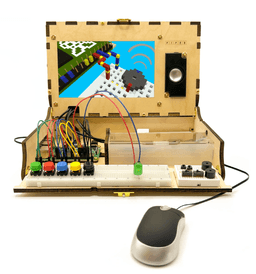
Piper Computer Kit
Product by Piper Learning, Inc.
Facts checked: Not yet checked
Our take (not a Learning Standard rating). This label applies to learning-science judgments throughout this overview.
Our take (not a Learning Standard rating)
While The Learning Standard has not yet evaluated the Piper Computer Kit, its design effectively links physical manipulatives with problem-based learning. Connecting hardware assembly to a game-based environment encourages active learning. However, the high price point and reliance on discovery learning over explicit direct instruction may limit foundational skill transfer.
Pros
- Integrates physical manipulatives with digital gameplay to strengthen cognitive connections through multimodal learning.
- Employs problem-based learning by requiring users to build physical electronic circuits to progress within the game.
- Provides immediate, observable feedback when hardware components are assembled correctly or incorrectly.
- Encourages productive struggle and troubleshooting through trial-and-error hardware construction.
Cons
- Relies heavily on discovery learning, lacking explicit direct instruction on underlying computer science principles.
- Demands high working memory capacity as students must simultaneously manage physical wires and a digital interface.
- Features a high upfront cost that limits accessibility for many families and classrooms.
- Requires significant setup time and a dedicated physical workspace compared to purely digital coding platforms.
What Do We Know About Piper Computer Kit?
The Piper Computer Kit appears effective for teaching basic hardware engineering and circuitry through hands-on construction, though The Learning Standard has not yet formally evaluated it. Rather than staring at a screen to passively consume information, your child must physically assemble a wooden computer case and connect wires on a breadboard. This physical interaction leverages embodied cognition, a learning science principle showing that physical movement and tactile engagement enhance memory retention.
Once the physical setup is complete, your child plays a block-building game where in-game progress requires real-world circuit building. If the game demands a button to move a character, your child must physically wire that button on their desk. This creates a tight, immediate feedback loop. However, you should monitor whether your child understands the underlying electronics or is simply following visual diagrams by rote. Because the kit relies heavily on game-based discovery, kids who struggle without explicit, step-by-step guidance may experience frustration. Furthermore, the $399 price point is substantial, making this a major investment. Parents must consider their child's patience for physical assembly and troubleshooting before committing to this kit.
How Does Piper Computer Kit Work?
The Piper Computer Kit utilizes a problem-based, constructionist learning approach where students build physical hardware to solve digital challenges. The experience begins completely offline. Students follow engineering blueprints to assemble a functioning computer using wooden panels, a Raspberry Pi microcomputer, and various electronic components. This tactile phase mimics real-world engineering tasks.
After assembly, the digital component activates. Students enter a gamified, block-building world reminiscent of popular sandbox games. The software presents a series of narrative missions. To complete these missions, students must construct specific circuits on an included physical breadboard using wires, LEDs, and switches. The game reads the inputs from these physical components. If the circuit is correct, the in-game action executes immediately. This cycle of building, testing, and observing results directly applies the scientific method. As students progress, the hardware challenges increase in complexity, introducing concepts like parallel circuits and basic coding logic through visual block-based programming interfaces.
Strengths and tradeoffs of Piper Computer Kit
The biggest strength of the Piper Computer Kit is its seamless integration of tactile hardware assembly with digital gameplay, while its biggest weakness is the potential for students to mindlessly follow diagrams without grasping the underlying electrical engineering principles.
Physical Manipulatives: By requiring students to handle wires, breadboards, and a microcomputer, the kit engages multimodal learning. Touching and manipulating physical objects helps encode spatial and procedural memory far better than purely digital simulations.
Immediate Feedback Loop: The game-based environment provides instantaneous, observable feedback. If a circuit is wired incorrectly, the in-game mechanism simply fails to work. This immediate correction prevents the reinforcement of misconceptions and encourages active troubleshooting.
Lack of Explicit Instruction: Problem-based learning works best when paired with sufficient background knowledge. The kit relies heavily on discovery learning. Without robust worked examples explaining why a circuit functions, such as the flow of electrons or the concept of resistance, novice learners may struggle to transfer these skills to contexts outside the game.
High Cognitive Load: Managing physical components while navigating a digital interface requires high working memory capacity. Younger students or those new to STEM often find these dual demands overwhelming without direct adult facilitation.
Who Might Benefit From Piper Computer Kit?
The Piper Computer Kit is best for upper elementary to middle school students (grades 3-8) who learn effectively through tactile, hands-on construction rather than traditional screen-based instruction. It serves well as an educational bridge for children who enjoy sandbox gaming environments but need exposure to physical engineering and computer science concepts. Because it requires patience and fine motor skills to manipulate small electronic components, it is ideal for highly motivated learners or environments where an adult can provide occasional scaffolding. It fits best in homes or classrooms with dedicated physical workspace.
Data Transparency
Does Not Meet Data Transparency Standard
Piper Computer Kit does not meet our data transparency standard. Its privacy policy does not document basic protections, including a statement that it does not sell data, a commitment against targeted advertising and limits on sharing children's data.
8 of 35 checks passed
Evaluated September 2026
Product Privacy Policy →Level 1 · Basic protections
Does not sell data or target ads at students, limits sharing, and lets parents see and delete their child's data.
Not documented: a statement that it does not sell data, a commitment against targeted advertising, limits on sharing children's data, contractual limits on service providers, parents' right to see their child's data, parents' right to delete their child's data
Level 2 · Parent control (meets the standard)
Families can get their data out, know who processes it, and know how long it is kept.
Not documented: data export, a data retention timeline, named service providers, self-service deletion
Level 3 · Direct data access
Families or schools can pull their own data through an API, in a stated format.
Not documented: an API for retrieving their own data, a named export format
View all 35 checks
Parent Access2/8
Does the policy mention parents specifically?
The policy mentions only a 'parent company' in an acquisition context and never refers to parents of children.
Can parents view their child's data?
The policy does not give parents any right to view their child's data.
Can parents modify their child's data?
The policy does not give parents any right to modify their child's data.
Can parents delete their child's account?
The policy does not give parents any right to delete their child's data or account.
Is there a dedicated Children's Privacy section?
The policy has no section headed for children's privacy or COPPA.
Does it reference COPPA compliance?
“We do not collect or store personal information via our product. This is in compliance with FERPA and COPPA standards in that we do not collect or utilize data related to educational records or personal identifiable information.”
Does it reference FERPA compliance?
“We do not collect or store personal information via our product. This is in compliance with FERPA and COPPA standards in that we do not collect or utilize data related to educational records or personal identifiable information.”
Is parental consent required for child accounts?
The policy does not address parental consent for child accounts.
Data Portability1/5
Can users access their personal data?
“Request access to personal information (commonly known as a "data subject access request"). This enables you to receive a confirmation from us as to whether we process any of your personal information or not, and if this is the case, to receive a copy of such personal information and to check that we are lawfully processing it;”
Can users download/export their data?
The policy lets users receive a copy of their data by request but does not mention download, export or data portability.
Is there a self-service data access tool?
The policy describes only email requests and no self-service tool.
Is a specific data format mentioned for export?
The policy does not name any data export format.
Is there an API for data access?
The policy does not mention an API for data access.
Data Minimization3/6
Is data collection itemized?
“For example, when using the Piper Computer Kit, we collect system errors, game checkpoints, and region data to help improve the quality of our software and provide language localization.”
Can the app be used without a real name?
“Information You Give Us. We do not collect any personal information from you via our products.”
Can the app be used without an email?
“Information You Give Us. We do not collect any personal information from you via our products.”
Does it state collection is limited to what is necessary?
The policy does not say collection is limited to what is necessary.
Is IP address anonymized or truncated?
The policy does not address anonymizing or truncating IP addresses.
Is location tracking explicitly excluded?
The policy says it collects region data and does not rule out location tracking.
Third-Party Protection1/7
Does it explicitly state no selling of data?
The policy says it does not store or share personal information but never explicitly says it does not sell data.
Are third-party providers named?
The policy does not name any third-party providers.
Are providers contractually restricted?
The policy does not describe contractual limits on providers.
No-targeted-advertising commitment?
The policy does not address targeted advertising.
Is AI/ML data sharing addressed?
The policy does not address sharing data for AI or machine learning.
Child-specific sharing restriction?
The policy has no sharing restriction specific to children.
Cookies/tracking limited or opt-out?
“Persistent Identifiers. We do not store any persistent identifiers that can be used across other sites or products. We do not use any unique device identifiers or serial numbers that can be linked to you, personally.”
Deletion & Retention1/5
Can users delete their account?
“Request erasure of personal information (often referred to as "the right to be forgotten"). This enables you to ask us to delete or remove personal information where there is no good reason for us continuing to process it.”
Self-service deletion mechanism?
The policy handles deletion only through email requests, with no self-service option.
Specific data retention timeline?
The policy gives no data retention timeline.
Auto-deletion of inactive accounts?
The policy does not address auto-deleting inactive accounts.
Post-deletion handling described?
The policy does not describe what happens to data after deletion.
Advertising0/4
Advertising model explicitly disclosed?
The policy does not address advertising.
Free from third-party advertisements?
The policy does not address third-party advertisements.
Children excluded from ad targeting?
The policy does not address ad targeting of children.
Ad-free option available?
The policy does not address advertising or an ad-free option.
What This Means
The policy review did not meet our data transparency standard. The checks above show the documented findings and unknowns. A missing statement does not establish how the app handles data in practice.
About this evaluation: Based on automated analysis of Product Privacy Policy against 35 policy-disclosure questions, including questions adapted from the Common Sense Privacy Program's published evaluation questions. TLS is not affiliated with Common Sense Media, and this is not a Common Sense rating. Quoted text is copied from the policy; unquoted notes are our summary. Results describe what the policy documents, not the company's actual practices. Privacy policies can change: this review reflects the version we analyzed and does not determine legal compliance.
Sources and review method
TLS combines product information and editorial analysis to explain how Piper Computer Kit works, its tradeoffs, and the questions to ask before choosing it. Product features, an instructional rationale and evidence of learning outcomes are different kinds of information.
Formal Learning Standard assessment: not yet completed. Data Transparency findings are reported separately and do not establish learning effectiveness. Read our methodology.
Frequently Asked Questions About Piper Computer Kit
Is the Piper Computer Kit free?
No, the Piper Computer Kit is a premium physical product with a significant upfront cost. The V4B version with the Sensor Explorer currently costs $399.00. This price includes all necessary physical hardware, such as the wooden case, Raspberry Pi, breadboard, wires, and the proprietary software required to run the educational game. There are no recurring software subscription fees once the initial kit is purchased.
Is the Piper Computer Kit good for 3rd graders?
Yes, but it requires adult supervision and direct scaffolding. While the manufacturer targets grades 3 through 9, third graders often possess developing fine motor skills and lower tolerance for frustration. The physical assembly of small wires and breadboards can induce high cognitive load for younger users. Parents should expect to act as co-facilitators, guiding the child through the engineering blueprints and helping decode the problem-based tasks.
What does the Piper Computer Kit teach?
The Piper Computer Kit teaches foundational computer engineering, basic circuitry, and computational thinking. Students learn to read visual blueprints, assemble a functioning computer case, and build parallel and series circuits using a physical breadboard. The software component introduces visual, block-based coding. Through its problem-based learning approach, it also teaches logical reasoning and troubleshooting, as students must identify and fix hardware errors to progress.
Piper Computer Kit vs Kano PC: Which is better?
It depends entirely on your child's specific learning goals. Both teach computer assembly, but they utilize vastly different pedagogical approaches. The Piper Computer Kit relies on tactile circuitry building and gamification via a block-building world. The Kano PC focuses more on building a functional Windows machine and learning text-based coding through software challenges. Choose Piper for hands-on, breadboard-level electrical engineering, and Kano for software programming.
Has The Learning Standard evaluated Piper Computer Kit?
TLS has not yet completed a Learning Standard evaluation of how well Piper Computer Kit teaches. Its privacy policy has been reviewed for Data Transparency and does not yet document the basic protections (Level 1).
Is Piper Computer Kit COPPA compliant?
The reviewed privacy policy references COPPA. A policy reference alone does not establish COPPA compliance. Policy review note: The policy claims compliance with COPPA standards.
Is Piper Computer Kit FERPA compliant?
The reviewed privacy policy references FERPA. A policy reference alone does not establish FERPA compliance. Policy review note: The policy claims compliance with FERPA standards.
Does Piper Computer Kit have a children's privacy policy?
No dedicated children's privacy section was found in the reviewed policy. Policy review note: The policy has no section headed for children's privacy or COPPA.
Does Piper Computer Kit sell student data?
A statement ruling out data selling was not found in the reviewed policy. This does not establish that the app sells student data. Policy review note: The policy says it does not store or share personal information but never explicitly says it does not sell data.
Can you delete your data from Piper Computer Kit?
The reviewed privacy policy describes account deletion. We have not tested the deletion process. Policy review note: Users can ask for their personal information to be erased.
Follow TLS Research
Subscribe to future TLS research updates: app reviews, findings, and what the evidence shows.
Screenshots



Take Action
For Piper Computer Kit
If you represent Piper Learning, Inc. and have a correction or new evidence, send the relevant source so we can review and update this page.
Submit a correctionDetails
- Pricing
- Piper Computer Kit V4B with Sensor Explorer $399.00
- Platforms
- Windows (Microsoft), Chrome OS (Google)
- Grade Levels
- 3rd Grade, 4th Grade, 5th Grade, 6th Grade, 7th Grade, 8th Grade, 9th Grade
- Website
- Visit site