Mobile Max
Product by ActiveFloor
Facts checked: Not yet checked
Our take (not a Learning Standard rating). This label applies to learning-science judgments throughout this overview.
Our take (not a Learning Standard rating)
Mobile Max successfully combines gross motor movement with rote retrieval practice, which can increase student engagement and blood flow to the brain. However, its effectiveness relies entirely on the quality of educator-created content. It serves better as an active review tool than a primary instructional method for introducing complex concepts.
Pros
- Integrates physical movement with cognitive tasks to boost student engagement and focus.
- Enables cooperative learning through multi-player interactive floor games.
- Allows educators to customize content templates to align with specific classroom learning objectives.
- Supports spaced retrieval practice when teachers load previously taught material into the quiz formats.
Cons
- Relies heavily on educator input to create academically rigorous content rather than providing a structured curriculum.
- Focuses primarily on multiple-choice and recall formats rather than teaching higher-order problem-solving skills.
- Requires significant physical space and hardware setup compared to standard digital learning applications.
- Lacks built-in adaptive learning algorithms to adjust difficulty based on individual student performance.
What Do We Know About Mobile Max?
Mobile Max is effective for active review and engagement, but it will not replace structured classroom instruction for your child. This hardware and software combination projects educational games onto the floor, requiring your child to physically step on answers. Learning science shows that integrating gross motor movement with cognitive tasks can increase blood flow to the brain and improve focus, especially for younger learners. When your child uses this system, they are primarily engaging in retrieval practice, recalling previously learned facts like math equations, vocabulary words, or historical dates. Because the games are largely customizable by the educator, the actual learning value depends entirely on what the teacher inputs into the system. It excels at cooperative play, allowing up to four students to collaborate or compete, which builds social-emotional skills alongside academic recall. However, it does not teach new concepts or provide detailed feedback on incorrect answers beyond signaling a wrong step. Parents should view this as a highly engaging supplementary tool used by schools to break up sedentary classroom time, rather than a standalone educational curriculum.
How Does Mobile Max Work?
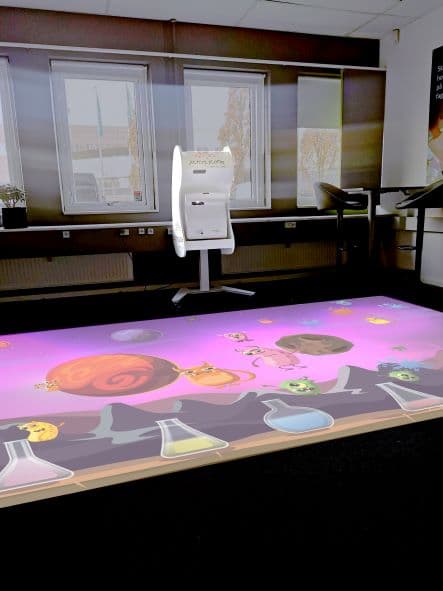
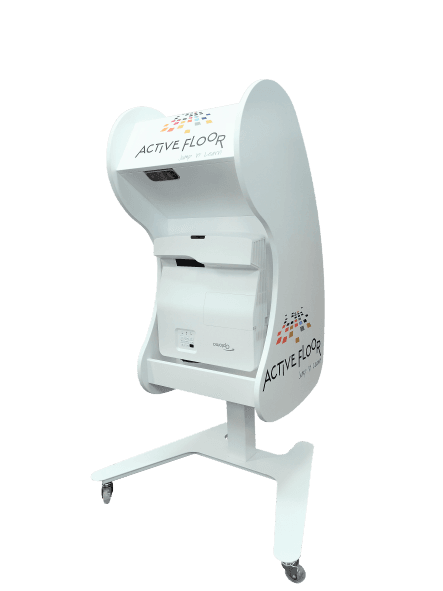
Mobile Max uses a play-based, kinesthetic approach to learning by combining physical floor movement with customizable digital quizzes. The system consists of a portable projector that beams an interactive interface directly onto the floor. Students interact with the content using their feet, stepping on projected objects or answers to participate in games. Teachers access the MyFloor software library to select pre-made games or use templates to build custom quizzes tailored to their current lesson plans. The activities focus heavily on timed retrieval practice and gamified review, accommodating two to four players at a time. This setup allows educators to facilitate cooperative learning activities where students must communicate and move together to solve problems. Because the hardware is portable and the projection size is adjustable, schools typically deploy it in common areas like libraries or STEAM labs for rotational brain-breaks and interactive team-building exercises.
Strengths and tradeoffs of Mobile Max
Mobile Max's biggest strength is its ability to blend gross motor movement with academic recall, while its biggest weakness is a reliance on basic rote memorization formats. Kinesthetic engagement is a powerful tool in learning science; physical activity increases arousal and attention, making subsequent cognitive tasks more effective. By turning the floor into an interactive quiz, the system capitalizes on the benefits of active learning and provides excellent opportunities for cooperative play. However, the instructional design is inherently limited by the medium. Stepping on answers naturally lends itself to multiple-choice questions and simple matching games, which heavily emphasizes rote retrieval practice over deep comprehension or complex problem-solving. The system lacks worked examples or scaffolding for struggling students; if a student steps on the wrong answer, they rarely receive an explanation of why they were incorrect. Furthermore, the absence of an adaptive learning algorithm means that the software cannot automatically scale difficulty to match an individual student's mastery level. The educational rigor ultimately depends on the teacher's ability to design challenging, curriculum-aligned templates.
Who Might Benefit From Mobile Max?
Mobile Max is best for elementary and middle school educators who want to integrate kinesthetic learning and brain-breaks into their review sessions. While the developer claims it supports grades PreK through 12, the play-based, floor-stepping mechanics are most developmentally appropriate and engaging for children ages 4 to 12. It serves as an excellent station in a STEAM lab, library, or common area where students need a physical outlet that still reinforces academic goals. It is particularly useful for teachers aiming to foster cooperative learning and teamwork, as the multi-player format requires students to physically coordinate to select correct answers.
Sources and review method
TLS combines product information and editorial analysis to explain how Mobile Max works, its tradeoffs, and the questions to ask before choosing it. Product features, an instructional rationale and evidence of learning outcomes are different kinds of information.
Formal Learning Standard assessment: not yet completed. Data Transparency findings are reported separately and do not establish learning effectiveness. Read our methodology.
Frequently Asked Questions About Mobile Max
Is Mobile Max free?
No, Mobile Max is not free and requires a significant institutional investment. Schools or parent organizations must purchase the physical portable projection hardware and pay for standard delivery. Additionally, the system requires an ongoing software license for the MyFloor platform to access the digital library of interactive games and custom templates. Optional professional development training is also available for an additional fee.
Is Mobile Max good for elementary students?
Yes, the kinesthetic approach is highly effective for elementary students. Integrating physical movement with cognitive tasks helps younger learners maintain focus and burn off excess energy while reviewing foundational skills like math facts and vocabulary. The play-based nature of the floor games perfectly aligns with the developmental needs of children in early childhood and elementary grades, making it a strong tool for cooperative classroom review.
What does Mobile Max teach?
Mobile Max does not provide a fixed curriculum or teach new concepts from scratch. Instead, it offers a flexible platform for educators to review any subject, including math, science, humanities, and language arts. Teachers input their own lesson material into the system's interactive game templates. This means the specific subjects and learning objectives taught are entirely dependent on what the educator chooses to load into the software for retrieval practice.
How does Mobile Max compare to standard tablet learning?
Unlike solitary tablet applications that often feature adaptive learning algorithms, Mobile Max focuses exclusively on cooperative, gross motor play. Standard tablets excel at personalized pacing and complex problem-solving but keep students sedentary. Mobile Max sacrifices individualized academic scaffolding in favor of physical engagement and group collaboration, making it a fundamentally different instructional tool designed for active review rather than primary instruction.
Has The Learning Standard evaluated Mobile Max?
TLS has not yet completed a Learning Standard evaluation of how well Mobile Max teaches. TLS has not published a Data Transparency result for its privacy policy.
Follow TLS Research
Subscribe to future TLS research updates: app reviews, findings, and what the evidence shows.
Screenshots

Take Action
For Mobile Max
If you represent ActiveFloor and have a correction or new evidence, send the relevant source so we can review and update this page.
Submit a correctionDetails
- Pricing
- Each model purchased requires one software license plus delivery and (optional) professional development training.
- Platforms
- Windows (Microsoft)
- Grade Levels
- Preschool, Prekindergarten, Transitional Kindergarten, Kindergarten, 1st Grade, 2nd Grade, 3rd Grade, 4th Grade, 5th Grade, 6th Grade, 7th Grade, 8th Grade, 9th Grade, 10th Grade, 11th Grade, 12th Grade
- Website
- Visit site