MLC Geoboard App
Product by The Math Learning Center
Facts checked: Not yet checked
Our take (not a Learning Standard rating). This label applies to learning-science judgments throughout this overview.
Our take (not a Learning Standard rating)
The MLC Geoboard App does not explicitly teach mathematical concepts through direct instruction or structured feedback, but it serves as an excellent digital manipulative. It leverages spatial reasoning and cognitive offloading by allowing learners to construct shapes, but requires teacher or parent guidance.
Pros
- Promotes spatial reasoning by allowing learners to actively manipulate vertices and line segments.
- Supports cognitive flexibility through open-ended exploration of area, perimeter, and fractions.
- Removes physical barriers of traditional geoboards such as snapping rubber bands and limited peg space.
- Offers a completely free environment with no advertisements or account registration required.
Cons
- Lacks explicit instruction, requiring an adult to provide the mathematical context and learning goals.
- Provides no automated feedback on constructed shapes to confirm mathematical accuracy.
- Offers no structured progression, scaffolding, or worked examples to guide novice learners.
What Do We Know About MLC Geoboard App?
The MLC Geoboard App is effective only when paired with adult guidance or a structured curriculum, as it is a sandbox tool rather than a standalone tutor. Your child will not find lessons, practice quizzes, or automated feedback here. Instead, this app replaces a physical classroom manipulative with a digital equivalent. If your child is studying perimeter, area, fractions, or geometric properties, this app provides a clean, distraction-free environment for visual representation. Learning science shows that virtual manipulatives support cognitive offloading, helping young learners transition from concrete to abstract mathematical thinking. However, because the app offers no scaffolding or error correction, your child cannot learn a new concept simply by opening it. You must provide the prompts, such as asking your child to build a polygon with a specific perimeter or to divide a square into equal fractions. Without this targeted adult interaction, the app is merely a digital drawing board. Please note that this app is currently pending formal evaluation by The Learning Standard.
How Does MLC Geoboard App Work?
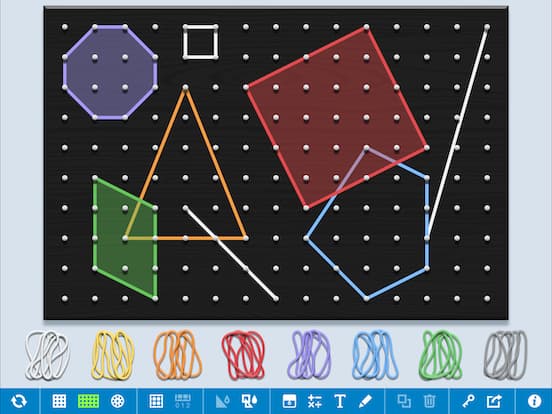
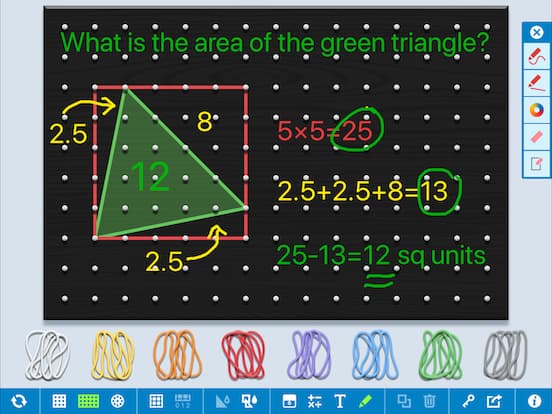
The MLC Geoboard App functions as an open-ended virtual manipulative designed for spatial exploration and visual modeling. Users select a board shape and drag colored virtual rubber bands onto a grid of pegs. By pulling the bands from the center or edges, learners manipulate vertices to create line segments, polygons, and complex geometric figures. The app includes simple annotation tools, allowing users to draw, write equations, or overlay a grid to count units of area and perimeter. There is no gamification, scoring, or leveled progression. The mechanics rely entirely on user-generated inputs, making it a blank canvas for applied geometry and fractions. Because it lacks built-in problems, the cognitive load is focused entirely on the construction of the visual model rather than navigating a complex interface or solving app-generated puzzles.
Strengths and tradeoffs of MLC Geoboard App
The biggest strength of the MLC Geoboard App is its capacity to build spatial reasoning through visual modeling, while its biggest weakness is the complete absence of scaffolding and feedback. Spatial visualization is a critical component of mathematical proficiency, and this app allows learners to instantly manipulate shapes, observing how changing one vertex alters angles, area, and perimeter. This supports embodied cognition, where interactive manipulation strengthens mathematical understanding. The app excels at cognitive offloading, letting students visually represent complex fraction problems without relying solely on working memory. However, the lack of worked examples or formative feedback severely limits its utility as an independent learning tool. If a student constructs an incorrect representation of a fraction, the app will not correct them. Therefore, it fails to utilize principles like retrieval practice or spaced repetition. It is a powerful modeling tool, but it relies entirely on the instructional design provided by the parent or teacher.
Who Might Benefit From MLC Geoboard App?
This app is best for elementary educators and parents who need a flexible, digital manipulative to supplement active math instruction. It serves students who are currently learning about geometry, fractions, area, and perimeter and need a visual way to model their thinking. Because it requires reading prompts or following external assignments, it is ideal for classroom environments, homework support, or homeschooling settings where an adult is actively directing the lesson. It is not suitable for students looking for independent practice or self-paced learning.
Sources and review method
TLS combines product information and editorial analysis to explain how MLC Geoboard App works, its tradeoffs, and the questions to ask before choosing it. Product features, an instructional rationale and evidence of learning outcomes are different kinds of information.
Formal Learning Standard assessment: not yet completed. Data Transparency findings are reported separately and do not establish learning effectiveness. Read our methodology.
Frequently Asked Questions About MLC Geoboard App
Is MLC Geoboard App free?
Yes, the MLC Geoboard App is completely free for all users across all platforms. There are no in-app purchases, hidden subscription fees, or distracting advertisements that interrupt the learning process. Furthermore, it does not require an account or login to access its features. This ensures immediate accessibility for classroom use and guarantees strong data privacy for your child, as no personal information is collected or stored by the developer.
Is MLC Geoboard App good for elementary students?
Yes, it is highly effective for elementary students when guided by an adult or integrated into a lesson plan. The app targets concepts typically taught in prekindergarten through fifth grade, such as spatial reasoning, fractions, area, and perimeter. It provides a visual, hands-on way for young learners to transition from concrete objects to abstract mathematical representations. However, because it lacks instructions, younger students will need explicit directions on what to build.
What does MLC Geoboard App teach?
The MLC Geoboard App does not explicitly teach concepts on its own, but it provides a digital sandbox to explore geometry, fractions, angles, symmetry, and measurement. Your child uses the app to construct visual models that demonstrate these mathematical principles in real time. It acts as an application tool where students can prove their understanding of a concept, such as showing why two different shapes can share the exact same perimeter.
Does MLC Geoboard App correct my child's mistakes?
No, the app does not provide any formative feedback, hints, or error correction. It functions strictly as an open-ended digital whiteboard rather than a tutoring system. If your child is asked to build a polygon with an area of twelve square units but builds one with ten, the app will not notify them of the mistake. An educator or parent must manually check and verify the mathematical accuracy of the student's work.
Has The Learning Standard evaluated MLC Geoboard App?
TLS has not yet completed a Learning Standard evaluation of how well MLC Geoboard App teaches. TLS has not published a Data Transparency result for its privacy policy.
Follow TLS Research
Subscribe to future TLS research updates: app reviews, findings, and what the evidence shows.
Screenshots

Take Action
For MLC Geoboard App
If you represent The Math Learning Center and have a correction or new evidence, send the relevant source so we can review and update this page.
Submit a correctionDetails
- Pricing
- Free. No login or registration needed.
- Platforms
- Web Browser, iOS (Apple mobile), Chrome OS (Google)
- Grade Levels
- Prekindergarten, Transitional Kindergarten, Kindergarten, 1st Grade, 2nd Grade, 3rd Grade, 4th Grade, 5th Grade
- Website
- Visit site