
Makeblock mBot2
Product by Makeblock
Facts checked: Not yet checked
Our take (not a Learning Standard rating). This label applies to learning-science judgments throughout this overview.
Our take (not a Learning Standard rating)
While The Learning Standard has not yet evaluated mBot2, the hardware relies heavily on project-based learning to teach coding. It succeeds in providing hands-on application of computational thinking, but success depends entirely on adult facilitation rather than built-in instructional scaffolding.
Pros
- Bridges the gap between block-based programming and text-based Python coding.
- Uses tactile manipulatives to reinforce abstract computational thinking concepts.
- Integrates multiple sensors that provide immediate physical feedback to student code.
- Supports project-based learning which encourages sustained problem-solving and iteration.
Cons
- Requires significant adult facilitation to ensure learning outcomes are met.
- Lacks built-in automated instructional scaffolding for absolute beginners.
- Demands a high upfront cost compared to purely software-based coding alternatives.
- Creates potential for cognitive overload if students attempt complex sensor integration without foundational knowledge.
What Do We Know About Makeblock mBot2 ?
mBot2 is an effective tool for teaching applied computational thinking, provided you actively guide your child through the problem-solving process. You cannot simply hand this robot to a child and expect them to learn Python independently. The hardware requires users to write code that produces immediate, physical actions, which leverages the learning science principle of embodied cognition. When your child programs a sensor to stop the robot before hitting a wall, the immediate visual feedback reinforces the coding logic. However, the system lacks automated instructional scaffolding. Without a teacher or parent to sequence the learning, your child may experience cognitive overload when trying to master both the hardware assembly and the software syntax simultaneously. To get the most out of this tool, you must structure their learning into small, manageable chunks, introducing one sensor or coding concept at a time before attempting complex projects.
How Does Makeblock mBot2 Work?
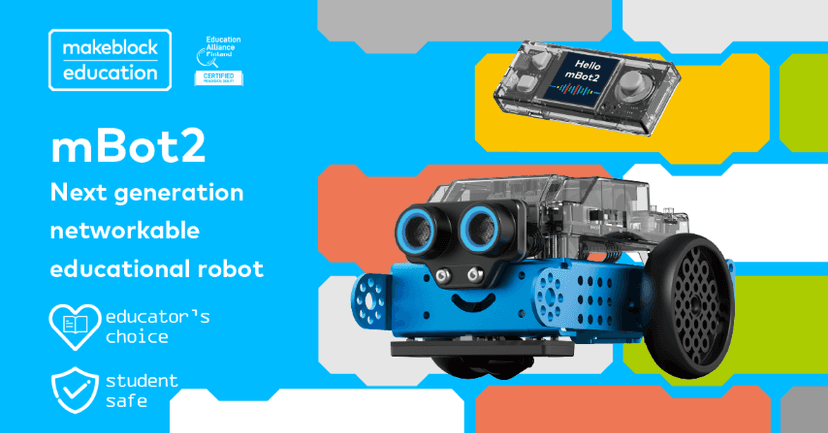
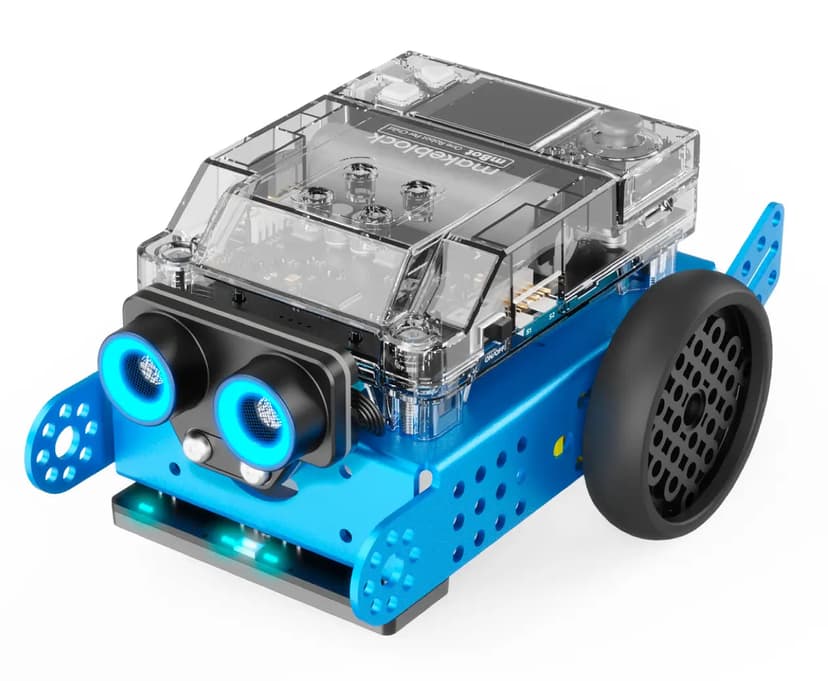
mBot2 uses project-based learning and hands-on manipulatives to teach coding and robotics. Students begin by physically assembling the robot, which builds spatial reasoning. Once assembled, users interface with the robot via a companion coding environment that supports both block-based programming and text-based Python. Learning occurs through an iterative cycle of coding, deploying, and observing. A student writes a sequence of commands, pushes the code to the robot microcomputer, and watches the physical execution. If the robot fails to navigate a maze or read a color correctly, the student must debug the code. This immediate feedback loop forces active problem-solving rather than passive consumption. The system relies on external project prompts and curriculum guides, requiring the user to apply logical sequencing, mathematical reasoning, and computational thinking to achieve specific physical outcomes.
Strengths and tradeoffs of Makeblock mBot2
The biggest strength of mBot2 is its ability to make abstract coding concepts tangible through immediate physical feedback, while its biggest weakness is the steep cognitive load it places on unsupported learners. Tactile learning and embodied cognition are central to the mBot2 experience. When students write a loop or a conditional statement, they see it executed in real space. This concrete representation helps solidify abstract logical concepts far better than on-screen simulations alone. The integration of sensors allows for active, iterative problem-solving, forcing students to debug and refine their code based on observable data. However, the lack of built-in, software-guided scaffolding is a significant drawback. Cognitive overload occurs easily when a novice must simultaneously navigate hardware troubleshooting, block-based logic, and sensor calibration. Without a structured curriculum or an educator to break down tasks into manageable, heavily scaffolded steps, students often hit a wall of frustration. While excellent for applying learned concepts, it is not a standalone instructional tool for absolute beginners.
Who Might Benefit From Makeblock mBot2 ?
Best for middle and high school students who have basic coding knowledge and need a physical platform to practice computational thinking. While marketed for all ages, the hardware assembly and dual block-to-text coding environment are best suited for students transitioning from introductory block programming into Python. It is an ideal resource for classrooms utilizing project-based learning or for dedicated parents willing to co-learn robotics alongside their child. It is not recommended for independent learning by young children or absolute beginners without active adult facilitation.
Data Transparency
Does Not Meet Data Transparency Standard
Makeblock mBot2 does not meet our data transparency standard. Its privacy policy does not document basic protections, including a statement that it does not sell data, a commitment against targeted advertising and a COPPA or FERPA commitment.
14 of 35 checks passed
Evaluated September 2026
Privacy Policy →Level 1 · Basic protections
Does not sell data or target ads at students, limits sharing, and lets parents see and delete their child's data.
Not documented: a statement that it does not sell data, a commitment against targeted advertising, a COPPA or FERPA commitment, parents' right to see their child's data
Level 2 · Parent control (meets the standard)
Families can get their data out, know who processes it, and know how long it is kept.
Not documented: a data retention timeline, self-service deletion
Level 3 · Direct data access
Families or schools can pull their own data through an API, in a stated format.
Not documented: an API for retrieving their own data, a named export format
View all 35 checks
Parent Access3/8
Does the policy mention parents specifically?
“Our Products and Services are primarily intended for use by parents, schools, and educators in educational settings.”
Can parents view their child's data?
The policy only lets parents ask for deletion of a child's data and does not give them a right to view it.
Can parents modify their child's data?
The policy does not give parents a right to change their child's data.
Can parents delete their child's account?
“If you are a parent or guardian and believe that a child under the age of 13 (or the applicable age of consent in your jurisdiction) has provided us with Personal Data without appropriate consent, please contact us immediately at service@makeblock.com. We will take steps to verify the information and delete it in accordance with Applicable Law.”
Is there a dedicated Children's Privacy section?
“15\. CHILDREN’S AND MINORS’ PRIVACY”
Does it reference COPPA compliance?
The policy does not mention COPPA.
Does it reference FERPA compliance?
The policy does not mention FERPA.
Is parental consent required for child accounts?
The policy says it does not knowingly collect children's data but does not require parental consent for child accounts.
Data Portability2/5
Can users access their personal data?
“Depending on your state of residency and subject to legal limitations and exceptions, you may have the right to know/access, portability, correction, deletion, opt-out of targeted advertising, opt-out of “sales,” and (in some states) control of Sensitive Personal Data.”
Can users download/export their data?
“Depending on your state of residency and subject to legal limitations and exceptions, you may have the right to know/access, portability, correction, deletion, opt-out of targeted advertising, opt-out of “sales,” and (in some states) control of Sensitive Personal Data.”
Is there a self-service data access tool?
The policy only mentions self-service tools "where available" and does not describe a data access tool.
Is a specific data format mentioned for export?
The policy does not name an export format.
Is there an API for data access?
The policy does not mention an API for data access.
Data Minimization2/6
Is data collection itemized?
“**Identity Data:** name/preferred name; usernames/display names; user ID; avatar/profile image (if provided); and, where required by law or for certain transactions, government-issued identifiers.”
Can the app be used without a real name?
The policy says it collects names as Identity Data.
Can the app be used without an email?
The policy says it collects email as Contact Data.
Does it state collection is limited to what is necessary?
“We collect only what we need to provide and improve the Service.”
Is IP address anonymized or truncated?
The policy collects IP addresses (approximate location) and does not say they are anonymized or truncated.
Is location tracking explicitly excluded?
The policy collects approximate location from IP addresses, and precise geolocation when a feature enables it.
Third-Party Protection4/7
Does it explicitly state no selling of data?
The policy says it does not knowingly sell data for money but admits some disclosures may count as sales; only data of known under-16s is excluded outright.
Are third-party providers named?
“hosting providers and IT tools supporting online store and Service functions (including the Shopify ecosystem and Microsoft Azure).”
Are providers contractually restricted?
“we use vendors under contractual obligations to protect Personal Data.”
No-targeted-advertising commitment?
The policy excludes only known under-16s from targeted advertising and otherwise allows it with an opt-out.
Is AI/ML data sharing addressed?
The policy mentions using data to train its own models but does not address sharing data with AI/ML providers.
Child-specific sharing restriction?
“For individuals we know to be under the age of 16, we will **not** “sell” or “share” their Personal Data for the purpose of cross-context behavioral advertising.”
Cookies/tracking limited or opt-out?
“You can manage cookies and similar technologies through your browser and device settings (for example, blocking or deleting cookies). If we make a cookie banner or preference tool available on a particular Site or Application, you may also use it to manage non-essential cookies.”
Deletion & Retention1/5
Can users delete their account?
“If you wish to completely deactivate or delete your account, please contact us in accordance with Section 3.”
Self-service deletion mechanism?
The policy only mentions delete-account functions "where available" and does not confirm a self-service deletion tool.
Specific data retention timeline?
The policy describes retention only in general terms, with no specific timelines.
Auto-deletion of inactive accounts?
The policy does not mention auto-deleting inactive accounts.
Post-deletion handling described?
The policy does not describe what happens to data after an account is deleted.
Advertising2/4
Advertising model explicitly disclosed?
“We use cookies and similar technologies on our Sites and Applications to (i) operate core functions (such as account login, security, and checkout), (ii) measure performance and improve the Service, and (iii) where permitted by Applicable Law and your choices, support marketing and advertising.”
Free from third-party advertisements?
The policy says third parties may place cookies for advertising and does not say the product is ad-free.
Children excluded from ad targeting?
“We do not sell the Personal Data of individuals we know to be under 16 years of age and we do not share such information for targeted advertising purposes.”
Ad-free option available?
The policy does not offer an ad-free option or say the product has no ads.
What This Means
The policy review did not meet our data transparency standard. The checks above show the documented findings and unknowns. A missing statement does not establish how the app handles data in practice.
About this evaluation: Based on automated analysis of Privacy Policy against 35 policy-disclosure questions, including questions adapted from the Common Sense Privacy Program's published evaluation questions. TLS is not affiliated with Common Sense Media, and this is not a Common Sense rating. Quoted text is copied from the policy; unquoted notes are our summary. Results describe what the policy documents, not the company's actual practices. Privacy policies can change: this review reflects the version we analyzed and does not determine legal compliance.
Sources and review method
TLS combines product information and editorial analysis to explain how Makeblock mBot2 works, its tradeoffs, and the questions to ask before choosing it. Product features, an instructional rationale and evidence of learning outcomes are different kinds of information.
Formal Learning Standard assessment: not yet completed. Data Transparency findings are reported separately and do not establish learning effectiveness. Read our methodology.
Frequently Asked Questions About Makeblock mBot2
Is mBot2 free?
No, the mBot2 hardware requires a purchase, with an MSRP of $149.99, though educational discounts of 10 to 30 percent are available for schools and educators.
Is mBot2 good for elementary students?
It can be used by upper elementary students, but it requires heavy adult facilitation to prevent frustration. It is better suited for middle school students who can handle the abstract logic of Python.
What does mBot2 teach?
The robot teaches computational thinking, basic physics, spatial reasoning, and coding syntax using both block-based interfaces and Python. It focuses heavily on applied science and mathematical logic.
How does mBot2 compare to LEGO Mindstorms?
mBot2 offers a more direct pathway to text-based Python coding at a lower price point, while LEGO typically provides a highly polished, proprietary block-based ecosystem with greater structural versatility.
Has The Learning Standard evaluated Makeblock mBot2?
TLS has not yet completed a Learning Standard evaluation of how well Makeblock mBot2 teaches. Its privacy policy has been reviewed for Data Transparency and does not yet document the basic protections (Level 1).
Is Makeblock mBot2 COPPA compliant?
A COPPA reference was not found in the reviewed privacy policy. This does not determine whether the app complies with COPPA. Policy review note: The policy does not mention COPPA.
Is Makeblock mBot2 FERPA compliant?
A FERPA reference was not found in the reviewed privacy policy. This does not determine whether the app complies with FERPA. Policy review note: The policy does not mention FERPA.
Does Makeblock mBot2 have a children's privacy policy?
The reviewed policy includes a dedicated children's privacy section. Policy review note: The policy has a dedicated children's and minors' privacy section.
Does Makeblock mBot2 sell student data?
A statement ruling out data selling was not found in the reviewed policy. This does not establish that the app sells student data. Policy review note: The policy says it does not knowingly sell data for money but admits some disclosures may count as sales; only data of known under-16s is excluded outright.
Can you delete your data from Makeblock mBot2 ?
The reviewed privacy policy describes account deletion. We have not tested the deletion process. Policy review note: Users can ask for their account to be deleted.
Follow TLS Research
Subscribe to future TLS research updates: app reviews, findings, and what the evidence shows.
Screenshots

Take Action
For Makeblock mBot2
If you represent Makeblock and have a correction or new evidence, send the relevant source so we can review and update this page.
Submit a correctionDetails
- Pricing
- 10%-30% educational discount on MSRP of $149.99
- Platforms
- iOS (Apple mobile), iPadOS (Apple tablet), Android (Google mobile), macOS (Apple), Chrome OS (Google)
- Website
- Visit site