
MAD-learn
Product by MAD-learn
Facts checked: Not yet checked
Our take (not a Learning Standard rating). This label applies to learning-science judgments throughout this overview.
Our take (not a Learning Standard rating)
While The Learning Standard has not yet formally evaluated MAD-learn, its project-based approach to mobile app development shows strong potential for teaching design thinking. It leverages active learning and cross-curricular integration effectively, but its reliance on teacher facilitation means actual learning outcomes will vary heavily depending on classroom implementation.
Pros
- Applies the design thinking process to foster active, problem-based learning instead of passive consumption.
- Integrates coding and app design across core academic subjects, increasing context and relevance for students.
- Includes virtual internship opportunities for older students to provide authentic, real-world application of skills.
- Provides extensive teacher training resources to support structured classroom implementation.
Cons
- Heavily dependent on teacher facilitation, meaning learning outcomes will vary significantly by classroom.
- Lacks built-in automated feedback mechanisms for individual student coding errors or design flaws.
- May overwhelm younger students in early elementary grades without substantial scaffolding from an educator.
What Do We Know About MAD-learn?
MAD-learn is a project-based platform that effectively teaches the design thinking process through mobile app development, though its success relies heavily on teacher execution. Your child will not just learn to code in a vacuum; instead, they will use technology to solve problems related to their core subjects, from social studies to science. This cross-curricular approach grounds abstract technical skills in real-world contexts, a method supported by learning science to improve retention and engagement. Because it covers a massive age range from third grade through high school, the complexity of the projects scales up, culminating in virtual internships for older students. However, parents should know that this is primarily a classroom tool rather than a standalone, self-guided app for home use. The platform requires significant scaffolding from educators to ensure students do not get stuck during the ideation and development phases. The Learning Standard has not yet completed a formal evaluation of this tool, but its adherence to active learning principles makes it a promising addition to career and technical education programs.
How Does MAD-learn Work?
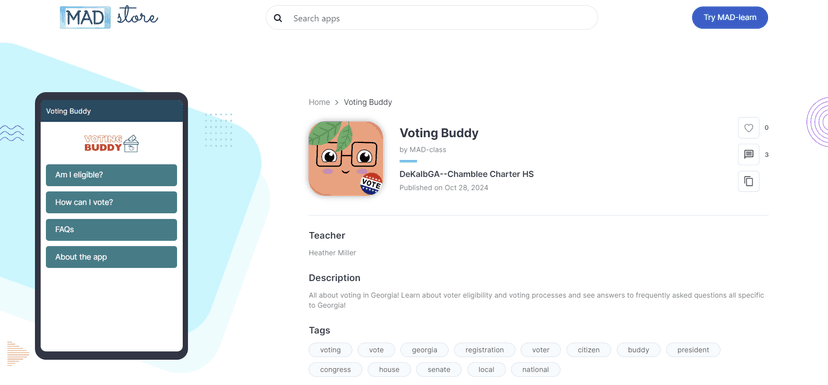
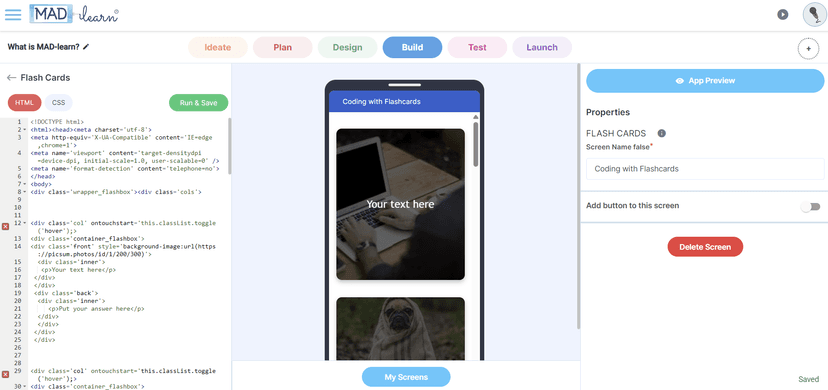
MAD-learn uses a project-based, cross-curricular pedagogy where students design and build mobile applications to demonstrate their understanding of academic concepts. The platform guides your child through the complete design thinking process: ideation, planning, design, creation, and testing. Rather than isolated coding drills, students tackle authentic problems based on their current coursework. For example, a student might build an interactive app about historical landmarks for a humanities class or a carbon footprint calculator for a science unit. This approach relies heavily on active learning, forcing students to synthesize information and construct their own knowledge. The interface provides a development environment that lowers the barrier to entry for programming concepts. For secondary students in grades 7-12, the platform integrates virtual internships, pushing students to apply their technical skills in simulated professional environments. Because it integrates directly into existing curricula, teachers act as facilitators, guiding the iterative design process rather than delivering direct instruction on computer science theory.
Strengths and tradeoffs of MAD-learn
MAD-learn's biggest strength is its emphasis on active, project-based learning across diverse subjects, while its biggest weakness is its heavy reliance on teacher facilitation rather than embedded instructional scaffolds. By forcing students to apply coding and design skills to subjects like history or math, the platform uses contextualized learning. This helps transfer abstract tech skills into long-term memory because students anchor new knowledge to existing academic concepts. The integration of design thinking also promotes metacognition, as students must deliberately plan, test, and revise their applications. However, the platform lacks robust, automated feedback mechanisms. In cognitive science, immediate corrective feedback is crucial for novices learning complex tasks like programming. Without it, students who encounter bugs or design flaws must wait for a teacher's intervention, which can create bottlenecks in a busy classroom. Furthermore, scaling the same core platform from 3rd grade to 12th grade means the user interface may lack the specific worked examples and step-by-step scaffolding younger learners need, placing a significant burden on the educator to bridge the instructional gap.
Who Might Benefit From MAD-learn?
MAD-learn is best for middle and high school classrooms seeking to integrate technology and design thinking into traditional academic subjects. It works exceptionally well for project-based learning environments and Career and Technical Education programs where students can benefit from its virtual internship components. While advertised for grades 3 and up, it is most appropriate for students in grades 6-12 who have the executive functioning skills to manage long-term design projects. It is not an ideal fit for individual at-home learning, as the curriculum requires a trained educator to facilitate.
Sources and review method
TLS combines product information and editorial analysis to explain how MAD-learn works, its tradeoffs, and the questions to ask before choosing it. Product features, an instructional rationale and evidence of learning outcomes are different kinds of information.
Formal Learning Standard assessment: not yet completed. Data Transparency findings are reported separately and do not establish learning effectiveness. Read our methodology.
Frequently Asked Questions About MAD-learn
Is MAD-learn free?
No, MAD-learn is not free. It is sold directly to schools and districts via an annual subscription model that includes volume pricing for larger deployments. It is not currently available as a direct-to-consumer application for individual household purchases. Parents interested in getting this for their child will need to advocate for its adoption at the school level.
Is MAD-learn good for elementary students?
Partially. While the developer lists MAD-learn for grades 3 and up, younger elementary students will require significant teacher scaffolding to succeed. The cognitive demands of the design thinking process and application development are generally better suited for middle and high school students. These older learners typically have the executive functioning skills required to manage multi-step, self-directed projects without constant intervention.
What does MAD-learn teach?
MAD-learn teaches the design thinking process, basic mobile app development, and long-term problem-solving skills. Because it is a cross-curricular tool, educators use it to teach core subjects like science, math, and humanities. Instead of taking a test, a student might build an interactive app to demonstrate their understanding of a historical event or a scientific process, anchoring the academic content in a practical project.
How does MAD-learn compare to standard coding platforms?
Unlike standard coding platforms that focus heavily on syntax drills and computer science theory, MAD-learn emphasizes the broader design thinking process. It is a project-based tool meant to integrate into non-computer science classes. Traditional coding platforms are usually designed specifically for dedicated computer science instruction, whereas MAD-learn functions more as a medium for students to demonstrate their knowledge in subjects like history or biology.
Has The Learning Standard evaluated MAD-learn?
TLS has not yet completed a Learning Standard evaluation of how well MAD-learn teaches. TLS has not published a Data Transparency result for its privacy policy.
Follow TLS Research
Subscribe to future TLS research updates: app reviews, findings, and what the evidence shows.
Screenshots

Take Action
For MAD-learn
If you represent MAD-learn and have a correction or new evidence, send the relevant source so we can review and update this page.
Submit a correctionDetails
- Pricing
- Annual subscription; volume pricing
- Platforms
- iOS (Apple mobile), iPadOS (Apple tablet), Android (Google mobile), Windows (Microsoft), macOS (Apple), Chrome OS (Google), Other
- Grade Levels
- 3rd Grade, 4th Grade, 5th Grade, 6th Grade, 7th Grade, 8th Grade, 9th Grade, 10th Grade, 11th Grade, 12th Grade
- Website
- Visit site