
Lumio
Product by SMART Technologies
Facts checked: Not yet checked
Our take (not a Learning Standard rating). This label applies to learning-science judgments throughout this overview.
Our take (not a Learning Standard rating)
Lumio is a delivery mechanism, not a standalone curriculum, so its effectiveness depends entirely on teacher-created content. It successfully facilitates active learning and formative assessment by turning static presentations into interactive workspaces. However, it does not provide built-in adaptive sequencing or automated retrieval practice.
Pros
- Enables active learning by allowing students to interact directly with digital lesson materials.
- Facilitates real-time formative assessment through embedded quizzes and short-answer prompts.
- Supports collaborative learning via shared digital workspaces where multiple students can co-create.
- Provides immediate feedback mechanisms for teachers during live instruction.
Cons
- Lacks built-in adaptive algorithms to adjust difficulty based on student performance.
- Relies completely on the pedagogical skill of the teacher designing the lesson.
- Does not utilize automated spaced repetition for long-term retention of facts.
- Requires heavy screen time for activities that might be better served with physical manipulatives in lower grades.
What Do We Know About Lumio?
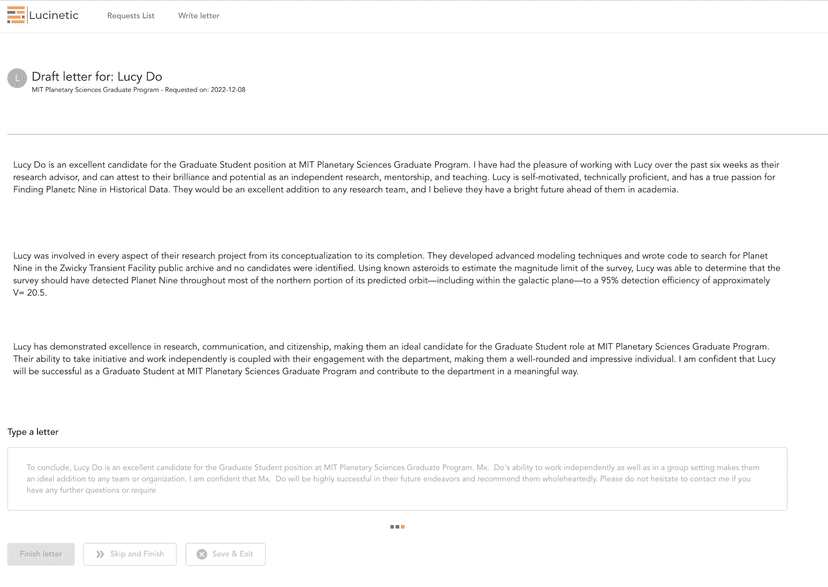
Lumio functions as an interactive digital whiteboard rather than an independent teaching application, meaning its effectiveness depends entirely on your child's teacher. This tool is designed for classroom environments and blended learning, not self-paced home study. If your child's school uses Lumio, they will log into teacher-hosted sessions to complete activities, take quizzes, and collaborate with peers. The platform converts passive lectures into active participation. When a teacher presents a lesson, your child can write, draw, or drag items directly on their own device. This active engagement prevents the mind-wandering often associated with traditional lectures. However, Lumio does not generate its own curriculum. It does not use algorithms to diagnose your child's learning gaps or automatically serve up practice problems using spaced repetition. If your child is struggling with a concept, Lumio will not automatically adjust the difficulty level. It simply provides the teacher with real-time data on your child's understanding through formative assessments. You should view Lumio as a modern classroom essential for group instruction, rather than an intelligent tutor that will help your child master specific skills at home.
How Does Lumio Work?
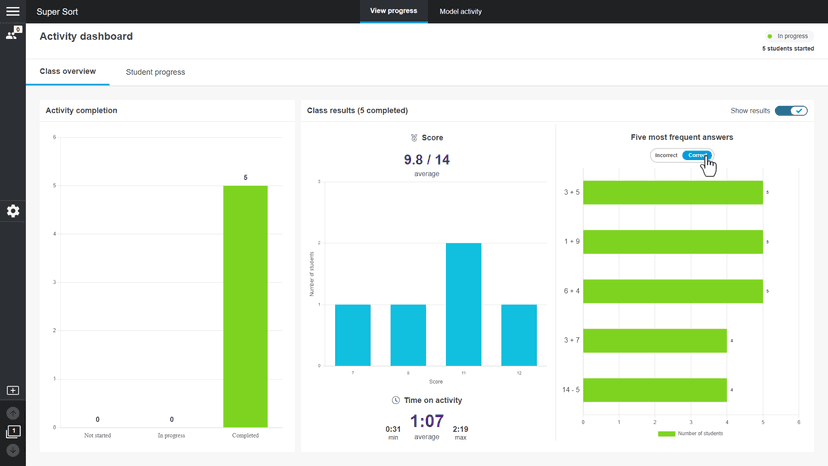
Lumio relies on blended and active learning pedagogies by transforming static teacher presentations into interactive student workstations. Educators upload existing files, such as PDFs or slide decks, and overlay interactive elements like quizzes, digital manipulatives, and collaborative workspaces. During instruction, the teacher broadcasts the lesson to student devices. Students join via a web browser and interact with the content in real time. The platform utilizes formative assessment through game-based activities, polls, and short-answer questions. As students submit answers or manipulate digital objects, the teacher receives instant data on classroom comprehension. This allows educators to identify misconceptions and provide immediate corrective feedback. Lumio also supports asynchronous learning. Teachers can switch lessons from teacher-paced to student-paced mode, allowing students to navigate through worked examples and interactive practice sets at their own speed. Because it is web-based, students can access these materials both in the classroom and at home.
Strengths and tradeoffs of Lumio
Lumio's biggest strength is its ability to facilitate real-time formative assessment, while its biggest weakness is the complete absence of automated adaptive scaffolding. The platform excels at keeping students actively engaged. By requiring frequent interaction, such as answering polls or moving virtual objects, it leverages active learning principles that prevent cognitive passive consumption. Teachers can embed retrieval practice activities directly into the flow of a lesson, forcing students to recall information from memory, which significantly strengthens long-term retention. However, Lumio lacks the built-in intelligence found in dedicated subject-specific apps. It provides no automated spaced repetition. If a student fails a concept, the software will not systematically reintroduce that concept over time. Furthermore, the platform offers no adaptive sequencing. Every student receives the exact same lesson materials unless the teacher manually creates and assigns differentiated versions. The learning experience is entirely dependent on the quality of the teacher's instructional design. If a teacher uploads a poorly constructed lesson lacking worked examples or clear objectives, Lumio simply digitizes poor instruction.
Who Might Benefit From Lumio?
Lumio is best for K-12 educators who want to increase student engagement during live classroom instruction or assign interactive blended learning modules. Because it spans all grade levels and subjects, it is highly versatile for school districts implementing one-to-one device programs. It works exceptionally well for teachers transitioning from passive lecturing to active learning models. Parents should note this is not a standalone app for independent home use. Your child will only benefit from Lumio if their classroom teacher actively uses it to build lessons, administer formative assessments, and facilitate collaborative digital group work.
Data Transparency
Does Not Meet Data Transparency Standard
Lumio does not meet our data transparency standard. Its privacy policy does not document basic protections, including a commitment against targeted advertising, limits on sharing children's data and a COPPA or FERPA commitment.
14 of 35 checks passed
Evaluated September 2026
Privacy Policy →Level 1 · Basic protections
Does not sell data or target ads at students, limits sharing, and lets parents see and delete their child's data.
Not documented: a commitment against targeted advertising, limits on sharing children's data, a COPPA or FERPA commitment, parents' right to see their child's data, parents' right to delete their child's data
Level 2 · Parent control (meets the standard)
Families can get their data out, know who processes it, and know how long it is kept.
Not documented: data export
Level 3 · Direct data access
Families or schools can pull their own data through an API, in a stated format.
Not documented: an API for retrieving their own data, a named export format
View all 35 checks
Parent Access2/8
Does the policy mention parents specifically?
“The Customer is responsible for obtaining consent and authorization for a student to use our products and services from their parent or guardian.”
Can parents view their child's data?
The policy gives parents no right to view their child's data; access rights are framed for users and customers only.
Can parents modify their child's data?
The policy gives parents no right to modify their child's data.
Can parents delete their child's account?
The policy gives parents no right to delete their child's data; deletion requests go through the customer on behalf of users.
Is there a dedicated Children's Privacy section?
The policy has no separately headed section on children's privacy; children are covered only in a paragraph under Data Types.
Does it reference COPPA compliance?
The policy does not mention COPPA.
Does it reference FERPA compliance?
The policy does not mention FERPA.
Is parental consent required for child accounts?
“The Customer is responsible for obtaining consent and authorization for a student to use our products and services from their parent or guardian.”
Data Portability1/5
Can users access their personal data?
“You may have the right to request access to, rectification of, or erasure of personal information we hold about you.”
Can users download/export their data?
The policy does not mention downloading or exporting data.
Is there a self-service data access tool?
The policy offers access only by emailing privacy@smarttech.com, not through a self-service tool.
Is a specific data format mentioned for export?
The policy does not name an export format.
Is there an API for data access?
The policy does not describe an API for getting user data.
Data Minimization2/6
Is data collection itemized?
“This section outlines what data is collected and processed from our customers and the four types of Lumio users:”
Can the app be used without a real name?
The policy says students' first and last names are collected.
Can the app be used without an email?
The policy says student email addresses are collected.
Does it state collection is limited to what is necessary?
“By using Lumio you are consenting to SMART's collection, retention, use, and disclosure of certain information as necessary to provide Lumio to you.”
Is IP address anonymized or truncated?
The policy says IP addresses are collected through cookies and analytics; only the Splunk entry says the full IP is not captured.
Is location tracking explicitly excluded?
The policy says it may collect geographic location depending on device settings.
Third-Party Protection5/7
Does it explicitly state no selling of data?
“We do not sell your data, and we do not share personal data with third parties without your informed consent, which is the purpose of this document.”
Are third-party providers named?
“| Amazon Web Services, Inc., Amazon Web Services EMEA SARL | USA or Germany | Required for content storage.”
Are providers contractually restricted?
“All providers contracted by SMART are contractually bound to keep your personal data secure and use it only for necessary service delivery.”
No-targeted-advertising commitment?
The policy makes no promise against targeted advertising, and it describes lookalike-audience marketing for customers.
Is AI/ML data sharing addressed?
“The AI features do not collect, store, or process personal information, and user inputs are not retained or used to train the AI model.”
Child-specific sharing restriction?
The policy limits use of children's data to providing educational services but has no sharing restriction specific to children.
Cookies/tracking limited or opt-out?
“Most web browsers allow some control over cookies through the browser settings. Blocking all cookies will, however, have a negative impact upon the usability of Lumio.”
Deletion & Retention4/5
Can users delete their account?
“SMART will respond to customer requests to delete personal data within 30 days. Users (teachers and students) must contact their school (i.e., our customer) to make this request to SMART on their behalf.”
Self-service deletion mechanism?
“All student and teacher created content stored within a teacher’s account can be deleted by the teacher without contacting SMART.”
Specific data retention timeline?
“Non-paying accounts are deleted after two (2) years of inactivity.”
Auto-deletion of inactive accounts?
“Non-paying accounts are deleted after two (2) years of inactivity.”
Post-deletion handling described?
The policy does not explain what happens to data after deletion, such as backup purging, beyond saying some information may not be removable.
Advertising0/4
Advertising model explicitly disclosed?
The policy does not disclose an advertising model or say the product has no ads.
Free from third-party advertisements?
The policy does not say the product is free of third-party ads.
Children excluded from ad targeting?
The policy does not say children are excluded from ad targeting.
Ad-free option available?
The policy does not mention an ad-free option or say the product has no ads.
What This Means
The policy review did not meet our data transparency standard. The checks above show the documented findings and unknowns. A missing statement does not establish how the app handles data in practice.
About this evaluation: Based on automated analysis of Privacy Policy against 35 policy-disclosure questions, including questions adapted from the Common Sense Privacy Program's published evaluation questions. TLS is not affiliated with Common Sense Media, and this is not a Common Sense rating. Quoted text is copied from the policy; unquoted notes are our summary. Results describe what the policy documents, not the company's actual practices. Privacy policies can change: this review reflects the version we analyzed and does not determine legal compliance.
Sources and review method
TLS combines product information and editorial analysis to explain how Lumio works, its tradeoffs, and the questions to ask before choosing it. Product features, an instructional rationale and evidence of learning outcomes are different kinds of information.
Formal Learning Standard assessment: not yet completed. Data Transparency findings are reported separately and do not establish learning effectiveness. Read our methodology.
Frequently Asked Questions About Lumio
Is Lumio free?
Lumio offers a freemium model. It provides a free tier for individual educators with a 50MB storage limit for lessons, which fills up quickly. A paid Standard plan gives teachers unlimited storage for continuous use. The Spark plan is designed for schools and districts, offering shared administrative libraries and custom pricing based on licenses and specific institutional needs. Students do not pay to access teacher lessons, as costs are handled entirely by the school.
Is Lumio good for K-12 students?
Yes, Lumio is suitable for students from kindergarten through 12th grade. Because it functions as a blank instructional canvas, teachers can tailor the visual content and interaction types to any age group. High schoolers can tackle complex collaborative projects, while early readers can practice letter tracing. However, younger students in early elementary grades may struggle with the digital interface and would benefit more from physical manipulatives for foundational learning before transitioning to screen-based equivalents.
What does Lumio teach?
Lumio does not teach any specific subject out of the box. It is a digital delivery platform used by teachers to teach all subjects, including math, science, humanities, and career and technical education. The actual curriculum, reading materials, math problems, and learning objectives are determined entirely by the educator creating the lesson. Parents should review the actual content uploaded by the teacher rather than relying on Lumio itself to guarantee academic rigor or subject coverage.
How does Lumio compare vs Nearpod?
Lumio and Nearpod both convert static presentations into interactive digital lessons. Nearpod features a massive library of pre-made, standards-aligned curriculum, making it significantly easier for teachers to find ready-to-use content without building from scratch. In contrast, Lumio focuses heavily on collaborative digital whiteboarding. It allows multiple students to draw, write, and work together on the same document simultaneously in small digital groups. Schools choose Nearpod for its content library and Lumio for its live collaborative workspaces.
Has The Learning Standard evaluated Lumio?
TLS has not yet completed a Learning Standard evaluation of how well Lumio teaches. Its privacy policy has been reviewed for Data Transparency and does not yet document the basic protections (Level 1).
Is Lumio COPPA compliant?
A COPPA reference was not found in the reviewed privacy policy. This does not determine whether the app complies with COPPA. Policy review note: The policy does not mention COPPA.
Is Lumio FERPA compliant?
A FERPA reference was not found in the reviewed privacy policy. This does not determine whether the app complies with FERPA. Policy review note: The policy does not mention FERPA.
Does Lumio have a children's privacy policy?
No dedicated children's privacy section was found in the reviewed policy. Policy review note: The policy has no separately headed section on children's privacy; children are covered only in a paragraph under Data Types.
Does Lumio sell student data?
The reviewed policy states that the app does not sell data. This is a policy statement; actual data practices were not verified. Policy review note: The policy says SMART does not sell data.
Can you delete your data from Lumio?
The reviewed privacy policy describes account deletion. We have not tested the deletion process. Policy review note: Users can ask for deletion through their school.
Follow TLS Research
Subscribe to future TLS research updates: app reviews, findings, and what the evidence shows.
Screenshots

Take Action
For Lumio
If you represent SMART Technologies and have a correction or new evidence, send the relevant source so we can review and update this page.
Submit a correctionDetails
- Pricing
- Lumio offers a freemium pricing model with tiered options suitable for different users' needs. There are three primary plans: Free: Aimed at individual educators, offering 50MB of lesson storage. Standard: Also for individual educators but provides unlimited lesson storage. Spark: Tailored for schools and districts, featuring shared libraries, organization library, co-editing, and LMS integrations. Pricing for the Spark plan is customized. Factors that might affect costs include the number of licenses required, the length of subscription term and the specific needs of a school or district.
- Platforms
- Web Browser, iOS (Apple mobile), iPadOS (Apple tablet), Android (Google mobile), Windows (Microsoft), macOS (Apple), Chrome OS (Google)
- Grade Levels
- Kindergarten, 1st Grade, 2nd Grade, 3rd Grade, 4th Grade, 5th Grade, 6th Grade, 7th Grade, 8th Grade, 9th Grade, 10th Grade, 11th Grade, 12th Grade
- Website
- Visit site