
Lightbox Nonfiction
Product by Lightbox Learning Inc.
Facts checked: Not yet checked
Our take (not a Learning Standard rating). This label applies to learning-science judgments throughout this overview.
Our take (not a Learning Standard rating)
Lightbox Nonfiction delivers content through a rich multimedia approach, utilizing audio narration and embedded videos to support dual coding and early literacy. However, without a formal evaluation of its interactive activities, it is unclear if the platform enforces active retrieval practice or simply relies on passive consumption.
Pros
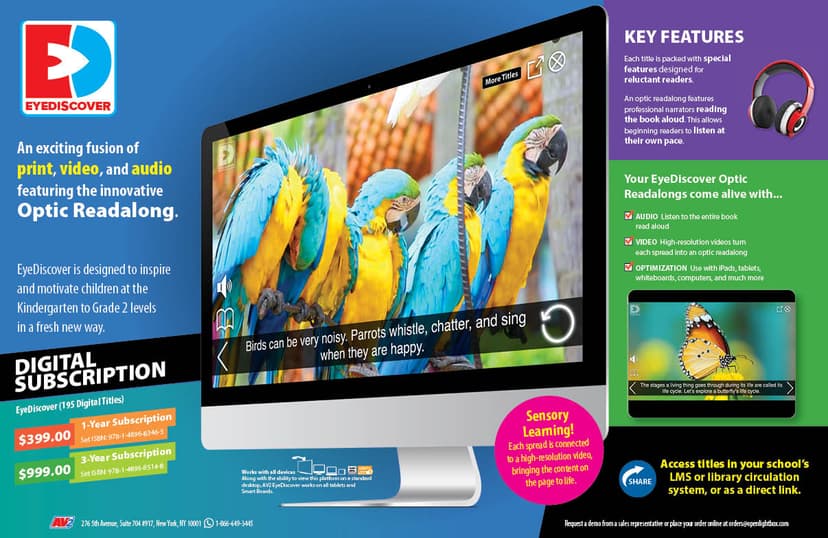
- Integrates text with audio narration to support dual coding and assist struggling readers.
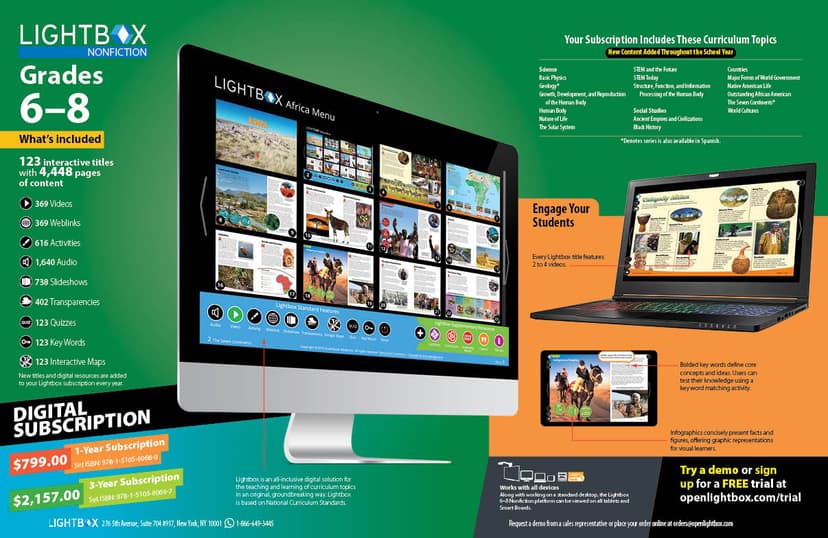
- Uses embedded videos and slideshows to provide multiple representations of complex concepts.
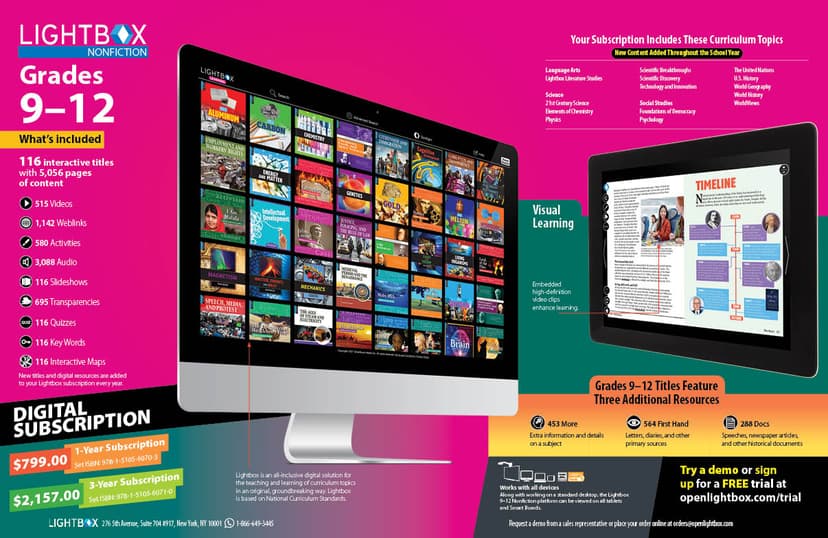
- Covers a comprehensive range of cross-curricular subjects for grades K-12 in a single platform.
- Includes built-in activities that attempt to shift students from passive reading to active engagement.
Cons
- Unclear if the embedded activities utilize spaced repetition or meaningful retrieval practice to cement long-term memory.
- High volume of multimedia elements risks increasing extraneous cognitive load for younger learners.
- Lacks transparent data on how difficulty adapts to individual student performance.
- Requires a paid 1-year or 3-year subscription with no clear short-term or monthly options.
What Do We Know About Lightbox Nonfiction?
Lightbox Nonfiction is an effective digital library for building background knowledge, though its capacity to drive deep mastery remains unverified. This web-based subscription provides your child with access to a vast array of nonfiction titles spanning kindergarten through twelfth grade. Instead of traditional static text, the platform embeds videos, slideshows, and curated weblinks directly into the reading experience. From a learning science perspective, this multimedia approach can support comprehension by providing multiple representations of a topic. The inclusion of high-quality audio narration supports dual coding, allowing your child to hear the text while reading along, which is particularly beneficial for early literacy and struggling readers. However, you should monitor how your child interacts with the content. Abundant multimedia can sometimes cause cognitive overload, distracting students from the core instructional material. While the platform includes activities meant to stimulate independent thinking, it is not yet clear if these exercises employ effective retrieval practice or simply serve as basic comprehension checks. Because The Learning Standard has not yet evaluated Lightbox Nonfiction, parents should treat this tool as a supplementary resource for research and exploration rather than a primary instructional curriculum.
How Does Lightbox Nonfiction Work?
Lightbox Nonfiction uses a multimedia-enhanced reading approach combined with integrated comprehension activities. When a student logs into the web-based platform, they select a digital title from subjects ranging from early childhood science to high school career and technical education. The core mechanic revolves around interactive text. As students read, they encounter embedded multimedia elements seamlessly integrated into the pages. A student reading about the solar system might click an embedded video to watch a planetary orbit or flip through a slideshow of telescope images. Curated external weblinks are provided to encourage deeper, guided research. To support literacy, the platform features professional audio narration. Students can toggle this feature on to have the text read aloud, aiding in pronunciation and pacing. Following the reading, students complete built-in activities designed to reinforce the material. The progression is entirely self-directed; students navigate the library and interact with the media at their own pace, making it highly dependent on the learner's own motivation and focus.
Strengths and tradeoffs of Lightbox Nonfiction
The biggest strength of Lightbox Nonfiction is its adherence to the multimedia principle by pairing text with relevant videos and audio, while its biggest weakness is the potential for extraneous cognitive load caused by media distractions. Strengths in Representation: By offering multiple modalities like text, audio, and video, Lightbox Nonfiction supports dual coding. When students process information through both visual and auditory channels simultaneously, they are more likely to retain the concepts. The audio narration is particularly effective for modeling fluent reading and decoding complex nonfiction vocabulary. Weaknesses in Active Practice: The platform relies heavily on passive consumption. While reading and watching videos builds background knowledge, true mastery requires active retrieval practice. The built-in activities offer some interaction, but without spaced repetition or adaptive difficulty, students may simply guess answers or forget material shortly after reading. Cognitive Load Concerns: A well-known risk in multimedia learning is distraction. The constant availability of external weblinks and embedded videos can disrupt the reading process. If not carefully managed, these features increase the extraneous cognitive load, pulling the student's working memory away from the core educational content and reducing overall comprehension.
Who Might Benefit From Lightbox Nonfiction?
Lightbox Nonfiction is best for K-12 students who require multimedia scaffolding to engage with informational texts. Because it covers a massive span of grades and subjects, it serves well as a centralized research database for school projects or independent inquiry. Visual learners and struggling readers will benefit most from the integrated audio narration and explanatory videos. However, it is less suited for students who need highly structured, adaptive drilling to master specific academic standards, as the platform functions primarily as an exploratory digital library rather than a step-by-step curriculum.
Sources and review method
TLS combines product information and editorial analysis to explain how Lightbox Nonfiction works, its tradeoffs, and the questions to ask before choosing it. Product features, an instructional rationale and evidence of learning outcomes are different kinds of information.
Formal Learning Standard assessment: not yet completed. Data Transparency findings are reported separately and do not establish learning effectiveness. Read our methodology.
Frequently Asked Questions About Lightbox Nonfiction
Is Lightbox Nonfiction free?
No, Lightbox Nonfiction requires a paid subscription. The developer offers 1-year and 3-year subscription plans, which are typically structured to accommodate schools, districts, or dedicated homeschooling families.
Is Lightbox Nonfiction good for early elementary students?
Yes, it provides excellent scaffolding for early readers. The inclusion of professional audio narration helps younger K-2 students bridge the gap between their listening comprehension and their developing reading skills.
What does Lightbox Nonfiction teach?
Lightbox Nonfiction teaches background knowledge and research skills across a wide range of subjects. Its library spans Humanities, Social Science, Science, Math, Applied Science, and Career & Tech Education for grades K-12.
How does Lightbox Nonfiction compare to Epic!?
Lightbox Nonfiction focuses exclusively on informational texts and heavily integrates multimedia like videos and curated links directly into the pages. Epic! offers a broader library of both fiction and nonfiction, but generally features more traditional digital reading experiences without embedded video content.
Has The Learning Standard evaluated Lightbox Nonfiction?
TLS has not yet completed a Learning Standard evaluation of how well Lightbox Nonfiction teaches. TLS has not published a Data Transparency result for its privacy policy.
Follow TLS Research
Subscribe to future TLS research updates: app reviews, findings, and what the evidence shows.
Screenshots

Take Action
For Lightbox Nonfiction
If you represent Lightbox Learning Inc. and have a correction or new evidence, send the relevant source so we can review and update this page.
Submit a correctionDetails
- Pricing
- The product can be purchases as a 1-year and 3-year subscription plan. We offered several plans to accommodate the needs of different customers.
- Platforms
- Web Browser, iOS (Apple mobile), iPadOS (Apple tablet), Android (Google mobile), Tizen (Samsung mobile), Windows (Microsoft), macOS (Apple), Chrome OS (Google)
- Grade Levels
- Kindergarten, 1st Grade, 2nd Grade, 3rd Grade, 4th Grade, 5th Grade, 6th Grade, 7th Grade, 8th Grade, 9th Grade, 10th Grade, 11th Grade, 12th Grade
- Website
- Visit site