
Kiddom
Product by Kiddom
Facts checked: Not yet checked
Our take (not a Learning Standard rating). This label applies to learning-science judgments throughout this overview.
Our take (not a Learning Standard rating)
Kiddom functions effectively as a delivery system for high-quality, mastery-based curricula rather than teaching directly. Its success depends entirely on the specific third-party instructional materials your school selects. When paired with evidence-based curriculum, it facilitates personalized learning and competency tracking, but relies heavily on teacher implementation.
Pros
- Consolidates multiple high-quality curriculum providers into a single digital platform for streamlined access.
- Supports competency-based learning by allowing educators to track specific standard mastery over time.
- Enables blended learning models that combine direct instruction with digital practice.
- Provides actionable performance data to help teachers differentiate instruction for individual students.
Cons
- Relies entirely on the quality of the third-party curriculum loaded into the platform.
- Requires significant teacher training to implement effectively in a classroom setting.
- Not designed for independent, direct-to-consumer home use by parents and children.
What Do We Know About Kiddom?
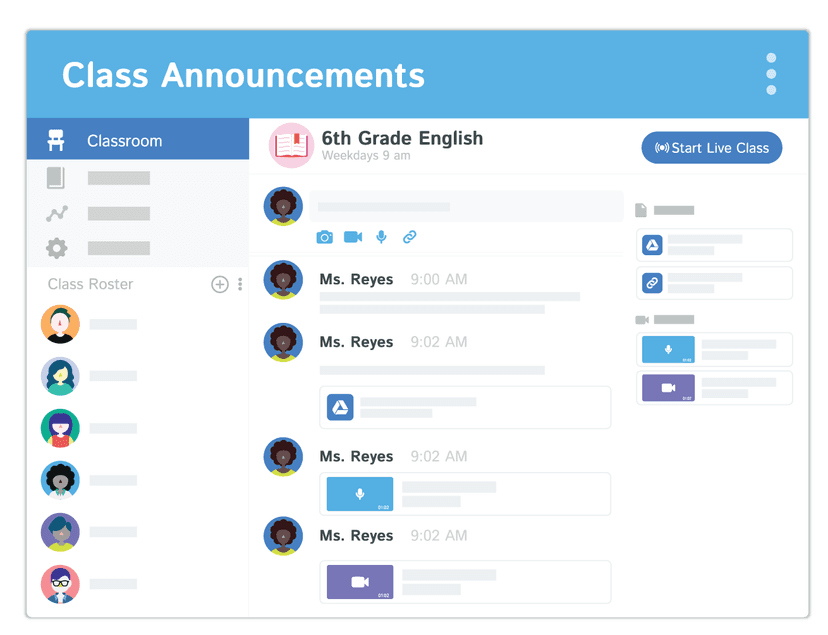
Kiddom is effective for learning only if your child's school pairs it with an evidence-based curriculum. Rather than acting as a standalone educational game or tutoring app, Kiddom is a digital classroom platform that schools use to distribute and grade assignments. Because it relies on third-party instructional materials for math, science, and humanities, the actual teaching quality depends entirely on what the school purchases. If your child uses Kiddom, you will see a centralized hub where they can access daily assignments, review teacher feedback, and track their progress against specific academic standards. This transparency supports mastery-based learning, allowing you to see exactly which skills your child has secured and which require more practice. The platform's effectiveness is heavily tied to teacher involvement; it requires educators to actively review data, provide feedback, and adjust instruction. It is not an app you can purchase for independent home practice. Instead, think of it as the digital desk where your child completes their schoolwork. When educators use the platform to its full potential, it allows for targeted retrieval practice and personalized assignment pathways based on real-time performance data.
How Does Kiddom Work?
Kiddom uses a blended, competency-based learning approach by acting as a digital delivery system for structured curriculum. The platform houses instructional materials, interactive assignments, and assessments for grades TK through 12. Teachers assign specific lessons, and students log in to read texts, watch instructional videos, or complete problem sets. The mechanics revolve around standards-aligned progression. As your child completes tasks, the system maps their correct and incorrect answers to specific academic standards. This allows teachers to monitor mastery rather than just completion. The platform supports interactive elements like digital graphing, multiple-choice questions, and open-ended text submissions. Because it integrates with core curricula, it facilitates spaced repetition and structured practice only if those elements are built into the publisher's materials. Teachers can also modify assignments to provide targeted interventions, giving your child customized practice exactly where they show gaps in understanding.
Strengths and tradeoffs of Kiddom
Kiddom's biggest strength is its ability to track mastery against specific academic standards, while its biggest weakness is its absolute dependence on the quality of the selected third-party curriculum. Mastery tracking is a core component of effective learning science; by tying every assignment to specific competencies, Kiddom helps educators move away from generic grading and focus on specific skill acquisition. This transparency helps both teachers and parents identify exact areas where a child needs targeted intervention. Furthermore, the platform's ability to facilitate personalized learning pathways means teachers can assign different practice sets based on a student's current proficiency level. However, because Kiddom is a delivery vehicle rather than a curriculum creator, it does not inherently guarantee effective pedagogy. If a school loads poorly designed materials that lack spaced repetition or retrieval practice, the platform cannot correct those deficits. The user experience can also become cumbersome if a teacher does not actively curate and organize the digital space. Ultimately, its educational value scales directly with the quality of the instructional design of the imported materials.
Who Might Benefit From Kiddom?
Kiddom is best for K-12 school districts that need a centralized platform to deliver and track standards-aligned, third-party curricula. It is not designed for individual parents seeking supplemental at-home learning apps. For students, it serves as a daily hub to access assignments in math, science, and the humanities, making it ideal for classrooms utilizing a blended learning model. It is particularly effective for schools prioritizing mastery-based grading, as it provides detailed insights into exactly which academic standards a student has mastered and which require further instruction.
Sources and review method
TLS combines product information and editorial analysis to explain how Kiddom works, its tradeoffs, and the questions to ask before choosing it. Product features, an instructional rationale and evidence of learning outcomes are different kinds of information.
Formal Learning Standard assessment: not yet completed. Data Transparency findings are reported separately and do not establish learning effectiveness. Read our methodology.
Frequently Asked Questions About Kiddom
Is Kiddom free?
No, Kiddom is not free for individual use. It is an enterprise platform purchased by schools and districts. Pricing varies based on the specific third-party curricula selected, the number of student licenses required, and the length of the contract.
Is Kiddom good for TK-12 students?
Yes, Kiddom is highly effective for TK-12 students when implemented by trained teachers using high-quality curriculum. Because it scales from early elementary to high school, the interface adapts to different age groups, providing structured access to daily assignments and assessments.
What does Kiddom teach?
Kiddom itself does not teach specific content; it delivers instructional materials for math, science, humanities, and social sciences. The actual lessons and pedagogical approaches depend entirely on the curriculum providers your school district chooses to integrate into the platform.
Kiddom vs. Canvas: Which is better?
Canvas is a general-purpose Learning Management System (LMS) that houses teacher-created materials, while Kiddom is specifically designed to deeply integrate with and deliver pre-packaged, standards-aligned third-party curricula. Kiddom offers better out-of-the-box curriculum implementation, whereas Canvas provides more flexibility for higher education and custom course design.
Has The Learning Standard evaluated Kiddom?
TLS has not yet completed a Learning Standard evaluation of how well Kiddom teaches. TLS has not published a Data Transparency result for its privacy policy.
Follow TLS Research
Subscribe to future TLS research updates: app reviews, findings, and what the evidence shows.
Screenshots

Take Action
For Kiddom
If you represent Kiddom and have a correction or new evidence, send the relevant source so we can review and update this page.
Submit a correctionDetails
- Pricing
- Pricing varies depending on the curricula selected, the number of student licenses, the need for print and supplemental resources, and the license length.
- Platforms
- Web Browser, iOS (Apple mobile), iPadOS (Apple tablet), Android (Google mobile), Windows (Microsoft), macOS (Apple)
- Grade Levels
- Transitional Kindergarten, Kindergarten, 1st Grade, 2nd Grade, 3rd Grade, 4th Grade, 5th Grade, 6th Grade, 7th Grade, 8th Grade, 9th Grade, 10th Grade, 11th Grade, 12th Grade
- Website
- Visit site