
Grid for Schools
Product by Smartbox Assistive Technology, Inc.
Facts checked: Not yet checked
Our take (not a Learning Standard rating). This label applies to learning-science judgments throughout this overview.
Our take (not a Learning Standard rating)
While The Learning Standard has not yet fully evaluated Grid for Schools, it functions primarily as an assistive communication tool rather than a direct instructional platform. By reducing the cognitive load required for basic expression, it enables students with speech difficulties to participate actively in classroom learning and peer interactions.
Pros
- Reduces extraneous cognitive load for non-verbal students by providing customizable, symbol-supported communication boards.
- Facilitates multimodal learning through auditory feedback when students select text or symbol pathways.
- Integrates across subjects, allowing educators to build specific vocabulary grids for targeted lesson plans.
Cons
- Lacks built-in instructional sequencing or adaptive practice for mastering academic content independently.
- Requires significant teacher training and setup time to map custom vocabulary to specific lesson plans.
- Does not provide automated feedback on academic accuracy, only on communication execution.
What Do We Know About Grid for Schools?
Grid for Schools does not teach academic subjects directly, but rather provides the essential communication infrastructure your child needs to access classroom instruction. Because The Learning Standard has not yet evaluated this specific platform, parents should understand its primary function is augmentative and alternative communication (AAC). If your child has complex communication needs, this software replaces or supplements verbal speech with digital symbols, text, and voice output. It does not generate math problems or reading quizzes. Instead, it allows your child to answer a teacher's math question or participate in a history discussion. By offloading the physical and cognitive demands of speech, it frees up your child's working memory to focus on learning the actual academic material. The success of this tool depends entirely on how well your child's school customizes the interface to match their daily routine and curriculum. It requires active involvement from speech-language pathologists and special educators to build targeted vocabulary sets that align with what is being taught in the classroom.
How Does Grid for Schools Work?
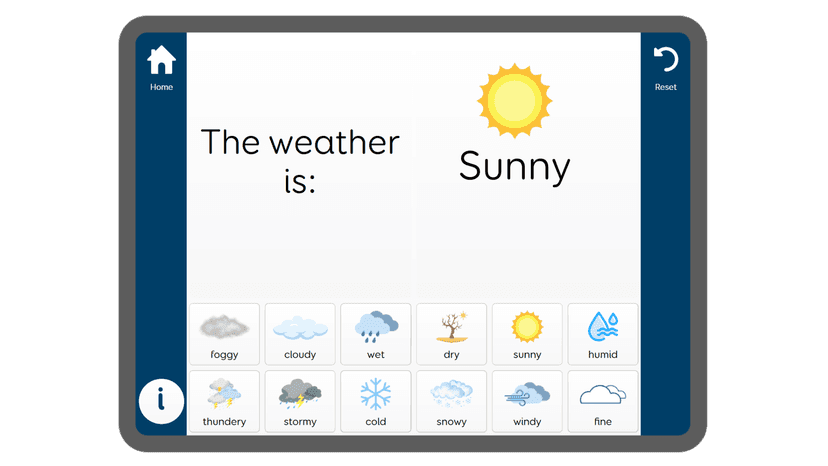
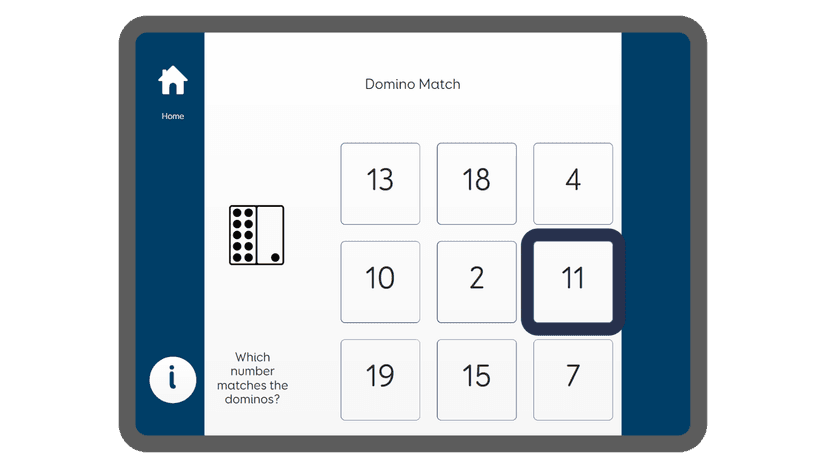
Grid for Schools relies on multimodal scaffolding and symbol-to-speech translation to facilitate expressive language. The software operates as a customizable grid of cells containing pictures, symbols, or text. When a student selects a cell, the program generates spoken audio. Educators design specific grid sets tailored to a student's cognitive level, motor skills, and the immediate academic context. For example, during a science lesson, a teacher might load a grid containing specialized vocabulary like 'evaporation' or 'predict.' This approach uses errorless learning principles for basic communication; every selection yields a predictable, consistent auditory output. Students progress from utilizing single-symbol requests to constructing complex, multi-word sentences using grammatical prediction features. The platform also includes eye-tracking and switch-access compatibility, ensuring that students with severe motor impairments can still navigate the grids and demonstrate their understanding of classroom material.
Strengths and tradeoffs of Grid for Schools
The biggest strength of Grid for Schools is its highly customizable multimodal interface, while its biggest weakness is the heavy administrative burden required to align it with specific academic curricula. Customization drives engagement. Because the software allows educators to build specific vocabulary grids, students receive immediate, relevant language tools for whatever subject they are studying. This reduces extraneous cognitive load, meaning students spend less mental energy trying to communicate and more energy processing the actual math or humanities lesson. The auditory feedback also supports dual-channel processing, reinforcing the connection between visual symbols and spoken words. However, the software does not function as an independent learning tool. Lack of instructional scaffolding means the app itself does not teach a child how to add fractions or analyze a historical event. Furthermore, without diligent setup by an educator, the grids can become cluttered, overwhelming a student's working memory. The platform relies entirely on the pedagogical expertise of the adults programming it, offering no built-in adaptive algorithms or retrieval practice routines to test student knowledge automatically.
Who Might Benefit From Grid for Schools?
Grid for Schools is best for non-verbal students or those with significant speech impairments who require a robust augmentative and alternative communication (AAC) system to participate in school. It serves students across all age groups, from early childhood through high school, by adapting to their specific motor and cognitive needs. This tool is specifically designed for institutional use, making it ideal for special education departments and speech-language pathologists who need to deploy a unified communication framework across multiple classrooms. It is not suitable for general education students seeking independent academic tutoring or subject-specific drill practice.
Data Transparency
Does Not Meet Data Transparency Standard
Grid for Schools does not meet our data transparency standard. Its privacy policy does not document basic protections, including a commitment against targeted advertising, limits on sharing children's data and parents' right to see their child's data.
15 of 35 checks passed
Evaluated September 2026
Privacy Notice →Level 1 · Basic protections
Does not sell data or target ads at students, limits sharing, and lets parents see and delete their child's data.
Not documented: a commitment against targeted advertising, limits on sharing children's data, parents' right to see their child's data, parents' right to delete their child's data
Level 2 · Parent control (meets the standard)
Families can get their data out, know who processes it, and know how long it is kept.
Not documented: a data retention timeline
Level 3 · Direct data access
Families or schools can pull their own data through an API, in a stated format.
Not documented: an API for retrieving their own data, a named export format
View all 35 checks
Parent Access5/8
Does the policy mention parents specifically?
“You must be over the age of 13 (or minimum age in your country) to use these Online AI features. If you are under the age of 18 you may only use them with parental or guardian consent.”
Can parents view their child's data?
The policy gives access rights to users but gives parents no specific right to view their child's data.
Can parents modify their child's data?
The policy gives correction rights to users but gives parents no specific right to change their child's data.
Can parents delete their child's account?
The policy says the company will delete a child's data collected without proper consent, but gives parents no right to request deletion.
Is there a dedicated Children's Privacy section?
“Our products are designed for people of all ages. We do not directly control who ultimately uses our products after purchase, so we encourage legal guardians to supervise the use of our products.”
Does it reference COPPA compliance?
“For U.S. requirements, we also implement contractual and technical protections consistent with applicable federal and state privacy laws (including HIPAA, FERPA, COPPA, GLBA, and the CCPA/CPRA).”
Does it reference FERPA compliance?
“For U.S. requirements, we also implement contractual and technical protections consistent with applicable federal and state privacy laws (including HIPAA, FERPA, COPPA, GLBA, and the CCPA/CPRA).”
Is parental consent required for child accounts?
“We will seek the consent of legal guardians acting on behalf of a child if we, in the provision of our products and services, record any personal information.”
Data Portability2/5
Can users access their personal data?
“Access to the personal data we hold about you”
Can users download/export their data?
“Request the transfer of your data to another third-party of your choice”
Is there a self-service data access tool?
The policy says users request access by email or phone and describes no self-service access tool.
Is a specific data format mentioned for export?
The policy does not name a data export format.
Is there an API for data access?
The policy does not mention an API for data access.
Data Minimization1/6
Is data collection itemized?
“Contact data**: name, address, email address, phone number.”
Can the app be used without a real name?
The policy says it collects contact data, including name.
Can the app be used without an email?
The policy says it collects contact data, including email address.
Does it state collection is limited to what is necessary?
The policy limits how long data is kept to what is necessary, but does not say collection itself is limited to what is necessary.
Is IP address anonymized or truncated?
The policy does not address anonymising or truncating IP addresses.
Is location tracking explicitly excluded?
The policy does not address location tracking.
Third-Party Protection5/7
Does it explicitly state no selling of data?
“We will never sell your data to third parties for commercial purposes.”
Are third-party providers named?
“When you submit text to Online AI Tools, your content will be shared with OpenAI and may be retained temporarily for operational and safety purposes.”
Are providers contractually restricted?
“When we transfer data,we ensure there are appropriate and adequate safeguards in place to ensure your data is securesuch as Standard Contractual Clauses (SCCs), UK IDTA, or adequacy decisions, in compliance with EU GDPR, UK GDPR, CNIL, and the Irish DPA.”
No-targeted-advertising commitment?
The policy mentions a right to opt out of targeted advertising but makes no commitment against it.
Is AI/ML data sharing addressed?
“When you submit text to Online AI Tools, your content will be shared with OpenAI and may be retained temporarily for operational and safety purposes. Smartbox do not retain copies of your submitted text.”
Child-specific sharing restriction?
The policy has no sharing restriction specific to children's data.
Cookies/tracking limited or opt-out?
“Our website uses a cookie banner that requires your active opt-in for non-essential cookies, in line with the GDPR/ePrivacy framework, UK PECR, and guidance from supervisory authorities such as the CNIL.”
Deletion & Retention2/5
Can users delete their account?
“If you hold a Smartbox Account, you can delete the account from your profile page on our website.”
Self-service deletion mechanism?
“If you hold a Smartbox Account, you can delete the account from your profile page on our website.”
Specific data retention timeline?
The policy says data is kept only as long as necessary and gives no specific timeline.
Auto-deletion of inactive accounts?
The policy does not address automatic deletion of inactive accounts.
Post-deletion handling described?
The policy only says some information may be held for legal reasons and does not describe what happens to data after deletion.
Advertising0/4
Advertising model explicitly disclosed?
The policy does not disclose an advertising model or state that the product has no ads.
Free from third-party advertisements?
The policy does not state that the product is free of third-party ads.
Children excluded from ad targeting?
The policy does not exclude children from ad targeting.
Ad-free option available?
The policy does not address an ad-free option.
What This Means
The policy review did not meet our data transparency standard. The checks above show the documented findings and unknowns. A missing statement does not establish how the app handles data in practice.
About this evaluation: Based on automated analysis of Privacy Notice against 35 policy-disclosure questions, including questions adapted from the Common Sense Privacy Program's published evaluation questions. TLS is not affiliated with Common Sense Media, and this is not a Common Sense rating. Quoted text is copied from the policy; unquoted notes are our summary. Results describe what the policy documents, not the company's actual practices. Privacy policies can change: this review reflects the version we analyzed and does not determine legal compliance.
Sources and review method
TLS combines product information and editorial analysis to explain how Grid for Schools works, its tradeoffs, and the questions to ask before choosing it. Product features, an instructional rationale and evidence of learning outcomes are different kinds of information.
Formal Learning Standard assessment: not yet completed. Data Transparency findings are reported separately and do not establish learning effectiveness. Read our methodology.
Frequently Asked Questions About Grid for Schools
Is Grid for Schools free?
No, Grid for Schools is not free. It is an enterprise-level software platform designed for institutional purchase. Schools must contact the developer directly for a custom quote based on their specific district size and student needs.
Is Grid for Schools good for early childhood education?
Yes, it is highly effective for early childhood environments. The software supports early language acquisition by pairing simple visual symbols with auditory feedback. Educators can create highly simplified grids that introduce foundational vocabulary and basic requesting skills to young children with developmental delays.
What does Grid for Schools teach?
Grid for Schools does not explicitly teach academic subjects like math or reading through targeted lessons. Instead, it facilitates expressive communication. It teaches students how to construct sentences, navigate vocabulary categories, and participate socially and academically using augmentative and alternative communication (AAC) methods.
How does Grid for Schools compare to Proloquo2Go?
Both are robust AAC applications, but Grid for Schools is positioned primarily as a school-wide ecosystem with extensive educator resources and alternative access methods like eye-tracking. Proloquo2Go is often purchased individually by parents for iOS devices. Both utilize symbol-based communication, but Grid offers broader institutional management tools.
Has The Learning Standard evaluated Grid for Schools?
TLS has not yet completed a Learning Standard evaluation of how well Grid for Schools teaches. Its privacy policy has been reviewed for Data Transparency and does not yet document the basic protections (Level 1).
Is Grid for Schools COPPA compliant?
The reviewed privacy policy references COPPA. A policy reference alone does not establish COPPA compliance. Policy review note: The policy says its protections are consistent with COPPA.
Is Grid for Schools FERPA compliant?
The reviewed privacy policy references FERPA. A policy reference alone does not establish FERPA compliance. Policy review note: The policy says its protections are consistent with FERPA.
Does Grid for Schools have a children's privacy policy?
The reviewed policy includes a dedicated children's privacy section. Policy review note: The policy has a section headed "Data relating to children".
Does Grid for Schools sell student data?
The reviewed policy states that the app does not sell data. This is a policy statement; actual data practices were not verified. Policy review note: The policy states the company will never sell user data.
Can you delete your data from Grid for Schools?
The reviewed privacy policy describes account deletion. We have not tested the deletion process. Policy review note: Users can delete their account.
Follow TLS Research
Subscribe to future TLS research updates: app reviews, findings, and what the evidence shows.
Screenshots
Take Action
For Grid for Schools
If you represent Smartbox Assistive Technology, Inc. and have a correction or new evidence, send the relevant source so we can review and update this page.
Submit a correctionDetails
- Pricing
- For a custom quote please contact us-schools@thinksmartbox.com
- Platforms
- iPadOS (Apple tablet), Windows (Microsoft)
- Website
- Visit site