
Gizmos
Product by ExploreLearning
Facts checked: Not yet checked
Our take (not a Learning Standard rating). This label applies to learning-science judgments throughout this overview.
Our take (not a Learning Standard rating)
Gizmos effectively supports inquiry-based learning through interactive STEM simulations, but requires heavy teacher guidance to ensure students do not simply guess or click aimlessly. Grounded in active learning principles, the visual models help build conceptual understanding of complex scientific and mathematical systems when paired with explicit instruction.
Pros
- Translates abstract math and science concepts into manipulatable visual models to reduce cognitive load.
- Supports active learning by allowing students to change variables and immediately observe systemic outcomes.
- Provides built-in assessment questions that measure conceptual understanding rather than simple rote memorization.
- Aligns simulations directly with academic standards to ensure relevance to classroom curriculum.
Cons
- Lacks built-in instructional scaffolding, meaning students can easily click through simulations without understanding the underlying concepts.
- Does not provide elaborative feedback on incorrect quiz answers beyond identifying the right choice.
- Relies heavily on external teacher instruction to bridge the gap between simulation play and conceptual mastery.
- Utilizes a purchasing structure designed for schools rather than individual parents, making full home access difficult.
What Do We Know About Gizmos?
Gizmos is highly effective for reinforcing complex math and science concepts when used alongside formal classroom instruction, but it is not a standalone teaching tool. Your child will use interactive simulations to manipulate variables in real-time, observing how changes affect systems like electrical circuits, cell division, or quadratic equations. This active learning approach builds strong conceptual models by allowing students to test hypotheses and see immediate results. However, parents should understand that Gizmos lacks internal teaching sequences. It does not explain foundational material before launching the simulation. Instead, it relies on inquiry-based learning, which assumes your child is already receiving direct instruction from a teacher. If your child struggles with a concept, the platform will not provide worked examples or step-by-step remediation to get them back on track. Because ExploreLearning targets schools, individual parent subscriptions are not available, though your child might access a rotating library of free simulations. For home use, your child will get the most out of Gizmos if you sit with them to ask guiding questions about what happens when they change specific parameters in the virtual lab.
How Does Gizmos Work?
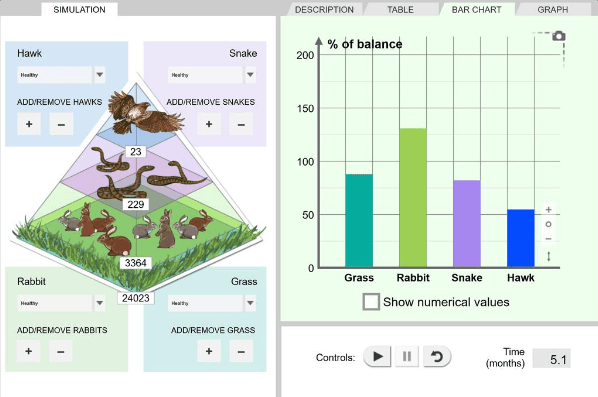
Gizmos uses inquiry-based learning and interactive visual models to teach middle and high school STEM concepts. Students select a specific simulation, such as a virtual ecosystem or a graphing calculator for polynomial functions, and interact with sliding scales, buttons, and input fields to alter the scenario's variables. As they manipulate these inputs, the platform generates real-time data, graphs, and visual changes to reflect the outcomes of their choices. This process leverages active learning and experiential discovery, encouraging students to form hypotheses, test them, and analyze the resulting data. Each simulation is accompanied by a lesson guide and a short multiple-choice assessment designed to test retrieval and conceptual application. Because the platform operates on problem-based learning principles, it strips away heavy text and focuses entirely on the manipulatable environment, forcing the student to observe patterns and draw conclusions based on systemic behavior rather than reading a textbook explanation.
Strengths and tradeoffs of Gizmos
The biggest strength of Gizmos is its ability to make invisible scientific and mathematical phenomena visible through interactive models, while its biggest weakness is the lack of explicit instructional scaffolding for struggling students. Active discovery is where this platform excels. By allowing students to isolate variables and observe outcomes in real-time, Gizmos supports the construction of accurate mental models, effectively reducing the cognitive load typically associated with abstract STEM topics like thermodynamics or algebra. Students engage in hypothetico-deductive reasoning, testing their assumptions in a safe, immediate-feedback environment. However, the platform's reliance on inquiry-based learning can be a double-edged sword. Research shows that pure discovery learning without direct guidance often leaves novice learners frustrated or prone to developing misconceptions. Because Gizmos does not provide worked examples or step-by-step tutorials within the simulation itself, students who lack foundational knowledge may resort to random clicking rather than meaningful exploration. Furthermore, the assessment mechanisms rely heavily on summative multiple-choice questions without offering elaborative feedback on incorrect answers, missing an opportunity to correct misunderstandings precisely when they occur.
Who Might Benefit From Gizmos?
Gizmos is best for classroom teachers and students in grades 3 through 12 who need interactive virtual labs to supplement direct STEM instruction. Because the simulations require foundational knowledge to use effectively, it is ideal for students who have already been introduced to a concept and need an experiential environment to test hypotheses and observe system dynamics. It is highly valuable for middle and high school science and math classrooms where physical lab equipment is limited or too dangerous to use. It is not recommended as a primary homeschooling curriculum unless the parent is prepared to provide the necessary explicit instruction and guided questioning.
Data Transparency
Does Not Meet Data Transparency Standard
Gizmos reaches Level 1 of 3 (Basic protections), below our data transparency standard. Reaching Level 2 needs the policy to document data export, named service providers and self-service deletion.
19 of 35 checks passed
Evaluated September 2026
Privacy Policy →Level 1 · Basic protections
Does not sell data or target ads at students, limits sharing, and lets parents see and delete their child's data.
Level 2 · Parent control (meets the standard)
Families can get their data out, know who processes it, and know how long it is kept.
Not documented: data export, named service providers, self-service deletion
Level 3 · Direct data access
Families or schools can pull their own data through an API, in a stated format.
Not documented: an API for retrieving their own data, a named export format
View all 35 checks
Parent Access7/8
Does the policy mention parents specifically?
“We collect and process personal information from parents and guardians, teachers, school administrators, and students.”
Can parents view their child's data?
“For _Enterprise Platform Services_ and _Direct Platform Services_, we support access to, correction, and deletion of Student Data by our educational institution customer and/or teachers by cooperating and assisting the school and teachers to meet their requirements for access, correction, and deletion, or by responding to requests we receive from schools. If we receive such a request directly from a student or parent, we will advise the corresponding educational institution or teacher customer of the request and we will follow all lawful instructions from the institutions and teachers.”
Can parents modify their child's data?
“For _Enterprise Platform Services_ and _Direct Platform Services_, we support access to, correction, and deletion of Student Data by our educational institution customer and/or teachers by cooperating and assisting the school and teachers to meet their requirements for access, correction, and deletion, or by responding to requests we receive from schools. If we receive such a request directly from a student or parent, we will advise the corresponding educational institution or teacher customer of the request and we will follow all lawful instructions from the institutions and teachers.”
Can parents delete their child's account?
“For _Enterprise Platform Services_ and _Direct Platform Services_, we support access to, correction, and deletion of Student Data by our educational institution customer and/or teachers by cooperating and assisting the school and teachers to meet their requirements for access, correction, and deletion, or by responding to requests we receive from schools. If we receive such a request directly from a student or parent, we will advise the corresponding educational institution or teacher customer of the request and we will follow all lawful instructions from the institutions and teachers.”
Is there a dedicated Children's Privacy section?
The policy covers COPPA and children under 13 in untitled paragraphs, with no separately headed children's privacy section.
Does it reference COPPA compliance?
“This Privacy Policy and our Services are designed to comply with COPPA.”
Does it reference FERPA compliance?
“We provide the Learning Application Services as a “School Official” under the provisions of the Family Educational Rights and Privacy Act (“FERPA”).”
Is parental consent required for child accounts?
“When a parent or guardian signs up to provide our _Learning Platform Services at Home_ to a child under 13, we will seek the appropriate consent directly from the parent or guardian before collecting any personal information from the child.”
Data Portability1/5
Can users access their personal data?
“The right to know what personal information we process about you, including categories of data, sources of it, the business purposes for collecting, selling, or sharing it, and the categories of third-party service providers to which it may be disclosed.”
Can users download/export their data?
The policy does not address downloading or exporting data.
Is there a self-service data access tool?
The policy offers access only by contacting the company or the school, with no self-service tool.
Is a specific data format mentioned for export?
The policy does not mention any data export format.
Is there an API for data access?
The policy lists student API calls as data it collects but does not offer an API for users to retrieve their data.
Data Minimization2/6
Is data collection itemized?
“We may collect and process the following types of student personal information as part of the Services:”
Can the app be used without a real name?
The policy says it collects student first and last names, which are required for autorostered students.
Can the app be used without an email?
The policy does not explicitly state that student email addresses are never collected.
Does it state collection is limited to what is necessary?
“In providing our Services we strive to only collect and process data elements which are reasonably necessary, proportionate, and not excessive for the uses for which we need to process that data.”
Is IP address anonymized or truncated?
The policy says it collects IP addresses but does not mention anonymizing or truncating them.
Is location tracking explicitly excluded?
The policy does not address location tracking.
Third-Party Protection4/7
Does it explicitly state no selling of data?
“We do not sell or process personal information of students arising from the use of our Services to target marketing or advertising to them.”
Are third-party providers named?
The policy links to external sub-processor pages but does not name any third-party providers.
Are providers contractually restricted?
The policy hints that service providers work under agreements but does not explicitly say they are contractually restricted.
No-targeted-advertising commitment?
“We do not sell or process personal information of students arising from the use of our Services to target marketing or advertising to them.”
Is AI/ML data sharing addressed?
The policy does not address AI or machine learning data sharing.
Child-specific sharing restriction?
“We automatically receive and record certain technical information from children's browsers as they use our products, including their IP address, using technologies such as cookies. We collect and use this information only within our company in order to operate and improve our products.”
Cookies/tracking limited or opt-out?
“We collect and use this information only within our company in order to operate and improve our products.”
Deletion & Retention4/5
Can users delete their account?
“The right to request that we delete personal information we have collected about you, subject to certain exceptions.”
Self-service deletion mechanism?
The policy handles deletion only by request, with no self-service mechanism.
Specific data retention timeline?
“For _Direct Platform Services_, student data is processed during the term an active licensing agreement is in place and is deleted within 45 days after the end of that licensing agreement; however, depending upon our back-up systems retention times such information may be maintained in backups for up to 180 days after termination of the Learning Platform Services.”
Auto-deletion of inactive accounts?
“If educational institutions do not instruct us to delete data, or our contracts do not specify time periods for retention, we reserve the right to delete inactive account information, including Student Data, in a reasonable period of time, which will not exceed one year from the last activity in an account.”
Post-deletion handling described?
“Once we receive and confirm your verifiable request, we will delete (and direct our Service Providers to delete) your personal information from our records, unless an exception applies.”
Advertising1/4
Advertising model explicitly disclosed?
The policy says student data is not used for targeted ads but does not state whether the product carries advertising.
Free from third-party advertisements?
The policy does not state that the product is free of third-party advertisements.
Children excluded from ad targeting?
“We do not sell or process personal information of students arising from the use of our Services to target marketing or advertising to them.”
Ad-free option available?
The policy does not mention an ad-free option or state that the product has no advertising.
What This Means
The policy review did not meet our data transparency standard. The checks above show the documented findings and unknowns. A missing statement does not establish how the app handles data in practice.
About this evaluation: Based on automated analysis of Privacy Policy against 35 policy-disclosure questions, including questions adapted from the Common Sense Privacy Program's published evaluation questions. TLS is not affiliated with Common Sense Media, and this is not a Common Sense rating. Quoted text is copied from the policy; unquoted notes are our summary. Results describe what the policy documents, not the company's actual practices. Privacy policies can change: this review reflects the version we analyzed and does not determine legal compliance.
Sources and review method
TLS combines product information and editorial analysis to explain how Gizmos works, its tradeoffs, and the questions to ask before choosing it. Product features, an instructional rationale and evidence of learning outcomes are different kinds of information.
Formal Learning Standard assessment: not yet completed. Data Transparency findings are reported separately and do not establish learning effectiveness. Read our methodology.
Frequently Asked Questions About Gizmos
Is Gizmos free?
ExploreLearning offers Gizmos primarily through paid school site licenses or bulk teacher licenses, meaning it is not a traditional consumer app. However, anyone can create a free account to access a small, rotating collection of simulations. If your child's school has a subscription, they can access the full library of over 400 interactive labs for free at home using their student login credentials.
Is Gizmos good for elementary students?
Gizmos is effective for upper elementary students in grades 3 through 5, provided a teacher or parent guides the session. The platform relies heavily on inquiry-based learning, meaning younger students might struggle to draw accurate scientific conclusions without structured questioning. The interactive models help make abstract elementary concepts like fractions or basic circuits tangible, but they require adult scaffolding to maximize learning.
What does Gizmos teach?
Gizmos teaches core concepts in mathematics, science, and applied STEM fields for students in grades 3 through 12. The platform covers foundational topics like basic multiplication and life cycles, up through advanced high school subjects including physics, chemistry, and trigonometry. It focuses on translating these complex academic standards into manipulatable visual models so students can practice data analysis and scientific reasoning.
How does Gizmos compare to PhET Interactive Simulations?
Both platforms use interactive visualizations to teach STEM concepts, but they differ in structure and cost. PhET Interactive Simulations is entirely free, open-source, and focuses heavily on open-ended sandbox exploration. Gizmos requires a paid subscription but offers a significantly larger library of over 400 simulations. Furthermore, Gizmos includes more structured supplementary materials, such as built-in assessment quizzes and detailed teacher lesson plans, making it more integrated into standard classroom curricula than the standalone PhET models.
Has The Learning Standard evaluated Gizmos?
TLS has not yet completed a Learning Standard evaluation of how well Gizmos teaches. Its privacy policy has been reviewed for Data Transparency and reaches Level 1, Basic protections.
Is Gizmos COPPA compliant?
The reviewed privacy policy references COPPA. A policy reference alone does not establish COPPA compliance. Policy review note: The policy states it is designed to comply with COPPA.
Is Gizmos FERPA compliant?
The reviewed privacy policy references FERPA. A policy reference alone does not establish FERPA compliance. Policy review note: The policy says it acts as a School Official under FERPA.
Does Gizmos have a children's privacy policy?
No dedicated children's privacy section was found in the reviewed policy. Policy review note: The policy covers COPPA and children under 13 in untitled paragraphs, with no separately headed children's privacy section.
Does Gizmos sell student data?
The reviewed policy states that the app does not sell data. This is a policy statement; actual data practices were not verified. Policy review note: The policy states it does not sell students' personal information.
Can you delete your data from Gizmos?
The reviewed privacy policy describes account deletion. We have not tested the deletion process. Policy review note: Users can request deletion of their personal information.
Follow TLS Research
Subscribe to future TLS research updates: app reviews, findings, and what the evidence shows.
Screenshots
Take Action
For Gizmos
If you represent ExploreLearning and have a correction or new evidence, send the relevant source so we can review and update this page.
Submit a correctionDetails
- Pricing
- ExploreLearning offers site license and teacher license pricing models for Gizmos. Site license offers access to an entire school for one annual price. Teacher license allows an educator to purchase seats per student (minimum of 10 seats). Volume discounts also available. Free access is available to a rotating collection of Gizmos chosen from our library of over 400.
- Platforms
- Web Browser, iPadOS (Apple tablet), Android (Google mobile), Windows (Microsoft), macOS (Apple), Chrome OS (Google)
- Grade Levels
- 3rd Grade, 4th Grade, 5th Grade, 6th Grade, 7th Grade, 8th Grade, 9th Grade, 10th Grade, 11th Grade, 12th Grade
- Website
- Visit site