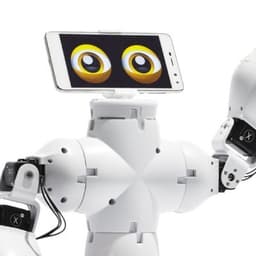
Fable
Product by Shape Robotics
Facts checked: Not yet checked
Our take (not a Learning Standard rating). This label applies to learning-science judgments throughout this overview.
Our take (not a Learning Standard rating)
While Fable has not yet been formally evaluated by The Learning Standard, its modular robotics framework strongly supports experiential learning and spatial reasoning. The fast assembly reduces cognitive load during setup, allowing your child to focus directly on computational thinking and problem-solving.
Pros
- Magnetic modular design minimizes setup time and reduces extraneous cognitive load.
- Supports embodied cognition by requiring students to physically manipulate objects to test their code.
- Integrates with visual and text-based programming interfaces to scaffold computational thinking skills.
- Provides immediate real-world feedback on coding logic through physical robotic movements.
Cons
- Relies entirely on external curricula and teacher facilitation rather than providing built-in, standalone instruction.
- Lacks built-in formative assessment tools to automatically track coding progress or correct syntax errors.
- Requires high initial investment in physical hardware, creating a barrier to entry for individual home use.
What Do We Know About Fable?
Fable is a highly engaging tool for teaching applied science and coding, provided you have the time and resources to actively facilitate your child's projects. Because it is a physical robotics kit rather than a standalone software app, it does not teach concepts independently. Instead, it serves as a tactile platform for project-based learning. Your child builds custom robots using snap-together magnetic modules and then programs them to complete specific tasks. This approach leverages embodied cognition: the idea that physical interaction with the learning environment strengthens neural pathways and deepens understanding.
When your child builds a robotic arm to pick up an object, they instantly see the results of their code in the real world. This immediate, physical feedback loop is excellent for teaching trial-and-error problem solving. However, parents should know that Fable requires significant adult involvement. There is no automated tutoring system to correct a flawed line of code or explain a physics concept. You will need to guide the learning process or rely on school-provided lesson plans to ensure actual educational outcomes are achieved.
How Does Fable Work?
Fable uses a constructionist, project-based learning approach where students build physical robots to solve open-ended challenges. The system consists of hardware modules (like joint motors, wheels, and sensors) that snap together using strong magnets. Your child constructs a robot structure and connects it wirelessly to a computer or tablet via a USB hub.
Once the physical robot is assembled, users program its behaviors using Fable's software. The platform scaffolds the coding experience by offering a visual block-based language for beginners. This reduces the cognitive load of memorizing syntax, allowing novice learners to focus on computational logic. As your child's skills advance, they can transition to programming the robot using Python. The learning mechanics rely entirely on an iterative testing loop: write code, execute it on the physical robot, observe the real-world behavior, and debug the errors. This cycle forces students to continuously apply retrieval practice and logical sequencing.
Strengths and tradeoffs of Fable
Fable’s biggest strength is its ability to reduce extraneous cognitive load during hardware assembly, while its biggest weakness is the lack of built-in instructional scaffolding for independent learners.
Strengths: The magnetic snap-together design is a massive pedagogical advantage. Many robotics kits bog students down in screws and wires, which exhausts working memory before the coding even begins. Fable allows your child to assemble a functional robot in seconds. This ensures their mental energy is spent on the actual learning objective: computational thinking and algorithmic design. Additionally, the transition from block-based coding to Python provides a clear worked example pipeline, allowing students to map visual logic blocks directly to text-based syntax.
Weaknesses: Fable is a tool, not a teacher. It lacks the built-in spaced repetition or structured retrieval practice found in comprehensive learning software. If your child makes a logic error, the robot simply fails to perform the task; the software does not provide hints, prompt reflection, or explain the underlying computer science principles. Effective learning with Fable relies heavily on external lesson plans and active facilitation from an educator or parent to contextualize the failures and guide the debugging process.
Who Might Benefit From Fable?
Fable is best for middle and high school students in structured STEM classrooms or highly facilitated homeschool environments. While the manufacturer markets it for all ages, the cognitive demands of spatial reasoning and Python programming are most appropriate for learners aged 10 and older. It is an ideal tool for career and technical education (CTE) programs focusing on applied science, engineering, and computer science. Because of the high cost and need for guided project-based instruction, it is better suited for institutional use rather than casual after-school play by independent learners.
Sources and review method
TLS combines product information and editorial analysis to explain how Fable works, its tradeoffs, and the questions to ask before choosing it. Product features, an instructional rationale and evidence of learning outcomes are different kinds of information.
Formal Learning Standard assessment: not yet completed. Data Transparency findings are reported separately and do not establish learning effectiveness. Read our methodology.
Frequently Asked Questions About Fable
Is Fable free?
No, Fable requires the purchase of physical hardware kits, which are priced at a premium for institutional use. The accompanying programming software is free to download, but it is useless without the proprietary robotic modules. Parents and educators must contact Shape Robotics directly to obtain a quote, as pricing varies based on the specific modules and bundles required.
Is Fable good for elementary students?
Fable can be used by upper elementary students, but it is best suited for middle and high schoolers. While younger children can easily snap the magnetic pieces together and use the block-based coding interface, the lack of built-in instructional tutorials means they will require constant adult guidance. Older students are better equipped to handle the open-ended frustration of debugging and the transition to text-based Python programming.
What does Fable teach?
Fable teaches applied science, spatial reasoning, and computational thinking through physical robotics. Your child will learn algorithmic logic, sequencing, and debugging by writing code to control the robot's motors and sensors. It bridges the gap between digital coding and physical engineering, demonstrating how software commands translate into real-world mechanical actions and physics concepts.
How does Fable compare to LEGO Mindstorms?
Fable offers a much faster hardware setup than LEGO Mindstorms, but LEGO provides a more versatile building experience. Because Fable uses large, pre-built magnetic modules, your child can build a robot in seconds and immediately start coding. LEGO Mindstorms requires tedious assembly with hundreds of small pins and beams, which can cause cognitive fatigue. However, LEGO boasts a much larger community-driven curriculum and is often more accessible for individual consumer purchase.
Has The Learning Standard evaluated Fable?
TLS has not yet completed a Learning Standard evaluation of how well Fable teaches. TLS has not published a Data Transparency result for its privacy policy.
Follow TLS Research
Subscribe to future TLS research updates: app reviews, findings, and what the evidence shows.
Screenshots
Take Action
For Fable
If you represent Shape Robotics and have a correction or new evidence, send the relevant source so we can review and update this page.
Submit a correctionDetails
- Pricing
- Contact vendor for pricing.
- Website
- Visit site