EditMentor
Product by EditMentor
Facts checked: Not yet checked
Our take (not a Learning Standard rating). This label applies to learning-science judgments throughout this overview.
Our take (not a Learning Standard rating)
While pending official evaluation from The Learning Standard, EditMentor applies problem-based learning to teach video editing mechanics and storytelling. It uses worked examples to guide students through creative choices, but its overall effectiveness requires active teacher facilitation and it trains specific skills rather than providing standalone conceptual mastery.
Pros
- Employs problem-based learning by requiring students to identify and correct editing errors in provided footage.
- Uses worked examples to demonstrate narrative pacing, continuity, and broadcast journalism standards.
- Provides immediate instructional feedback on creative choices to reinforce proper technical mechanics.
Cons
- Currently lacks independent evaluation data from The Learning Standard to verify long-term technical skill retention.
- Requires bulk seat purchasing, entirely excluding individual parents, home educators, or single learners.
- Relies heavily on external teacher facilitation rather than acting as a fully independent instructional tool for beginners.
What Do We Know About EditMentor?
EditMentor is a potentially effective classroom tool for teaching video editing, though it remains pending official evaluation by The Learning Standard. Your child will not learn to edit simply by watching passive tutorials; instead, the platform forces them to interact with simulated timelines and make direct cuts to provided footage. This active engagement prevents the passive consumption trap common in video-based software training. Because the platform requires bulk purchases of at least 20 licenses, you cannot buy this directly for your child at home. You will typically encounter EditMentor as part of your child's middle school, high school, or vocational CTE curriculum. It focuses heavily on project-based learning, asking students to solve specific visual storytelling problems. If your child struggles with creative choices, the app provides immediate constraints to help them practice targeted skills like pacing, audio mixing, and visual continuity. However, your child's teacher must actively guide the broader concepts, as the software functions best as a focused practice environment rather than a standalone automated teacher.
How Does EditMentor Work?
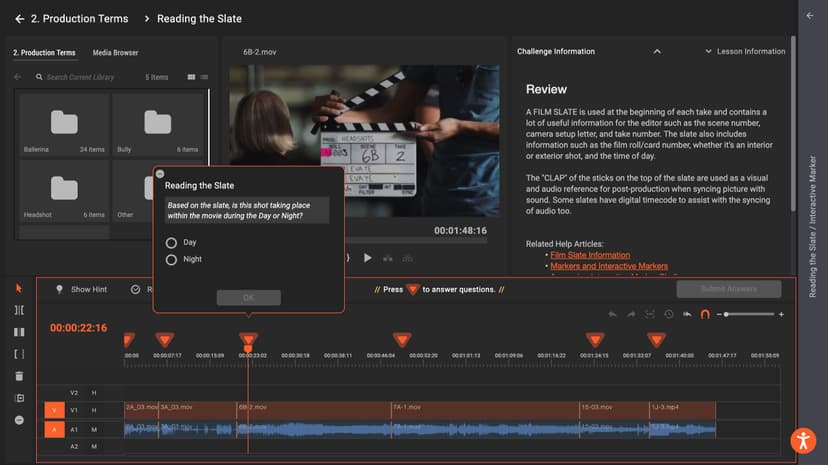
EditMentor uses a problem-based learning approach where students interact directly with a simulated video editing timeline to solve creative and technical challenges. Instead of passively watching software tutorials, students are dropped into partially edited projects and tasked with fixing specific issues. The platform provides raw footage and asks students to make active decisions about continuity, pacing, and shot selection. When a student makes a cut or adjusts an audio level, the system evaluates that specific action against established film and broadcast standards. This mechanic leverages immediate feedback, correcting misconceptions right when the student makes a technical error. Teachers assign specific modules covering topics like YouTube formatting, journalism, or narrative film, and monitor progress through a central dashboard. By using worked examples, showing the ideal edit before asking the student to replicate or improve upon it, the platform effectively reduces cognitive load, allowing learners to focus strictly on one specific editing principle at a time.
Strengths and tradeoffs of EditMentor
EditMentor's biggest strength is its use of interactive, problem-based timelines to teach editing concepts, while its biggest weakness is its complete inaccessibility to individual consumers and home educators. Strengths: The platform excels at moving students away from passive tutorial consumption. By utilizing active retrieval practice, EditMentor forces learners to recall editing rules and apply them instantly to raw footage. The inclusion of worked examples provides a strong instructional scaffold. Students see what a proper broadcast or narrative cut looks like before they are asked to execute it themselves. This effectively manages the high cognitive load typically associated with learning complex professional editing interfaces. Weaknesses: Because it requires a minimum purchase of 20 seats, the platform shuts out parents and individual learners. Furthermore, while the gamified elements keep students engaged, the app relies heavily on external teacher facilitation. It does not possess the robust internal adaptive logic required to independently remediate a student who fundamentally misunderstands visual storytelling. It acts as an excellent interactive workbook, but it still requires a human instructor to teach overarching theory. Additionally, its effectiveness remains pending official evaluation by The Learning Standard.
Who Might Benefit From EditMentor?
EditMentor is best for middle school through adult learners enrolled in formal CTE, journalism, or film production classes that need hands-on technical practice. The platform scales appropriately for students in 6th grade through post-baccalaureate programs by adjusting the complexity of the video assets and narrative challenges. It is an ideal supplementary tool for teachers who want to assign interactive editing homework without requiring students to download massive video files or expensive software. It is not suitable for individual home users due to its enterprise pricing model.
Sources and review method
TLS combines product information and editorial analysis to explain how EditMentor works, its tradeoffs, and the questions to ask before choosing it. Product features, an instructional rationale and evidence of learning outcomes are different kinds of information.
Formal Learning Standard assessment: not yet completed. Data Transparency findings are reported separately and do not establish learning effectiveness. Read our methodology.
Frequently Asked Questions About EditMentor
Is EditMentor free?
No, EditMentor is not free. It is sold exclusively to schools and institutions on a subscription basis. Pricing ranges from $17 to $21 per student per year, and the company strictly requires a minimum purchase of 20 seats per transaction. Because of this enterprise-focused purchasing model, individual parents, home educators, or independent learners cannot purchase single licenses for personal use.
Is EditMentor good for middle school students?
Yes, EditMentor is appropriate for students in 6th grade and up. The platform scales its problem-based learning modules to accommodate younger learners who are encountering video editing concepts for the very first time. Simultaneously, it offers sufficiently advanced broadcast journalism and narrative film techniques to remain engaging and challenging for high school students, college attendees, and adult learners in vocational programs.
What does EditMentor teach?
EditMentor teaches the technical mechanics and creative principles of video editing. It comprehensively covers specific industry domains including broadcast journalism, narrative film, YouTube video creation, business explainers, and sports videography. Instead of just learning software buttons, students actively practice narrative pacing, visual continuity, audio mixing, and storytelling structure by manipulating interactive timelines and correcting intentional errors in provided raw video footage.
How does EditMentor compare to WeVideo or Adobe Premiere?
EditMentor is an instructional training tool, whereas WeVideo and Premiere Pro are blank-canvas production software. EditMentor uses worked examples and guided challenges specifically to teach students how to edit and why certain cuts work. Students use EditMentor to learn the foundational theory and technical mechanics first, before eventually moving on to create their own original creative projects from scratch in standard software.
Has The Learning Standard evaluated EditMentor?
TLS has not yet completed a Learning Standard evaluation of how well EditMentor teaches. TLS has not published a Data Transparency result for its privacy policy.
Follow TLS Research
Subscribe to future TLS research updates: app reviews, findings, and what the evidence shows.
Screenshots

Take Action
For EditMentor
If you represent EditMentor and have a correction or new evidence, send the relevant source so we can review and update this page.
Submit a correctionDetails
- Pricing
- $17-$21 per student per year, purchased in blocks of 20 seats.
- Platforms
- Windows (Microsoft), macOS (Apple), Chrome OS (Google)
- Grade Levels
- 6th Grade, 7th Grade, 8th Grade, 9th Grade, 10th Grade, 11th Grade, 12th Grade, Associate's degree, Bachelor's degree, Post-baccalaureate certificate, Master's Degree, Adult Education, Professional or Technical Credential
- Website
- Visit site