Construct 3
Product by Construct
Facts checked: Not yet checked
Our take (not a Learning Standard rating). This label applies to learning-science judgments throughout this overview.
Our take (not a Learning Standard rating)
Construct 3 provides a robust environment for applying computational thinking, but it lacks built-in instructional scaffolding. It excels at project-based learning and bridging the gap between block-based and text-based coding. However, without external curriculum or teacher guidance, novice learners will struggle to master foundational programming concepts.
Pros
- Transitions learners from visual logic to text-based coding through side-by-side event blocks and JavaScript integration.
- Facilitates project-based learning by allowing students to immediately test and iterate on functional game mechanics.
- Operates entirely in the browser, removing software installation barriers for schools using Chromebooks.
- Applies immediate visual feedback to logical programming errors, strengthening cause-and-effect reasoning.
Cons
- Lacks embedded tutorials or worked examples to introduce foundational computer science concepts to absolute beginners.
- Requires educators to build or source their own curriculum to ensure structured progression of learning objectives.
- Overwhelms new users with a highly complex user interface designed for professional development rather than structured education.
- Provides no automated assessment or adaptive feedback mechanisms to correct specific student misconceptions.
What Do We Know About Construct 3?
Construct 3 is an effective sandbox for applying computer science skills, but it requires adult guidance or a structured curriculum to actually teach programming. Your child will not learn how to code simply by opening this application. Instead, this web-based tool serves as a transitional environment that bridges the gap between drag-and-drop programming and typed languages like JavaScript. It uses an event sheet system where students define logic using cause-and-effect rules before moving on to actual text-based coding. Because Construct 3 is an open-ended creation engine rather than an educational course, it relies heavily on project-based learning. Students learn by doing, testing hypotheses, and debugging errors in real-time. This immediate feedback loop is excellent for reinforcing logical reasoning and computational thinking. However, parents and educators must provide the necessary learning goals and step-by-step instruction. The platform lacks built-in assessments, spaced repetition of key concepts, or guided worked examples. If your child already understands basic coding logic and wants a robust platform to design functional games, Construct 3 provides an authentic, browser-based environment to practice those skills.
How Does Construct 3 Work?
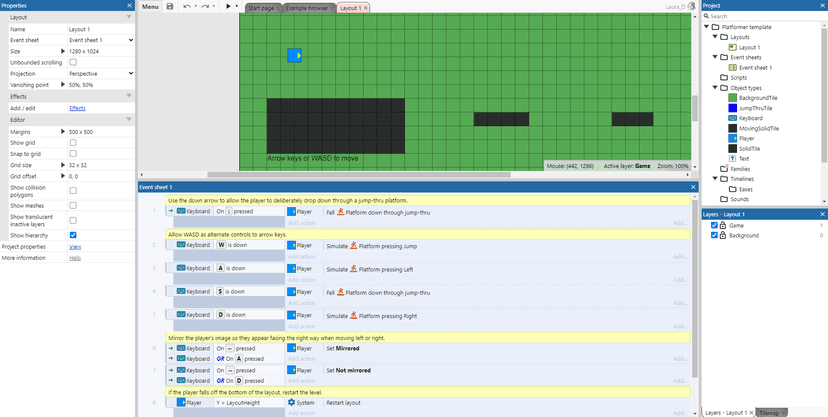
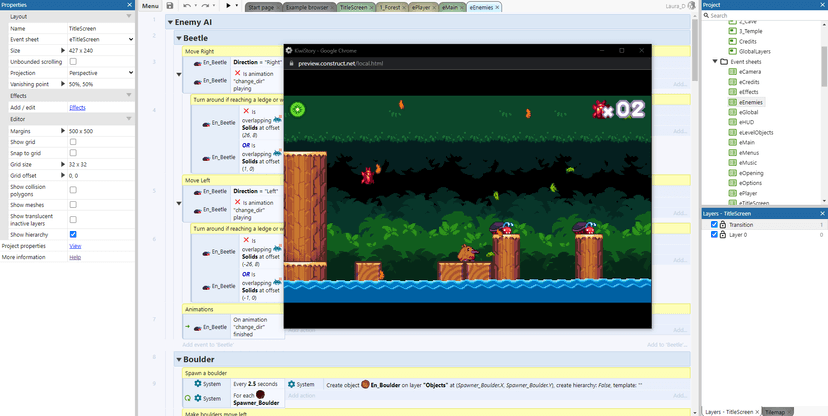
Construct 3 uses open-ended, project-based learning alongside a visual-to-text transitional programming interface. Students interact with the platform primarily through an event sheet system, which breaks programming down into clear logical statements. This removes the cognitive load of memorizing syntax, allowing learners to focus entirely on computational logic and program structure. When a student builds a game, they place visual assets on a canvas and assign behaviors to them. They then open the event sheet to dictate how those objects interact. As learners master this visual logic, they can seamlessly transition to writing raw JavaScript directly within the same project. This scaffolding technique allows students to test their code instantly, receiving immediate visual feedback in the game preview. When a character fails to jump, the student must apply debugging strategies and trace their logic to find the error. While it provides the tools for creation, the platform assumes the user is following an external lesson plan.
Strengths and tradeoffs of Construct 3
Construct 3's biggest strength is its seamless visual-to-text coding progression, while its biggest weakness is the complete absence of embedded instructional scaffolding for novices. The platform relies heavily on project-based learning, allowing students to construct their own knowledge by experimenting with game mechanics. This active creation process strengthens retention and transfer of computational thinking skills because students are applying logic to solve authentic problems. The transition from visual event sheets to JavaScript is a powerful application of faded scaffolding, gradually removing visual supports as the learner's competence with syntax grows. However, because Construct 3 is a commercial game engine adapted for education, it ignores several established principles of direct instruction. There are no built-in worked examples to demonstrate proper logic structures before asking students to build them. It lacks formative assessment to verify if a student actually understands a concept rather than just copying code. Furthermore, the interface imposes a high extraneous cognitive load on beginners who must learn how to navigate the software alongside learning how to code.
Who Might Benefit From Construct 3?
Construct 3 is best for middle and high school students who have outgrown basic block-coding platforms and are ready to transition toward text-based programming. It is highly effective for career and technical education classrooms or dedicated coding clubs where a teacher is actively providing curriculum and structure. Because it runs smoothly on Chromebooks, it fits perfectly into school device programs. Independent learners can also thrive here, provided they are highly motivated and willing to seek out third-party tutorials to overcome the initial learning curve. It is not recommended for young elementary students.
Data Transparency
Does Not Meet Data Transparency Standard
Construct 3 does not meet our data transparency standard. Its privacy policy does not document basic protections, including a commitment against targeted advertising, contractual limits on service providers and parents' right to see their child's data.
18 of 35 checks passed
Level 1 · Basic protections
Does not sell data or target ads at students, limits sharing, and lets parents see and delete their child's data.
Not documented: a commitment against targeted advertising, contractual limits on service providers, parents' right to see their child's data, parents' right to delete their child's data
Level 2 · Parent control (meets the standard)
Families can get their data out, know who processes it, and know how long it is kept.
Level 3 · Direct data access
Families or schools can pull their own data through an API, in a stated format.
Not documented: an API for retrieving their own data, a named export format
View all 35 checks
Parent Access4/8
Does the policy mention parents specifically?
“We do not knowingly collect any data from any child under this age without consent of a parent or guardian.”
Can parents view their child's data?
The policy gives access rights to users but does not give parents a right to view their child's data.
Can parents modify their child's data?
The policy does not give parents a right to change their child's data.
Can parents delete their child's account?
The policy lets users ask for deletion but does not give parents a right to delete their child's data or account.
Is there a dedicated Children's Privacy section?
“This section has been created to provide clarity on how this Privacy Policy addresses the”
Does it reference COPPA compliance?
“requirements of the Children’s Online Privacy and Protection Act (“COPPA”) and the UK Children’s Code requirements.”
Does it reference FERPA compliance?
The policy does not mention FERPA.
Is parental consent required for child accounts?
“If the Educator decides to assign licenses to accounts created by students then if that student is under the age of 16, they must obtain their parent’s or guardian’s consent in order to create an account.”
Data Portability2/5
Can users access their personal data?
“Under the law of some countries and states, you may have the right to ask us for a copy of your personal information”
Can users download/export their data?
“to obtain the personal information you provide to us for a contract or with your consent in a structured, machine readable format, and to ask us to share (port) this information to another controller.”
Is there a self-service data access tool?
The policy describes editing a profile and asking for access by email, but no self-service tool for accessing or downloading data.
Is a specific data format mentioned for export?
The policy only says "structured, machine readable format" and names no specific format.
Is there an API for data access?
The policy does not mention an API for getting data.
Data Minimization4/6
Is data collection itemized?
“For example, we collect information like web requests, the data sent in response to such requests, the Internet Protocol address, the browser type, the browser language, and a timestamp for the request.”
Can the app be used without a real name?
“If you use the Construct 3 Editor through Access Codes (https://www.construct.net/en/make-games/education/licensing) then we do not collect any personally identifiable information (PII).”
Can the app be used without an email?
“The recommended method of doing that is through setting up Access Codes so that a student may access full functionality without providing any personal information.”
Does it state collection is limited to what is necessary?
“At the heart of our philosophy is the aim to hold the smallest amount of private information about our customers that is consistent with running our business.”
Is IP address anonymized or truncated?
The policy says IP addresses are collected but does not say they are anonymized or truncated.
Is location tracking explicitly excluded?
The policy says it records users' country and has city-level location through Google Analytics.
Third-Party Protection4/7
Does it explicitly state no selling of data?
“To be clear - We do NOT sell or pass on any personal information.”
Are third-party providers named?
“We use third party credit card processor Stripe and Paypal to process credit card payments.”
Are providers contractually restricted?
The policy does not say that providers are bound by contract terms.
No-targeted-advertising commitment?
The policy says it does not profile users but makes no commitment against targeted advertising, and it mentions profiling for direct marketing.
Is AI/ML data sharing addressed?
The policy mentions automated analysis of content with consent but does not address sharing data for AI or machine learning.
Child-specific sharing restriction?
“The stored Project file is automatically deleted after 72 hours and at no time do any Scirra company personnel interact with that file, nor is it used for any purpose other than to make available to the subscription administrator.”
Cookies/tracking limited or opt-out?
“You can block or delete cookies and still be able to use Construct.net, although many interactive features will become unavailable.”
Deletion & Retention4/5
Can users delete their account?
“A user may use this email address to request to have their personal data removed and their account terminated.”
Self-service deletion mechanism?
“Likewise, you can delete files or photos you have stored in our websites and apps by logging in and using the deletion functions that are available.”
Specific data retention timeline?
“However, we typically retain personal information related to our contract and business transactions with you for seven years after your last interaction with us.”
Auto-deletion of inactive accounts?
The policy does not describe automatic deletion of inactive accounts.
Post-deletion handling described?
“When you close your account, after 60 days we begin deleting certain personal information that we no longer have a business reason to retain, such as social media profiles, name, website reference etc. .”
Advertising0/4
Advertising model explicitly disclosed?
The policy mentions the company's advertising practices but does not explain an advertising model or say the product has no ads.
Free from third-party advertisements?
The policy does not say whether the product shows third-party ads.
Children excluded from ad targeting?
The policy says it does not profile users but does not specifically exclude children from ad targeting.
Ad-free option available?
The policy does not mention an ad-free option or say the product has no ads.
What This Means
The policy review did not meet our data transparency standard. The checks above show the documented findings and unknowns. A missing statement does not establish how the app handles data in practice.
About this evaluation: Based on automated analysis of Privacy Policy and Children's Code against 35 policy-disclosure questions, including questions adapted from the Common Sense Privacy Program's published evaluation questions. TLS is not affiliated with Common Sense Media, and this is not a Common Sense rating. Quoted text is copied from the policy; unquoted notes are our summary. Results describe what the policy documents, not the company's actual practices. Privacy policies can change: this review reflects the version we analyzed and does not determine legal compliance.
Sources and review method
TLS combines product information and editorial analysis to explain how Construct 3 works, its tradeoffs, and the questions to ask before choosing it. Product features, an instructional rationale and evidence of learning outcomes are different kinds of information.
Formal Learning Standard assessment: not yet completed. Data Transparency findings are reported separately and do not establish learning effectiveness. Read our methodology.
Frequently Asked Questions About Construct 3
Is Construct 3 free?
Construct 3 offers a limited free version that does not expire but restricts the number of events, layers, and special effects you can use. For educational environments, full access requires a paid subscription starting at $9.99 per seat monthly or $32.99 annually. Schools can use concurrent licensing, meaning you only pay for the number of students using the software at the exact same time.
Is Construct 3 good for elementary students?
Construct 3 is generally too complex for early elementary students. The dense user interface and reliance on advanced logical reasoning make it better suited for middle schoolers and high school students. Younger learners should start with platforms specifically designed for early computational thinking, such as Scratch, before graduating to Construct 3.
What does Construct 3 teach?
Construct 3 teaches computational thinking, game design, and computer programming. Students learn foundational computer science concepts like variables, loops, conditionals, and boolean logic through the platform's visual event sheet system. As they progress, it also teaches applied JavaScript, allowing students to write standard text-based code within their projects.
How does Construct 3 compare vs Scratch?
Scratch is designed for absolute beginners, using colorful, puzzle-like blocks to teach basic logic with heavy instructional scaffolding. Construct 3 is a significant step up in complexity, functioning as a professional-grade game engine. While Scratch is a pure educational tool, Construct 3 bridges the gap between learning logic and typing real JavaScript, making it the better choice for older students outgrowing Scratch.
Has The Learning Standard evaluated Construct 3?
TLS has not yet completed a Learning Standard evaluation of how well Construct 3 teaches. Its privacy policy has been reviewed for Data Transparency and does not yet document the basic protections (Level 1).
Is Construct 3 COPPA compliant?
The reviewed privacy policy references COPPA. A policy reference alone does not establish COPPA compliance. Policy review note: The policy says it addresses COPPA requirements.
Is Construct 3 FERPA compliant?
A FERPA reference was not found in the reviewed privacy policy. This does not determine whether the app complies with FERPA. Policy review note: The policy does not mention FERPA.
Does Construct 3 have a children's privacy policy?
The reviewed policy includes a dedicated children's privacy section. Policy review note: The policy has its own section headed "Children’s Privacy".
Does Construct 3 sell student data?
The reviewed policy states that the app does not sell data. This is a policy statement; actual data practices were not verified. Policy review note: The company states that it does not sell personal information.
Can you delete your data from Construct 3?
The reviewed privacy policy describes account deletion. We have not tested the deletion process. Policy review note: Users can ask by email to have their account and data deleted.
Follow TLS Research
Subscribe to future TLS research updates: app reviews, findings, and what the evidence shows.
Screenshots

Take Action
For Construct 3
If you represent Construct and have a correction or new evidence, send the relevant source so we can review and update this page.
Submit a correctionDetails
- Pricing
- Construct 3 has a free version which is not time-limited, but puts limitations of the level of features available. The paid version is offered on a subscription basis and starts at $32.99 per seat, per year, or $9.99 per seat, per month. We offer progressive discounts as the number of seats increases and our access code system allows you to re-use licenses so you only need as many seats as you have concurrent users.
- Platforms
- Web Browser, iOS (Apple mobile), Android (Google mobile), Windows (Microsoft), macOS (Apple), Chrome OS (Google)
- Website
- Visit site