
CodeMonkey
Product by CodeMonkey Studios
Facts checked: Not yet checked
Our take (not a Learning Standard rating). This label applies to learning-science judgments throughout this overview.
Our take (not a Learning Standard rating)
While The Learning Standard has not formally evaluated CodeMonkey, its structure relies heavily on problem-based learning and scaffolded progression. Your child solves logic puzzles using code, which builds foundational computational thinking. However, game-based models often struggle with knowledge transfer, meaning students may learn to beat levels rather than write functional software independently.
Pros
- Employs scaffolded progression to transition students from block-based commands to text-based syntax.
- Provides immediate, automated feedback on logic errors to correct student misconceptions in real-time.
- Uses worked examples in early levels to reduce cognitive load before introducing complex tasks.
- Fosters problem-based learning by requiring students to plan algorithms to achieve specific in-game goals.
Cons
- Lacks robust explicit instruction, relying primarily on trial-and-error which can frustrate novice learners.
- Risks poor knowledge transfer since completing localized game puzzles does not automatically translate to building independent applications.
- Does not utilize spaced repetition for syntax rules, making it difficult for students to recall specific commands later.
- Has not yet been evaluated by The Learning Standard to verify empirical long-term learning outcomes.
What Do We Know About CodeMonkey?
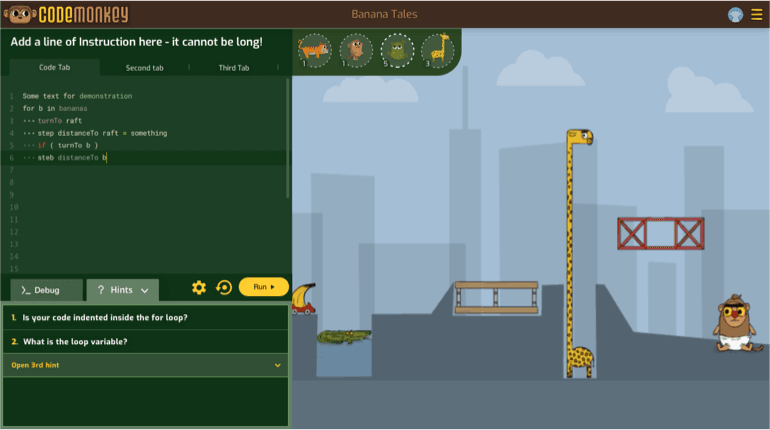
CodeMonkey is an effective introductory tool for teaching your child basic computational thinking, though it relies heavily on puzzle-solving rather than independent software creation. Your child will guide a monkey to catch bananas by writing short lines of code. This structure uses goal-directed practice to introduce logic concepts like loops, sequencing, and conditionals. The app begins with block-based visual coding for younger learners and scales up to text-based languages like Python for older students. Because CodeMonkey uses a game-based model, student motivation is generally high. However, parents should understand the limitations of game-based coding platforms. Students often figure out how to beat a specific level through trial and error rather than truly understanding the underlying syntax. The app does not heavily emphasize spaced retrieval practice, meaning your child might forget how to write a loop once they move past that specific module. To maximize learning, you should encourage your child to explain their code to you rather than simply clicking through levels. Please note that The Learning Standard has not yet formally evaluated CodeMonkey's long-term efficacy against our rigorous rubrics.
How Does CodeMonkey Work?
CodeMonkey uses scaffolded, problem-based learning disguised as a series of logic puzzles. Your child writes sequential commands in an integrated text editor to navigate a character across the screen and achieve a specific objective. The platform gradually increases complexity, introducing a new concept like a variable or a loop with a short demonstration before asking the student to apply it. This aligns with the learning science principle of fading scaffolding. Initially, tasks are highly constrained with clear worked examples. As your child progresses, the app removes these supports, requiring them to recall previous concepts to solve more complex visual layouts. The interface provides immediate corrective feedback if the code fails to execute properly. If the monkey misses the banana, the student must debug their sequence and try again. While this iterative process builds resilience, it can also lead to blind guessing if the student does not fully grasp the logic.
Strengths and tradeoffs of CodeMonkey
CodeMonkey's biggest strength is its seamless transition from visual concepts to text-based syntax, while its biggest weakness is the potential for localized puzzle-solving that fails to transfer to real-world programming. Cognitive load management is handled exceptionally well in the early stages. The app does not overwhelm novice coders with a blank text editor. Instead, it provides a highly constrained environment where students only need to focus on one logical concept at a time. This step-by-step introduction of loops, arrays, and functions builds confidence efficiently. However, the game-based structure relies heavily on trial-and-error learning. Because students can run their code endlessly without penalty, they often brute-force the solution rather than engaging in deliberate planning. The app also lacks robust spaced repetition. Once a student finishes the module on loops, they are rarely forced to retrieve that specific syntax from memory in later modules, which degrades long-term retention. Additionally, the jump from solving linear puzzles to engaging in open-ended project creation is steep, and the initial curriculum does not adequately prepare students to structure a project from scratch.
Who Might Benefit From CodeMonkey?
CodeMonkey is best for elementary and middle school students who need a highly structured, engaging introduction to coding logic before tackling open-ended programming. Targeting students in grades K-9, it serves as a strong bridge between pure block-coding and typing actual syntax like Python or CoffeeScript. It works particularly well in classroom environments where teachers can provide supplementary explicit instruction, or at home for parents who want a self-paced, gamified curriculum. It is not ideal for advanced students looking to build independent apps or websites, as the environment is strictly confined to the puzzle interface.
Data Transparency
Meets Data Transparency Standard
CodeMonkey meets our data transparency standard at Level 2 of 3 (Parent control). Level 3 needs the policy to document an API for retrieving their own data and a named export format.
26 of 35 checks passed
Evaluated September 2026
Privacy Policy →Level 1 · Basic protections
Does not sell data or target ads at students, limits sharing, and lets parents see and delete their child's data.
Level 2 · Parent control (meets the standard)
Families can get their data out, know who processes it, and know how long it is kept.
Level 3 · Direct data access
Families or schools can pull their own data through an API, in a stated format.
Not documented: an API for retrieving their own data, a named export format
View all 35 checks
Parent Access7/8
Does the policy mention parents specifically?
“A parent or guardian needs to create an account on behalf of their child and provide the necessary level of consent.”
Can parents view their child's data?
“A parent, guardian, school administrator, or teacher, as applicable, can view, edit or delete all information associated with a child’s account, through their dashboard, by clicking “my account” or by accessing the “classroom””
Can parents modify their child's data?
“A parent, guardian, school administrator, or teacher, as applicable, can view, edit or delete all information associated with a child’s account, through their dashboard, by clicking “my account” or by accessing the “classroom””
Can parents delete their child's account?
“A parent, guardian, school administrator, or teacher, as applicable, can view, edit or delete all information associated with a child’s account, through their dashboard, by clicking “my account” or by accessing the “classroom””
Is there a dedicated Children's Privacy section?
“1\. CHILDREN’S INFORMATION”
Does it reference COPPA compliance?
“The PRIVO COPPA safe harbor certification Seal posted on this page indicates CodeMonkey Studios Inc. has established COPPA compliant privacy practices and has agreed to submit to PRIVO’s oversight and consumer dispute resolution process.”
Does it reference FERPA compliance?
The policy does not mention FERPA.
Is parental consent required for child accounts?
“The Children’s Online Privacy Protection Act (“COPPA”) requires that we obtain parental consent before knowingly collecting Personal Information (as defined under COPPA, “PI”) online from children who are aged 12 or under.”
Data Portability3/5
Can users access their personal data?
“The right to access, update or to delete the information we have on you. Whenever made possible, you can access, update or request deletion of your Personal Information directly within your account settings section.”
Can users download/export their data?
“The right to data portability. You have the right to be provided with a copy of the Personal Information we have on you in a structured, machine-readable and commonly used format.”
Is there a self-service data access tool?
“Whenever made possible, you can access, update or request deletion of your Personal Information directly within your account settings section.”
Is a specific data format mentioned for export?
The policy mentions only a generic "structured, machine-readable and commonly used format" and names no specific format.
Is there an API for data access?
The policy does not describe any API for users to retrieve their data.
Data Minimization2/6
Is data collection itemized?
“When a parent registers on behalf of a child, we collect: – Child’s username – Child’s display name – Password – Age (optional)”
Can the app be used without a real name?
The policy says the vendor collects a child's name when the child contacts support, and teachers may provide the child's details.
Can the app be used without an email?
The policy says student email addresses are collected when students log in through Single Sign On.
Does it state collection is limited to what is necessary?
“We do not require children aged 12 or under to disclose more information than is reasonably necessary to participate in our Services”
Is IP address anonymized or truncated?
The policy says IP addresses are collected; it notes Google Analytics discards them after use but does not say IPs are anonymized or truncated.
Is location tracking explicitly excluded?
The policy says it collects network location and geolocation derived from IP addresses.
Third-Party Protection7/7
Does it explicitly state no selling of data?
“Except in a business transaction as described herein, we never sell or rent your personal information.”
Are third-party providers named?
“We use New Relic and Google Analytics to better understand your use of these Websites.”
Are providers contractually restricted?
“When we use such service providers, we restrict them from using or disclosing children’s information, except as required to perform services on our behalf or to comply with legal requirements.”
No-targeted-advertising commitment?
“Personal Information of our users will not be shared with third parties for marketing purposes or used to contact or build a profile of children or used for behavioral advertising.”
Is AI/ML data sharing addressed?
“If a child uses our AI widget when coding, images are turned into vectors (a series of numbers) and the images are not collected or stored.”
Child-specific sharing restriction?
“When we use such service providers, we restrict them from using or disclosing children’s information, except as required to perform services on our behalf or to comply with legal requirements.”
Cookies/tracking limited or opt-out?
“You can also download the Google Analytics Opt-out Browser Add-on to prevent your data from being used by Google Analytics at https://tools.google.com/dlpage/gaoptout.”
Deletion & Retention5/5
Can users delete their account?
“You may cancel your account at any time via the interface of the Services. If you encounter any problem in cancelling your account and you wish that we no longer use or hold your information, please contact us via privacy@codemonkey.com.”
Self-service deletion mechanism?
“You may cancel your account at any time via the interface of the Services.”
Specific data retention timeline?
“User personal data is retained only while the account remains active. A student account is considered inactive if the user has not logged into or used the service for a continuous period of 12 months.”
Auto-deletion of inactive accounts?
“User personal data is retained only while the account remains active. A student account is considered inactive if the user has not logged into or used the service for a continuous period of 12 months.”
Post-deletion handling described?
“Please note that copies of information that you have updated, modified or deleted may remain viewable in cached and archived pages of the Websites until you delete your cache..”
Advertising2/4
Advertising model explicitly disclosed?
“When you visit or log in to our website, cookies and similar technologies may be used by our online data partners or vendors to associate these activities with other personal information they or others have about you, including by association with your email. We (or service providers on our behalf) may then send communications and marketing to these email. You may opt out of receiving this advertising by visiting [https://app.retention.com/optout](https://app.retention.com/optout)”
Free from third-party advertisements?
The policy does not say the product is free of third-party ads, and its cookie list includes advertising cookies.
Children excluded from ad targeting?
“Personal Information of our users will not be shared with third parties for marketing purposes or used to contact or build a profile of children or used for behavioral advertising.”
Ad-free option available?
The policy does not say the product has no ads and does not offer an ad-free option.
Meets Data Transparency Standard
The reviewed policy met our data transparency standard. This result describes the policy disclosures we assessed. Actual practices and legal compliance were not verified.
About this evaluation: Based on automated analysis of Privacy Policy against 35 policy-disclosure questions, including questions adapted from the Common Sense Privacy Program's published evaluation questions. TLS is not affiliated with Common Sense Media, and this is not a Common Sense rating. Quoted text is copied from the policy; unquoted notes are our summary. Results describe what the policy documents, not the company's actual practices. Privacy policies can change: this review reflects the version we analyzed and does not determine legal compliance.
Sources and review method
TLS combines product information and editorial analysis to explain how CodeMonkey works, its tradeoffs, and the questions to ask before choosing it. Product features, an instructional rationale and evidence of learning outcomes are different kinds of information.
Formal Learning Standard assessment: not yet completed. Data Transparency findings are reported separately and do not establish learning effectiveness. Read our methodology.
Frequently Asked Questions About CodeMonkey
Is CodeMonkey free?
No, CodeMonkey requires a paid subscription. While it offers a limited free trial for parents and educators to test the interface, accessing the full curriculum necessitates a monthly or annual fee. Schools and districts must request custom quotes based on student headcount, while individual parent plans are available directly on their website.
Is CodeMonkey good for elementary students?
Yes, CodeMonkey is highly appropriate for elementary students. It begins with very simple, visual-heavy puzzles suitable for early readers and gradually introduces text-based syntax as reading comprehension improves. The gamified interface keeps young learners motivated, while the step-by-step scaffolding prevents them from becoming overwhelmed by complex coding rules.
What does CodeMonkey teach?
CodeMonkey teaches computational thinking and fundamental programming logic. Your child will learn concepts like sequencing, loops, conditionals, and variables. Initially, it teaches logic through block-based actions. As students progress, it introduces actual coding languages, specifically CoffeeScript and Python, alongside basic algorithmic problem-solving and debugging skills.
CodeMonkey vs. Scratch: Which is better?
CodeMonkey is better for structured, step-by-step learning, while Scratch is better for open-ended creativity. CodeMonkey forces students through a specific curriculum of puzzles to ensure they learn specific concepts like loops and arrays. Scratch provides a blank canvas, which fosters creativity but can leave novice learners without direction. Scratch is entirely free, whereas CodeMonkey is paid.
Has The Learning Standard evaluated CodeMonkey?
TLS has not yet completed a Learning Standard evaluation of how well CodeMonkey teaches. Its privacy policy has been reviewed for Data Transparency and reaches Level 2, Parent control.
Is CodeMonkey COPPA compliant?
The reviewed privacy policy references COPPA. A policy reference alone does not establish COPPA compliance. Policy review note: The policy states COPPA-compliant practices under PRIVO certification.
Is CodeMonkey FERPA compliant?
A FERPA reference was not found in the reviewed privacy policy. This does not determine whether the app complies with FERPA. Policy review note: The policy does not mention FERPA.
Does CodeMonkey have a children's privacy policy?
The reviewed policy includes a dedicated children's privacy section. Policy review note: The policy has a dedicated section headed Children's Information.
Does CodeMonkey sell student data?
The reviewed policy states that the app does not sell data. This is a policy statement; actual data practices were not verified. Policy review note: The policy says the vendor does not sell personal information.
Can you delete your data from CodeMonkey?
The reviewed privacy policy describes account deletion. We have not tested the deletion process. Policy review note: Users can cancel their account and ask for their information to be removed.
Follow TLS Research
Subscribe to future TLS research updates: app reviews, findings, and what the evidence shows.
Screenshots


Latest News
All CodeMonkey NewsTeaching Kids Sorting Algorithms: Why Physical Play Beats Raw Code
Learn how screen-free activities can teach sorting algorithms to kids. Discover why physical play is the best way to build early computational thinking.
Why Teaching Sorting Algorithms to Young Kids Requires Care
Learn why teaching complex sorting algorithms to young kids may clash with educational standards, and discover age-appropriate ways to introduce coding.
Why Screen-Free 'Sorting' Activities Are the Perfect Coding Gateway
Discover how unplugged computer science activities like sorting boost children's logical reasoning and prepare them for coding, according to new research.
Take Action
For CodeMonkey
If you represent CodeMonkey Studios and have a correction or new evidence, send the relevant source so we can review and update this page.
Submit a correctionDetails
- Pricing
- For teachers/schools and districts - prices vary due to the amount of students under the organization - please request a quote from our team. For parents - prices are listed on the website.
- Platforms
- Web Browser, iPadOS (Apple tablet), Windows (Microsoft), macOS (Apple), Chrome OS (Google), Other
- Grade Levels
- Transitional Kindergarten, Kindergarten, 1st Grade, 2nd Grade, 3rd Grade, 4th Grade, 5th Grade, 6th Grade, 7th Grade, 8th Grade, 9th Grade
- Website
- Visit site