
Code.org
Product by Code.org
Facts checked: Not yet checked
Our take (not a Learning Standard rating). This label applies to learning-science judgments throughout this overview.
Our take (not a Learning Standard rating)
Code.org provides highly structured introductions to computer science using block-based programming and immediate visual feedback. While pending formal evaluation, its reliance on worked examples effectively reduces cognitive load for beginners, though advanced learners may eventually outgrow the rigidly guided puzzle pathways.
Keep the Code.org decision brief
Keep a nontechnical project-conversation guide and a teacher message that separates completion indicators from the actual programming ideas being learned. Subscribe to future TLS research updates and download the one-page PDF here immediately.
Pros
- Uses worked examples and step-by-step scaffolding to introduce complex programming logic without overwhelming beginner memory capacity.
- Provides immediate visual feedback when code executes, allowing learners to quickly identify misconceptions and correct errors.
- Progresses systematically from block-based visual coding to text-based syntax to build foundational conceptual mapping.
- Integrates short video tutorials from industry experts to provide real-world context and direct instruction before practice sets.
Cons
- Highly guided exercises sometimes limit productive struggle by offering too many hints during problem-solving.
- Lacks spaced repetition mechanics to ensure long-term retention of specific coding syntax once a module is completed.
- Advanced modules transition abruptly to text-based coding, causing a spike in cognitive load for self-directed learners.
- Has not yet been formally evaluated by The Learning Standard to confirm long-term learning outcomes.
What Do We Know About Code.org?
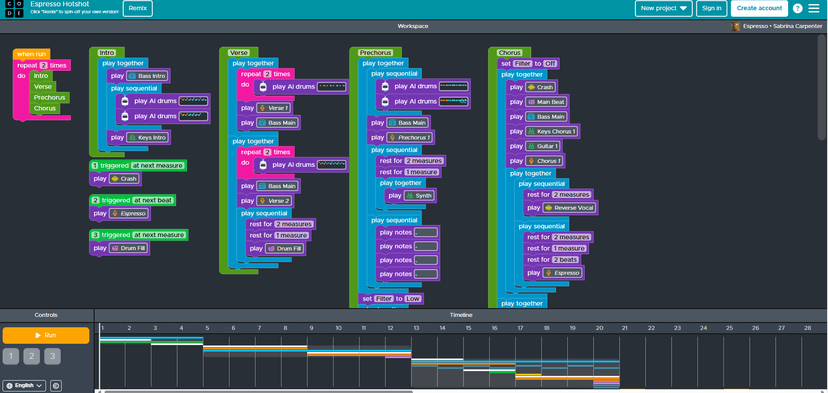
Code.org is a highly effective, free starting point for teaching your child foundational computer science concepts, though it has not yet been formally evaluated by The Learning Standard. The platform relies heavily on scaffolded learning, breaking down complex programming logic into bite-sized, game-like puzzles. Your child will drag and drop visual blocks of code to move characters, draw shapes, or build simple apps. This approach minimizes the frustration of typing errors and reduces cognitive load, allowing your child to focus on the underlying logic of loops, conditionals, and variables. Because the feedback is immediate and visual, your child can independently test and debug their solutions through trial and error. However, parents should know that the platform is heavily guided. If your child gets stuck, the system often provides heavy scaffolding that can sometimes bypass the productive struggle necessary for deep problem-solving. It excels at introductory exposure but requires transition to independent project-based learning for true mastery. Since it requires no subscription and runs entirely in a standard web browser, it removes traditional barriers to entry for early computer science education at home.
How Does Code.org Work?
Code.org uses a scaffolded, mastery-based progression model that combines short video instruction with immediate, interactive practice sets. The platform organizes learning into distinct courses based on age and reading ability. Your child begins a lesson by watching a brief instructional video or reviewing a worked example that introduces a single new concept, such as a 'while loop' or an 'if/then' statement. They are then presented with a visual workspace divided into a goal area, a block library, and a coding canvas. By snapping interlocking blocks together, your child constructs an algorithm to solve the puzzle on the screen. When they click 'run', the program executes their code step-by-step, providing immediate visual feedback. If the code fails, the platform highlights the point of failure, encouraging iterative debugging. As your child progresses through the curriculum, the visual blocks slowly translate into actual text-based code, transitioning them from conceptual understanding to standard programming syntax.
Strengths and tradeoffs of Code.org
Code.org's biggest strength is its use of visual block-based coding to reduce cognitive load, while its biggest weakness is a lack of spaced retrieval practice for long-term syntax retention. Cognitive Load Reduction: By removing the need to memorize syntax and type perfectly, the platform allows beginners to focus entirely on algorithmic thinking. This application of worked examples and highly scaffolded tasks ensures early success and builds confidence. Immediate Feedback Loop: The interface instantly shows the results of a code execution. This immediate feedback helps learners correct misconceptions in real-time before they encode incorrect logic into their memory. Transition to Text: Later courses effectively bridge the gap between visual logic and text-based languages like JavaScript, mapping established concepts to new syntax. Lack of Spaced Repetition: Once a module is completed, the platform rarely forces learners to retrieve older concepts from memory in a systematic, spaced interval. Over-Scaffolding: The hints and rigid puzzle structures sometimes prevent the productive struggle needed for deeper problem-solving. Evaluation Status: While these mechanics align with established learning science, The Learning Standard has not yet formally rated the application's overall efficacy.
Who Might Benefit From Code.org?
Best for elementary and middle school students who need a highly structured, visual introduction to programming logic before attempting text-based coding languages. Because the early courses do not require strong reading skills, younger learners can successfully grasp abstract concepts like sequencing and loops through game-based puzzles. It is also an excellent resource for parents seeking a ready-to-use, standards-aligned computer science curriculum that requires minimal technical setup. Older students or those with prior coding experience may find the rigid pacing too slow and would benefit from open-ended development environments.
Data Transparency
Does Not Meet Data Transparency Standard
Code.org reaches Level 1 of 3 (Basic protections), below our data transparency standard. Reaching Level 2 needs the policy to document data export and a data retention timeline.
26 of 35 checks passed
Evaluated September 2026
Privacy Policy →Level 1 · Basic protections
Does not sell data or target ads at students, limits sharing, and lets parents see and delete their child's data.
Level 2 · Parent control (meets the standard)
Families can get their data out, know who processes it, and know how long it is kept.
Not documented: data export, a data retention timeline
Level 3 · Direct data access
Families or schools can pull their own data through an API, in a stated format.
Not documented: an API for retrieving their own data, a named export format
View all 35 checks
Parent Access6/8
Does the policy mention parents specifically?
“A parent or legal guardian of a Student under the age of 18 may also review Personal Information and other personal data and correct erroneous information, if any, by asking the Student or Teacher to access the Student account.”
Can parents view their child's data?
“A parent or legal guardian of a Student under the age of 18 may also review Personal Information and other personal data and correct erroneous information, if any, by asking the Student or Teacher to access the Student account.”
Can parents modify their child's data?
“A parent or legal guardian of a Student under the age of 18 may also review Personal Information and other personal data and correct erroneous information, if any, by asking the Student or Teacher to access the Student account.”
Can parents delete their child's account?
“As a Parent, you have the ability to access and control information about your Child - including requesting deletion of the Child account - by either logging into their account with their credentials and using the self-help delete function or by contacting us from your Parent email address associated with the child’s account (if any) at [support@code.org](mailto:support@code.org).”
Is there a dedicated Children's Privacy section?
“This privacy notice supplements our full Privacy Policy and provides additional information about how we collect, use and share Personal Information from children under the age of 13 (a “Child” or “Children”).”
Does it reference COPPA compliance?
The policy states that CodeAI, as a nonprofit, is not subject to COPPA and does not claim COPPA compliance.
Does it reference FERPA compliance?
“may include information defined as “educational records” by the Family Educational Rights and Privacy Act (“FERPA”) or be covered by other similar student data privacy laws, to which the School may be subject. In these cases, the Student’s personal data we collect, along with any other student records the school provides to us and any student-generated content is referred to as “Student Records” and we have implemented controls and procedures to help the Schools address their obligations under such laws.”
Is parental consent required for child accounts?
The policy states that parental consent is not generally required and is sought only in some jurisdictions.
Data Portability2/5
Can users access their personal data?
“If, at any point, you wish to access, correct, update, or delete your personal data on the CodeAI learning platform, you may do so from your CodeAI account settings page as described below.”
Can users download/export their data?
The policy says transmitting data outside CodeAI is not technically feasible and portability requests are only considered case by case.
Is there a self-service data access tool?
“If, at any point, you wish to access, correct, update, or delete your personal data on the CodeAI learning platform, you may do so from your CodeAI account settings page as described below.”
Is a specific data format mentioned for export?
The policy names no specific export format, referring only to a "commonly used format" in its GDPR rights list.
Is there an API for data access?
The policy does not describe an API that lets users retrieve their data.
Data Minimization3/6
Is data collection itemized?
“The following table describes the data that CodeAI collects and stores if a User creates a CodeAI Student or Teacher account for use with CodeAI courses.”
Can the app be used without a real name?
The policy says display names may include students' first and last names, and rostering services may provide a student's full name.
Can the app be used without an email?
The policy says student email addresses are received at account creation or through rostering and stored as a one-way hash, so they are collected.
Does it state collection is limited to what is necessary?
“Our goal is to minimize the personal data we collect.”
Is IP address anonymized or truncated?
The policy says IP addresses are collected and does not mention anonymizing or truncating them.
Is location tracking explicitly excluded?
“CodeAI does not request or collect GPS or other precise location data.”
Third-Party Protection7/7
Does it explicitly state no selling of data?
“We do not rent or sell personal data or any other information that we collect from Users, or exploit it for financial gain in any other way.”
Are third-party providers named?
“We use the embedded YouTube player in Privacy Enhanced Mode to deliver computer science videos within our curriculum.”
Are providers contractually restricted?
“When we give service providers access to data, including personal data, they are only allowed to use the data to provide services for which we have contracted and based on our direction.”
No-targeted-advertising commitment?
“We do not engage in targeting advertising, the sale of personal data, or profiling in furtherance of decisions that produce legal or similarly significant effects concerning a User.”
Is AI/ML data sharing addressed?
“For example, we may use third parties such as email service platforms to send email, analytics companies to understand our Services usage and performance, Large Language Model providers to support AI-supported curricula, and social networking platforms to host our videos.”
Child-specific sharing restriction?
“We do not rent or sell information that we collect from Users (including Child accounts), or exploit it for financial gain in any other way. We take steps to restrict user-initiated sharing of Personal Information related to Child accounts.”
Cookies/tracking limited or opt-out?
“We use the embedded YouTube player in Privacy Enhanced Mode to deliver computer science videos within our curriculum. This means that YouTube does not place cookies or track viewing behavior for advertising purposes.”
Deletion & Retention4/5
Can users delete their account?
“A User can email [support@code.org](mailto:support@code.org) or enter a request at [https://code.org/contact](https://code.org/contact) to request an immediate permanent deletion of their account and all the associated data.”
Self-service deletion mechanism?
“However, Students and Teachers with an account may update, correct, or delete Personal Information and other personal data in their CodeAI accounts at any time via the account settings page after logging into their account.”
Specific data retention timeline?
The policy keeps account data while it is active or needed and gives no specific timeline; the only fixed period is two hours for Internet Simulator messages.
Auto-deletion of inactive accounts?
“We automatically delete personal data associated with Student or Teacher accounts that have remained unused and inactive for a period of time in accordance with our data retention policies.”
Post-deletion handling described?
“In order to allow Users to recover deleted accounts, we will save progress, code creations and other data for a short period of time after a User executes an online deletion request.”
Advertising4/4
Advertising model explicitly disclosed?
“CodeAI does not allow advertising on our Services, and we do not have the ability to collect web search history across third-party Internet websites or search engines.”
Free from third-party advertisements?
“CodeAI does not allow advertising on our Services, and we do not have the ability to collect web search history across third-party Internet websites or search engines.”
Children excluded from ad targeting?
“CodeAI does not display targeted advertising on the Service. We do not disclose personal information of Children for direct marketing purposes or for targeted advertising purposes - on our site or on other sites.”
Ad-free option available?
“CodeAI does not allow advertising on our Services, and we do not have the ability to collect web search history across third-party Internet websites or search engines.”
What This Means
The policy review did not meet our data transparency standard. The checks above show the documented findings and unknowns. A missing statement does not establish how the app handles data in practice.
About this evaluation: Based on automated analysis of Privacy Policy against 35 policy-disclosure questions, including questions adapted from the Common Sense Privacy Program's published evaluation questions. TLS is not affiliated with Common Sense Media, and this is not a Common Sense rating. Quoted text is copied from the policy; unquoted notes are our summary. Results describe what the policy documents, not the company's actual practices. Privacy policies can change: this review reflects the version we analyzed and does not determine legal compliance.
Sources and review method
TLS combines product information and editorial analysis to explain how Code.org works, its tradeoffs, and the questions to ask before choosing it. Product features, an instructional rationale and evidence of learning outcomes are different kinds of information.
Formal Learning Standard assessment: not yet completed. Data Transparency findings are reported separately and do not establish learning effectiveness. Read our methodology.
Frequently Asked Questions About Code.org
Is Code.org free?
Yes, all Code.org courses and student materials are completely free to use without any hidden fees. The nonprofit organization provides full access to its comprehensive K-12 computer science curriculum without paywalls, advertisements, or premium subscription tiers. This commitment removes traditional financial barriers, making high-quality computational thinking instruction highly accessible for both individual home use and district-wide classroom implementations.
Is Code.org good for elementary students?
Yes, it is specifically designed to accommodate young learners through highly scaffolded, age-appropriate pathways. The platform offers dedicated 'pre-reader' courses that use visual arrows and intuitive symbols instead of complex text blocks. This intentional design ensures that a child's reading level does not become an artificial barrier to understanding abstract computational logic, allowing early elementary students to independently build algorithms.
What does Code.org teach?
Code.org teaches fundamental computer science concepts, prioritizing algorithmic thinking over rote syntax memorization. Your child will learn sequencing, loops, conditionals, functions, variables, and digital citizenship. As they progress into middle and high school modules, the curriculum expands to introduce artificial intelligence, interactive game design, web development, and text-based programming languages including HTML, CSS, and JavaScript, ensuring a robust technical foundation.
Code.org vs Scratch: Which is better?
Code.org is significantly better for structured, step-by-step learning of foundational concepts, while Scratch is superior for open-ended, creative project building. Code.org actively guides your child through specific, scaffolded puzzles with immediate corrective feedback. Conversely, Scratch provides a blank canvas that requires independent application of coding skills, making it the ideal next step once your child outgrows Code.org's rigid pathways.
Has The Learning Standard evaluated Code.org?
TLS has not yet completed a Learning Standard evaluation of how well Code.org teaches. Its privacy policy has been reviewed for Data Transparency and reaches Level 1, Basic protections.
Is Code.org COPPA compliant?
A COPPA reference was not found in the reviewed privacy policy. This does not determine whether the app complies with COPPA. Policy review note: The policy states that CodeAI, as a nonprofit, is not subject to COPPA and does not claim COPPA compliance.
Is Code.org FERPA compliant?
The reviewed privacy policy references FERPA. A policy reference alone does not establish FERPA compliance. Policy review note: The policy has controls in place to help schools meet their FERPA obligations.
Does Code.org have a children's privacy policy?
The reviewed policy includes a dedicated children's privacy section. Policy review note: The policy has a dedicated Children’s Privacy Notice section.
Does Code.org sell student data?
The reviewed policy states that the app does not sell data. This is a policy statement; actual data practices were not verified. Policy review note: The policy states that CodeAI does not sell data.
Can you delete your data from Code.org?
The reviewed privacy policy describes account deletion. We have not tested the deletion process. Policy review note: Users can request that their account be deleted.
Keep the Code.org decision brief
Keep a nontechnical project-conversation guide and a teacher message that separates completion indicators from the actual programming ideas being learned. Subscribe to future TLS research updates and download the one-page PDF here immediately.
Screenshots



Latest News
All Code.org NewsHow New AI Workplace Trends Are Redefining Classroom Learning
Google’s new ATLAS data shows how AI is reshaping global work. Learn how schools are updating computer science and arts curricula to prepare students.
How to Choose Coding Tools Beyond the Latest EdTech Rankings
Learn why financial rankings of EdTech tools don't tell the whole story. We analyze Walnut Coding's placement on TIME's 2026 list using research-backed frameworks.
Google.org Names Auden Laurence to Lead Global Youth Digital Safety
Google.org hires McKinsey veteran Auden Laurence to direct global youth digital safety. Discover what this and new classroom AI research mean for families.
Take Action
For Code.org
If you represent Code.org and have a correction or new evidence, send the relevant source so we can review and update this page.
Submit a correctionDetails
- Pricing
- Free
- Platforms
- Web Browser, iOS (Apple mobile), iPadOS (Apple tablet), Android (Google mobile), Windows (Microsoft), Chrome OS (Google)
- Website
- Visit site