ClassSwift
Product by ViewSonic Corporation
Facts checked: Not yet checked
Our take (not a Learning Standard rating). This label applies to learning-science judgments throughout this overview.
Our take (not a Learning Standard rating)
ClassSwift functions as a classroom engagement tool rather than direct instructional software, meaning its teaching effectiveness relies entirely on the educator's implementation. It facilitates rapid formative assessment and retrieval practice by allowing teachers to turn static content into interactive questions, but it does not independently teach new concepts.
Pros
- Reduces friction in deploying frequent formative assessments during live instruction.
- Supports active retrieval practice by requiring students to respond to prompts rather than passively consuming content.
- Facilitates immediate corrective feedback from teachers based on real-time student response data.
- Enables cooperative learning through shared interactive activities on student devices.
Cons
- Lacks built-in instructional scaffolding to teach new concepts to struggling students.
- Depends entirely on the quality of teacher-provided questions rather than a validated curriculum.
- Offers no independent learning pathways for students to practice outside of live classroom sessions.
- Costs $100 per teacher annually, which may require school-level purchasing rather than individual teacher adoption.
What Do We Know About ClassSwift?
ClassSwift is effective for measuring your child's understanding during class, but it does not independently teach new academic concepts. Rather than acting as a standalone tutor, this platform serves as a digital bridge between the teacher and the classroom. When your child's teacher presents a lesson, they use ClassSwift to send quick questions or interactive prompts directly to your child's device. This forces your child to actively recall information, a process known in learning science as retrieval practice. Because the teacher sees answers instantly, they can adjust their lesson on the fly if your child or the class is confused. Your child will benefit from the immediate feedback and the inability to hide passively in the back of the classroom. However, parents should understand that ClassSwift is purely an engagement and assessment tool. It does not provide step-by-step explanations, adaptive homework assignments, or a structured curriculum. If your child misses a day of school, this app will not help them catch up on the material. Its value lies entirely in making live classroom time more interactive and data-driven for the educator.
How Does ClassSwift Work?
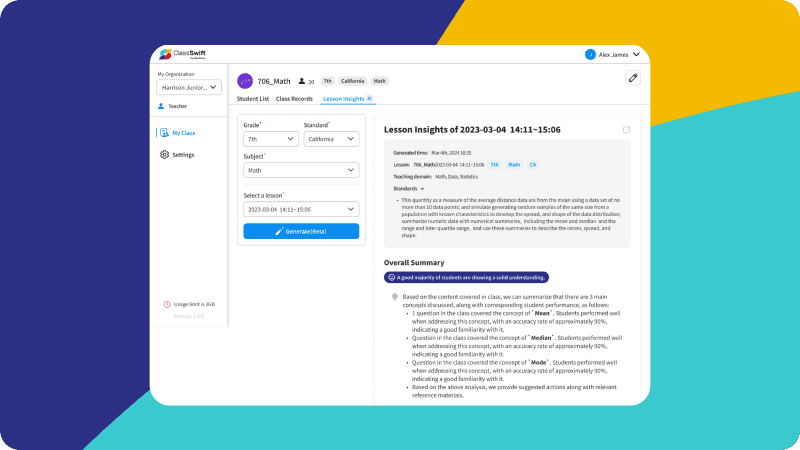
ClassSwift relies on real-time formative assessment and active engagement to keep students involved during live instruction. Teachers capture content from any digital source on their screen, such as a PDF or slide deck, and instantly convert it into a question. Students receive this prompt on their individual devices and submit their answers. The platform aggregates these responses, allowing the teacher to instantly identify misconceptions and provide targeted corrective feedback. By breaking up long lectures with frequent, low-stakes questions, the software leverages the spacing effect and prevents cognitive overload. The teacher dictates the pacing, moving the class forward only when the data indicates mastery of the current concept. While it includes gamified elements to boost motivation, the core mechanics are built around continuous questioning and response, ensuring students remain active participants rather than passive listeners.
Strengths and tradeoffs of ClassSwift
ClassSwift's biggest strength is its ability to facilitate frictionless retrieval practice, while its biggest weakness is its complete reliance on the teacher for instructional content. By allowing educators to turn any digital material into an instant assessment, the platform normalizes frequent, low-stakes testing. Learning science demonstrates that this type of active recall significantly strengthens long-term memory retention. Furthermore, the platform's real-time data collection enables immediate corrective feedback, a critical component of effective learning. Teachers can pinpoint exactly where a lesson is failing and adjust their instruction before moving on. However, ClassSwift is an empty vessel. It lacks built-in worked examples, adaptive pathways, or a structured curriculum. If a teacher asks a poorly framed question, the app will blindly distribute it. Additionally, the software offers no independent practice mechanism for students. All learning relies on synchronous classroom participation. For schools aiming to boost engagement and gather rapid formative data, it is a highly capable tool. For those seeking software that can independently scaffold learning or differentiate instruction without heavy teacher intervention, this platform falls short.
Who Might Benefit From ClassSwift?
Best for middle and high school teachers who want to integrate rapid formative assessment into their existing digital slide decks and lectures. The platform is ideal for live classroom environments across grades 3 through 12 where students have access to individual devices like Chromebooks or tablets. It serves educators teaching heavily conceptual subjects, such as Science, Humanities, and Math, who need to frequently check for understanding before introducing new complexity. It is not suitable for independent student study, homeschooling parents, or self-paced learning environments.
Data Transparency
Meets Data Transparency Standard
ClassSwift meets our data transparency standard at Level 2 of 3 (Parent control). Level 3 needs the policy to document an API for retrieving their own data and a named export format.
24 of 35 checks passed
Evaluated September 2026
ClassSwift →Level 1 · Basic protections
Does not sell data or target ads at students, limits sharing, and lets parents see and delete their child's data.
Level 2 · Parent control (meets the standard)
Families can get their data out, know who processes it, and know how long it is kept.
Level 3 · Direct data access
Families or schools can pull their own data through an API, in a stated format.
Not documented: an API for retrieving their own data, a named export format
View all 35 checks
Parent Access8/8
Does the policy mention parents specifically?
“Parents and guardians have the right to review, correct, or delete their child’s data and revoke consent at any time.”
Can parents view their child's data?
“Parents and guardians have the right to review, correct, or delete their child’s data and revoke consent at any time.”
Can parents modify their child's data?
“Parents and guardians have the right to review, correct, or delete their child’s data and revoke consent at any time.”
Can parents delete their child's account?
“Parents and schools may request deletion of a child's data at any time.”
Is there a dedicated Children's Privacy section?
“At ViewSonic, we take the privacy and safety of children seriously. This section supplements our Privacy Policy and explains how ClassSwift collects, uses, and safeguards personal information of children under the age of 13”
Does it reference COPPA compliance?
“explains how ClassSwift collects, uses, and safeguards personal information of children under the age of 13, in compliance with the Children’s Online Privacy Protection Act (COPPA)”
Does it reference FERPA compliance?
“ClassSwift acts as a 'School Official' under FERPA when used by educational institutions. We use student data solely for authorized educational purposes and offer Data Protection Agreements (DPAs) as needed.”
Is parental consent required for child accounts?
“Parents must provide active consent when their child registers or is invited to use ClassSwift.”
Data Portability2/5
Can users access their personal data?
“Information about your data stored by us and its processing (Art. 15 GDPR),”
Can users download/export their data?
“Data portability, insofar as you have consented to the data processing or have concluded a contract with us (Art. 20 GDPR).”
Is there a self-service data access tool?
The policy says access requests are made by contacting the company, and it describes no self-service access tool.
Is a specific data format mentioned for export?
The policy does not name any export format.
Is there an API for data access?
The policy does not describe an API that lets users retrieve their data.
Data Minimization3/6
Is data collection itemized?
“Account Information: First name, last name, username, school, class ID, and (if permitted) email address.”
Can the app be used without a real name?
The policy says it collects students' first and last names, including from school rosters.
Can the app be used without an email?
The policy says it collects email addresses, including student emails from rosters.
Does it state collection is limited to what is necessary?
“We adhere to the principles of data minimization and purpose limitation. This means we collect only the data necessary to provide our services”
Is IP address anonymized or truncated?
“Storage beyond this period is possible. In this case, the IP addresses of the users are anonymized, so that an assignment of the calling client is no longer possible.”
Is location tracking explicitly excluded?
The policy does not rule out location tracking, and it says location is recorded at newsletter sign-up.
Third-Party Protection7/7
Does it explicitly state no selling of data?
“We do not sell or share your personal data with third parties for their independent marketing or advertising purposes. Data sharing with trusted third parties is limited to what is necessary to:”
Are third-party providers named?
“We work with the following third-party service providers who may collect or process your personal information strictly on our behalf and solely for platform operational purposes.”
Are providers contractually restricted?
“All third-party processors are contractually obligated to process your data only as instructed by ViewSonic and in full compliance with applicable data protection laws.”
No-targeted-advertising commitment?
“We collect only the information necessary to support educational purposes, and we do not use children's data for advertising.”
Is AI/ML data sharing addressed?
“Recipients of user content are either ViewSonic or third-party service providers who help with our data processing. Our AI models are either in-house or sourced from external parties.”
Child-specific sharing restriction?
“We do not sell or share children’s personal information with third parties for marketing purposes. Data is only shared with teachers, parents, verified service providers, or law enforcement when required by law.”
Cookies/tracking limited or opt-out?
“You can set your browser so that you are informed about the setting of cookies and only allow cookies in individual cases, exclude the acceptance of cookies for certain cases, or in general, and activate the automatic deletion of cookies when closing the browser.”
Deletion & Retention3/5
Can users delete their account?
“If you wish to delete your account please send us an email to”
Self-service deletion mechanism?
The policy says account deletion is requested by email, not done through a self-service tool.
Specific data retention timeline?
“We store the data as long as you use ClassSwift. We delete your data when you did not sign in to your account for 12 months.”
Auto-deletion of inactive accounts?
“We delete your data when you did not sign in to your account for 12 months.”
Post-deletion handling described?
The policy says only that unneeded data is deleted or anonymized, and does not describe what happens to data after a deletion request, such as backups or residual copies.
Advertising1/4
Advertising model explicitly disclosed?
The policy does not say whether the product carries advertising.
Free from third-party advertisements?
The policy does not say the product is free of third-party ads.
Children excluded from ad targeting?
“We collect only the information necessary to support educational purposes, and we do not use children's data for advertising.”
Ad-free option available?
The policy does not say the product has no ads and mentions no ad-free option.
Meets Data Transparency Standard
The reviewed policy met our data transparency standard. This result describes the policy disclosures we assessed. Actual practices and legal compliance were not verified.
About this evaluation: Based on automated analysis of ClassSwift against 35 policy-disclosure questions, including questions adapted from the Common Sense Privacy Program's published evaluation questions. TLS is not affiliated with Common Sense Media, and this is not a Common Sense rating. Quoted text is copied from the policy; unquoted notes are our summary. Results describe what the policy documents, not the company's actual practices. Privacy policies can change: this review reflects the version we analyzed and does not determine legal compliance.
Sources and review method
TLS combines product information and editorial analysis to explain how ClassSwift works, its tradeoffs, and the questions to ask before choosing it. Product features, an instructional rationale and evidence of learning outcomes are different kinds of information.
Formal Learning Standard assessment: not yet completed. Data Transparency findings are reported separately and do not establish learning effectiveness. Read our methodology.
Frequently Asked Questions About ClassSwift
Is ClassSwift free?
No, ClassSwift is not free. It costs $100 per teacher per year. This pricing model means it is typically purchased by school districts or highly invested individual educators rather than parents or students.
Is ClassSwift good for elementary students?
Yes, it is appropriate for older elementary students starting in 3rd grade. Because it relies on digital devices and rapid responding, it is best suited for students who possess basic digital literacy and typing skills. It is highly effective for grades 3 through 12.
What does ClassSwift teach?
ClassSwift does not teach a specific subject. It is an empty-vessel platform that allows teachers to deliver interactive questions for any subject, including Humanities, Social Science, Science, and Math. The academic content comes entirely from the educator using the software.
ClassSwift vs Kahoot: Which is better?
ClassSwift focuses on seamless integration with a teacher's existing presentation materials for quick, on-the-fly formative assessment. Kahoot relies more heavily on pre-built, highly gamified quizzes that act as standalone classroom events. ClassSwift is better for continuous, low-stakes checks during a lecture, while Kahoot excels at review games.
Has The Learning Standard evaluated ClassSwift?
TLS has not yet completed a Learning Standard evaluation of how well ClassSwift teaches. Its privacy policy has been reviewed for Data Transparency and reaches Level 2, Parent control.
Is ClassSwift COPPA compliant?
The reviewed privacy policy references COPPA. A policy reference alone does not establish COPPA compliance. Policy review note: The policy states it complies with COPPA.
Is ClassSwift FERPA compliant?
The reviewed privacy policy references FERPA. A policy reference alone does not establish FERPA compliance. Policy review note: The policy has a section on FERPA compliance.
Does ClassSwift have a children's privacy policy?
The reviewed policy includes a dedicated children's privacy section. Policy review note: There is a dedicated "[Addendum] ClassSwift Children’s Privacy Policy" section.
Does ClassSwift sell student data?
The reviewed policy states that the app does not sell data. This is a policy statement; actual data practices were not verified. Policy review note: The vendor says it does not sell personal data and limits sharing to what is necessary.
Can you delete your data from ClassSwift?
The reviewed privacy policy describes account deletion. We have not tested the deletion process. Policy review note: Users can ask by email to have their account deleted.
Follow TLS Research
Subscribe to future TLS research updates: app reviews, findings, and what the evidence shows.
Screenshots


Take Action
For ClassSwift
If you represent ViewSonic Corporation and have a correction or new evidence, send the relevant source so we can review and update this page.
Submit a correctionDetails
- Pricing
- 100$ per teacher per year
- Platforms
- Windows (Microsoft), macOS (Apple)
- Grade Levels
- 3rd Grade, 4th Grade, 5th Grade, 6th Grade, 7th Grade, 8th Grade, 9th Grade, 10th Grade, 11th Grade, 12th Grade
- Website
- Visit site