
Calcularis
Product by Constructor Tech
Facts checked: Not yet checked
Our take (not a Learning Standard rating). This label applies to learning-science judgments throughout this overview.
Our take (not a Learning Standard rating)
While The Learning Standard has not yet fully evaluated Calcularis, its underlying design relies on strong adaptive pacing and neuroscientific principles to automate basic math skills. It effectively targets number sense and calculation fluency, though its heavy reliance on gamification may distract some learners from the core mathematical concepts.
Pros
- Adjusts problem difficulty in real-time based on learner responses to maintain an optimal cognitive load.
- Automates foundational number sense by moving students away from counting on fingers toward fact retrieval.
- Provides structured interventions specifically designed to support learners diagnosed with dyscalculia.
- Uses immediate corrective feedback to prevent the encoding of incorrect mathematical procedures.
Cons
- Gamification elements frequently interrupt learning blocks, reducing time on task.
- Lacks explicit instruction or worked examples to teach new concepts before testing them.
- Progress metrics emphasize speed and completion rather than deep conceptual understanding.
- Has not yet undergone formal rigorous evaluation by The Learning Standard to verify developer claims.
What Do We Know About Calcularis?
Calcularis is an effective supplementary tool for automating basic arithmetic skills, particularly for your child if they struggle with dyscalculia or foundational number sense. The app focuses on moving learners from slow, effortful counting to rapid retrieval practice. It tracks your child's response times and accuracy, continuously adjusting the difficulty to keep them in their zone of proximal development. This means your child will not be bored with problems that are too easy, nor overwhelmed by problems that are too hard. However, it relies heavily on gamification to drive engagement. While points and rewards motivate initial use, they can also shift your child's focus away from intrinsic math learning and toward simply beating the game. Because it acts primarily as a practice environment rather than an instructional one, your child will still need explicit teaching to understand new mathematical concepts. The Learning Standard has not yet formally evaluated the specific long-term outcomes of Calcularis, but its reliance on cognitive science principles for repeated practice makes it a solid tool for building basic computation speed and accuracy.
How Does Calcularis Work?
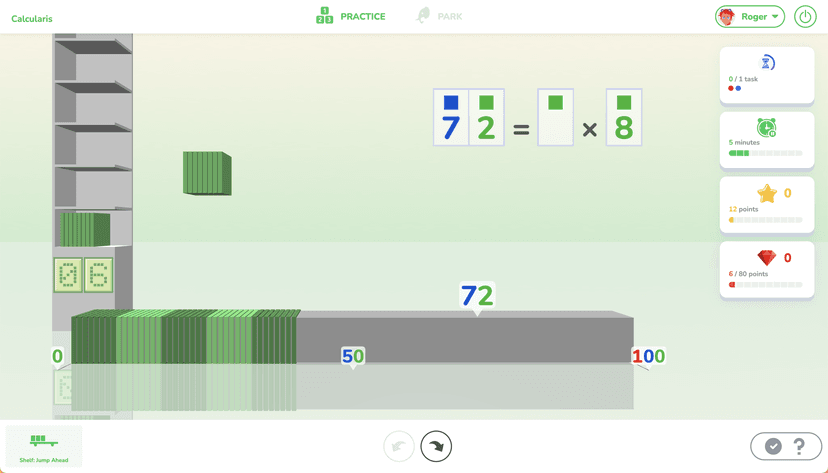
Calcularis uses mastery-based progression driven by artificial intelligence to provide targeted arithmetic practice. The system presents your child with brief math exercises ranging from basic number lines to complex addition and subtraction tasks. Behind the scenes, an algorithm tracks every input, measuring both accuracy and the exact time it takes to answer. This data builds a cognitive profile of your child's specific weaknesses. If your child struggles with the spatial representation of numbers, the system automatically loops back, providing visual aids like a digital abacus or number line. Once your child demonstrates rapid, error-free retrieval of a concept, the app gradually strips away these visual scaffolds. This process, known as fading, forces the brain to automate the math fact. Gamification is woven throughout the experience. After completing practice blocks, your child earns digital currency to customize avatars or unlock mini-games. This cycle of practice, feedback, and reward repeats, aiming to build computational fluency over short, consistent sessions.
Strengths and tradeoffs of Calcularis
The biggest strength of Calcularis is its highly responsive adaptive algorithm, while its biggest weakness is the lack of explicit worked examples to introduce new material. The program excels at retrieval practice, forcing learners to pull math facts from memory quickly. By carefully spacing out the repetition of specific problem types, it strengthens neural pathways and helps automate basic calculations. This is particularly beneficial for students with dyscalculia, as the app builds a strong visual-spatial representation of numbers before moving to abstract equations. However, the app assumes a level of prior knowledge. Without explicit instruction or step-by-step worked examples, a child encountering a completely new concept may resort to guessing rather than learning the underlying procedure. Furthermore, the extensive use of extrinsic rewards through gamification can create split attention. Your child may spend too much cognitive effort navigating the game mechanics rather than focusing on the mathematical relationships. Overall, while the cognitive scaffolding for existing skills is robust, parents must provide the foundational instruction separately.
Who Might Benefit From Calcularis?
Calcularis is best for elementary students in grades K-5 who need targeted intervention to build math fact fluency and overcome calculation anxiety. It is particularly valuable for children previously diagnosed with dyscalculia or those who consistently rely on finger-counting. Because the app adjusts automatically to the user's skill level, it serves well as a daily fifteen-minute supplement to standard classroom instruction. It is not ideal for teaching entirely new concepts, making it best suited for parents and educators looking for a scientifically grounded practice environment rather than a standalone comprehensive math curriculum.
Data Transparency
Does Not Meet Data Transparency Standard
Calcularis does not meet our data transparency standard. Its privacy policy does not document basic protections, including a statement that it does not sell data, a commitment against targeted advertising and a COPPA or FERPA commitment.
15 of 35 checks passed
Evaluated September 2026
Privacy notice →Level 1 · Basic protections
Does not sell data or target ads at students, limits sharing, and lets parents see and delete their child's data.
Not documented: a statement that it does not sell data, a commitment against targeted advertising, a COPPA or FERPA commitment, parents' right to see their child's data, parents' right to delete their child's data
Level 2 · Parent control (meets the standard)
Families can get their data out, know who processes it, and know how long it is kept.
Not documented: named service providers, self-service deletion
Level 3 · Direct data access
Families or schools can pull their own data through an API, in a stated format.
Not documented: an API for retrieving their own data, a named export format
View all 35 checks
Parent Access3/8
Does the policy mention parents specifically?
“Children (as defined under the applicable data privacy laws) may only access or use our services with the consent and under the supervision of a parent or legal guardian who agrees to be bound by this Privacy Notice.”
Can parents view their child's data?
The policy does not give parents a right to view their child's data; access rights are described only for the individual user.
Can parents modify their child's data?
The policy does not give parents a right to modify their child's data.
Can parents delete their child's account?
The policy does not give parents a right to delete their child's data or account.
Is there a dedicated Children's Privacy section?
“## 4\. Children’s privacy”
Does it reference COPPA compliance?
The policy text does not reference COPPA compliance; COPPA appears only as a footer badge image.
Does it reference FERPA compliance?
The policy text does not reference FERPA compliance; FERPA appears only as a footer badge image.
Is parental consent required for child accounts?
“Children (as defined under the applicable data privacy laws) may only access or use our services with the consent and under the supervision of a parent or legal guardian who agrees to be bound by this Privacy Notice.”
Data Portability3/5
Can users access their personal data?
“**Right to Access:** You have the right to view and request copies of your personal data.”
Can users download/export their data?
“**Right to Data Portability:** You have the right to request that we transfer data that we have collected to another organization, or directly to you under certain conditions.”
Is there a self-service data access tool?
“If you have an online account or profile with us, you may access your personal data via your account through the website or mobile app.”
Is a specific data format mentioned for export?
The policy does not specify any data export format.
Is there an API for data access?
The policy mentions APIs only for third-party integrations, not as a user data access API.
Data Minimization1/6
Is data collection itemized?
“**Contact information**, such as name, business email address, phone number, your photo, billing information, physical address, Telegram / Zoom / WhatsApp / Skype and similar services information, call recordings, information you input in open text fields in help/contact us forms.”
Can the app be used without a real name?
The policy states it collects names as contact information.
Can the app be used without an email?
The policy states it collects email addresses as contact information.
Does it state collection is limited to what is necessary?
The policy limits use and retention to stated purposes but does not state that collection is limited to what is necessary.
Is IP address anonymized or truncated?
The policy states it collects IP addresses and does not say they are anonymized or truncated.
Is location tracking explicitly excluded?
The policy does not explicitly exclude location tracking.
Third-Party Protection4/7
Does it explicitly state no selling of data?
The policy does not state that the company does not sell personal data.
Are third-party providers named?
The policy links to a subprocessor list but does not name third-party providers itself.
Are providers contractually restricted?
“Processing of personal data by such third parties is governed by data processing agreements we have in place.”
No-targeted-advertising commitment?
The policy states device information is used for advertising and that advertising partners use targeting cookies.
Is AI/ML data sharing addressed?
“| Content information | For data labeling and machine learning to improve our services | Our legitimate interests or your consent |”
Child-specific sharing restriction?
“Consent for children younger than 16 years old (or lower as required by law) must be given by the parent or guardian.”
Cookies/tracking limited or opt-out?
“We do not use cookies until you consent or opt in using cookie preferences.”
Deletion & Retention3/5
Can users delete their account?
“**Right to Request Erasure (Right to be Forgotten):** You may request that we delete your personal data, subject to certain limited exceptions.”
Self-service deletion mechanism?
The policy provides deletion only by email request, not a self-service tool.
Specific data retention timeline?
“We generally retain information regarding our services for a year from the date of our last interaction/account closure/etc., in compliance with our obligations under applicable laws”
Auto-deletion of inactive accounts?
The policy states a general retention period but does not explicitly commit to auto-deleting inactive accounts.
Post-deletion handling described?
“When we destroy your personal data, we do so in a way that prevents that information from being restored or reconstructed.”
Advertising1/4
Advertising model explicitly disclosed?
“our advertising partners may use targeting cookies to build a profile of your interests and show you relevant adverts on the website.”
Free from third-party advertisements?
The policy states advertising partners show adverts on the website.
Children excluded from ad targeting?
The policy does not exclude children from ad targeting.
Ad-free option available?
The policy does not describe an ad-free option and discloses advertising.
What This Means
The policy review did not meet our data transparency standard. The checks above show the documented findings and unknowns. A missing statement does not establish how the app handles data in practice.
About this evaluation: Based on automated analysis of Privacy notice against 35 policy-disclosure questions, including questions adapted from the Common Sense Privacy Program's published evaluation questions. TLS is not affiliated with Common Sense Media, and this is not a Common Sense rating. Quoted text is copied from the policy; unquoted notes are our summary. Results describe what the policy documents, not the company's actual practices. Privacy policies can change: this review reflects the version we analyzed and does not determine legal compliance.
Sources and review method
TLS combines product information and editorial analysis to explain how Calcularis works, its tradeoffs, and the questions to ask before choosing it. Product features, an instructional rationale and evidence of learning outcomes are different kinds of information.
Formal Learning Standard assessment: not yet completed. Data Transparency findings are reported separately and do not establish learning effectiveness. Read our methodology.
Frequently Asked Questions About Calcularis
Is Calcularis free?
Calcularis offers a limited free trial, but ongoing access requires a paid subscription. The trial allows parents to assess the adaptive algorithm before committing financially.
Is Calcularis good for elementary students?
Yes. It specifically targets kindergarten through 5th-grade math skills. The interface and game mechanics are designed to keep younger learners engaged while systematically building their foundational number sense.
What does Calcularis teach?
Calcularis teaches foundational arithmetic, including number lines, addition, subtraction, multiplication, and division. It focuses heavily on the automation of math facts and visual-spatial number representation rather than complex word problems.
Calcularis vs. Prodigy Math: Which is better?
Calcularis is better for focused, adaptive intervention for struggling learners, notably those with dyscalculia. Prodigy Math functions more like a traditional role-playing game with math questions layered on top, which can lead to more distractions but higher self-directed engagement.
Has The Learning Standard evaluated Calcularis?
TLS has not yet completed a Learning Standard evaluation of how well Calcularis teaches. Its privacy policy has been reviewed for Data Transparency and does not yet document the basic protections (Level 1).
Is Calcularis COPPA compliant?
A COPPA reference was not found in the reviewed privacy policy. This does not determine whether the app complies with COPPA. Policy review note: The policy text does not reference COPPA compliance; COPPA appears only as a footer badge image.
Is Calcularis FERPA compliant?
A FERPA reference was not found in the reviewed privacy policy. This does not determine whether the app complies with FERPA. Policy review note: The policy text does not reference FERPA compliance; FERPA appears only as a footer badge image.
Does Calcularis have a children's privacy policy?
The reviewed policy includes a dedicated children's privacy section. Policy review note: The policy has a dedicated Children's privacy section.
Does Calcularis sell student data?
A statement ruling out data selling was not found in the reviewed policy. This does not establish that the app sells student data. Policy review note: The policy does not state that the company does not sell personal data.
Can you delete your data from Calcularis?
The reviewed privacy policy describes account deletion. We have not tested the deletion process. Policy review note: Users can request deletion of their personal data.
Follow TLS Research
Subscribe to future TLS research updates: app reviews, findings, and what the evidence shows.
Screenshots

Take Action
For Calcularis
If you represent Constructor Tech and have a correction or new evidence, send the relevant source so we can review and update this page.
Submit a correctionDetails
- Pricing
- Free trial
- Platforms
- Web Browser, iPadOS (Apple tablet), Windows (Microsoft), Chrome OS (Google)
- Grade Levels
- Kindergarten, 1st Grade, 2nd Grade, 3rd Grade, 4th Grade, 5th Grade
- Website
- Visit site