
Breakout EDU
Product by Breakout EDU
Facts checked: Not yet checked
Our take (not a Learning Standard rating). This label applies to learning-science judgments throughout this overview.
What Do We Know About Breakout EDU?
Breakout EDU essentially forces a worksheet into an escape room. Instead of drilling practice problems, kids huddle over clues, trying to crack codes and pop open physical or digital locks. You feed them a storyline, scatter the hints, and suddenly they actually want to use whatever history or math you just taught them.
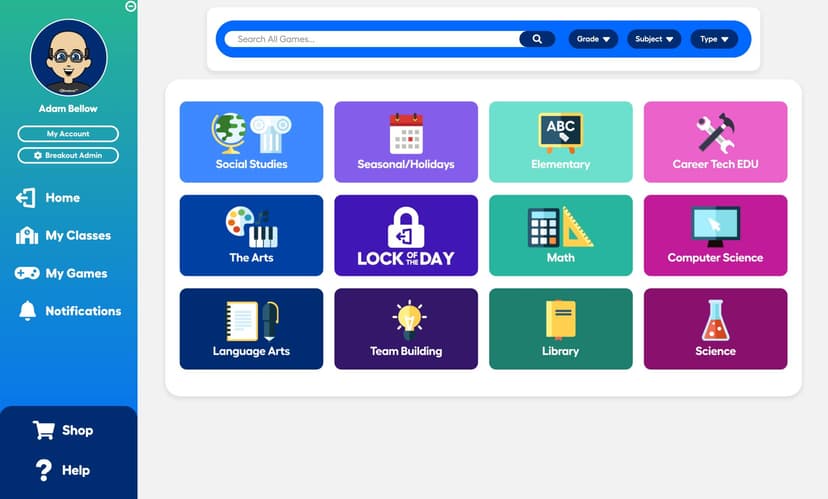
The platform has thousands of pre-made games, which is a massive time-saver. But honestly? The physical kits, the ones the students absolutely go wild for, are a headache to prep. You’re stuck resetting combo locks and hiding boxes during your five-minute passing periods. It's also an investment: $259 for the kit and digital bundle, or $99 a year for just the digital side once the trial runs out.
You also have to manage the room dynamics carefully. Slapping a giant countdown timer on the smartboard will completely paralyze anxious students while hyping the competitive ones up to a screeching 11.
Even with the heavy prep and the price tag, the payoff is usually worth it. It has the ESSA evidence badge, which is great for admin buy-in, but the real proof is seeing students recall the material weeks later because they had to use it to "survive." It’s loud, stressful, and messy, but it’s the good kind of chaos.
How Does Breakout EDU Work?
I've noticed kids engage completely differently when there's a ticking clock in the room. That's essentially the engine behind Breakout EDU. Instead of sitting through another slide deck, students are handed a locked box and a set of bizarre clues. They actually have to use the material we've been covering to get the thing open. It gets frustrating for them sometimes, which is exactly that 'productive struggle' educators are always chasing.
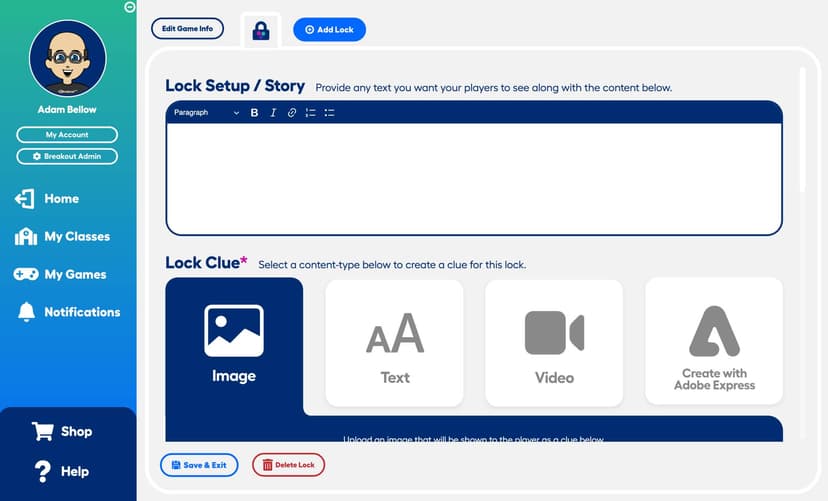
The setup relies heavily on basic game mechanics: timers, weird little narratives, and brutal, immediate feedback. A physical padlock doesn't care if a student is almost right. It either clicks open or it sits there mocking them. If a group's strategy fails, they have to pivot immediately. The puzzles are deliberately hard enough that one person can't just solo the whole thing. They literally run out of time unless they start delegating and talking to each other.
Honestly, the most valuable part happens after the final lock comes off. Taking ten minutes to debrief is where the actual connections are made. The adrenaline wears off, and they realize they just willingly applied the math or history concepts they were groaning about yesterday. Plus, we get to unpack why screaming at each other over a directional lock maybe wasn't the best communication strategy.
Strengths and tradeoffs of Breakout EDU
I've been using these escape-room setups for a while, and the engagement is honestly off the charts. Kids actually want to solve the problems to get the box open. You see them naturally divide up tasks (one kid reads the clue, another fiddles with the lock) which is a sneaky way to build soft skills. It’s also great for teaching them how to fail. Watching a group argue, realize their code is wrong, and have to try again builds serious resilience. Plus, there are thousands of pre-made games covering everything from early phonics to high school chem, and the digital versions are a lifesaver if you don't have the energy to deal with the physical locks.
That said, the physical kits are a massive investment. You’re looking at over $250 for a bundle, so you usually have to beg your admin or the PTA for funding. And the setup is a beast. Printing clues, setting combinations, and then resetting everything between periods is exhausting. This is definitely not a plug-and-play activity you can prep five minutes before the bell rings. You also have to manage the room heavily. The loud kids inevitably try to monopolize the boxes, and the ticking timer can totally paralyze anxious students if you aren't careful.
I usually roll my eyes at the "research" edtech companies slap on their websites, but the data actually supports this one. It carries an Instructure ESSA Evidence badge, and studies on educational escape rooms show they genuinely boost retention. Gamifying the lesson does work: you just have to be prepared for the heavy prep that comes with it.
Who Might Benefit From Breakout EDU?
If you walk into a classroom and see a group of kids huddled around a plastic lockbox, arguing over a cipher, they're probably doing a Breakout EDU lesson. I've seen teachers, coaches, and librarians pull out these escape-room-style games mostly to hype up a new unit, or to make test prep slightly less painful.
While the site advertises games for all of K-12, the reality is that the sweet spot is upper elementary through high school. Anything younger than fourth grade, and the multi-step puzzles usually just devolve into a turf war over who gets to physically hold the padlock.
It’s definitely not something you’d use as a standalone curriculum or hand out for independent homework. Instead, whether you're doing it in person or over a livestream, it's just a great, high-energy way to trick kids into doing heavy-lifting group work and actually talking to each other.
Data Transparency
Meets Data Transparency Standard
Breakout EDU meets our data transparency standard at Level 2 of 3 (Parent control). Level 3 needs the policy to document an API for retrieving their own data and a named export format.
20 of 35 checks passed
Level 1 · Basic protections
Does not sell data or target ads at students, limits sharing, and lets parents see and delete their child's data.
Level 2 · Parent control (meets the standard)
Families can get their data out, know who processes it, and know how long it is kept.
Level 3 · Direct data access
Families or schools can pull their own data through an API, in a stated format.
Not documented: an API for retrieving their own data, a named export format
View all 35 checks
Parent Access7/8
Does the policy mention parents specifically?
“If you are a parent and you have questions about your child's use of our Service and any information collected, you should discuss your questions with your child's School, which will submit the request to Breakout at the School’s discretion.”
Can parents view their child's data?
“Parents, legal guardians, or eligible pupils may review personally identifiable information in the pupil's records and correct erroneous information by contacting LEA directly.”
Can parents modify their child's data?
“Parents, legal guardians, or eligible pupils may review personally identifiable information in the pupil's records and correct erroneous information by contacting LEA directly.”
Can parents delete their child's account?
“Upon request, we will provide Schools with an opportunity to review, modify and/or delete the personal information collected from their students. If you are a parent and you have questions about your child's use of our Service and any information collected, you should discuss your questions with your child's School, which will submit the request to Breakout at the School’s discretion.”
Is there a dedicated Children's Privacy section?
“The Children's Online Privacy Protection Act (“COPPA”)”
Does it reference COPPA compliance?
“This Privacy Policy and our Service are designed to comply with COPPA.”
Does it reference FERPA compliance?
“This Privacy Policy and our Service are designed to meet our responsibilities to protect personal information from the students’ educational records under FERPA.”
Is parental consent required for child accounts?
The policy relies on the school, not parents, to give consent for students under 13.
Data Portability1/5
Can users access their personal data?
“Upon request, we will provide Schools with an opportunity to review, modify and/or delete the personal information collected from their students.”
Can users download/export their data?
The policy does not address downloading or exporting data.
Is there a self-service data access tool?
The policy describes access only by request, not through a self-service tool.
Is a specific data format mentioned for export?
The policy does not mention any export format.
Is there an API for data access?
The policy mentions Google APIs and SSO only, not an API for users or schools to retrieve their own data.
Data Minimization2/6
Is data collection itemized?
“Examples include referring URL; IP address; device identifier; browser type and version; device name and model; operating system type, name and version; web pages viewed; links clicked; and length of time spent engaged with the Service.”
Can the app be used without a real name?
The policy says schools may provide student first names and last initials, so real names can be collected.
Can the app be used without an email?
The policy gives a non-exhaustive list of student data and does not state that student email addresses are never collected.
Does it state collection is limited to what is necessary?
“NO Data, other than what is essential to provide service (listed above) is collected”
Is IP address anonymized or truncated?
The policy says it collects IP addresses but does not mention anonymizing or truncating them.
Is location tracking explicitly excluded?
The policy does not explicitly rule out location tracking.
Third-Party Protection5/7
Does it explicitly state no selling of data?
“We DO NOT share or sell any data about our users.”
Are third-party providers named?
“We may collect analytics data, or use third-party analytics tools, such as Google Analytics, to help us measure traffic and usage trends for the Service”
Are providers contractually restricted?
The policy does not describe contractual restrictions on service providers; it only covers successor obligations in a business transfer.
No-targeted-advertising commitment?
“Breakout does not display any targeted advertising on the Service.”
Is AI/ML data sharing addressed?
The policy does not address AI or machine learning.
Child-specific sharing restriction?
“We consider Student Data to be highly confidential and do not use such data for any purpose other than providing our Service to the School and as otherwise provided in our agreements with the School.”
Cookies/tracking limited or opt-out?
“Most browsers are initially set up to accept cookies, but you can reset your browser to refuse all cookies or to indicate when a cookie is being sent.”
Deletion & Retention4/5
Can users delete their account?
“Otherwise, we will delete personal information upon request or according to our standard data retention schedule.”
Self-service deletion mechanism?
“The School is responsible for maintaining current class rosters and managing Student Data which the School no longer needs for an educational purpose through the School roster or by submitting a deletion request.”
Specific data retention timeline?
“We retain Student Data for a period of up to six months after termination of the contract to continue to provide the School access to its records, after which the Student Data will be deleted and/or de-identified, unless we receive a deletion request from a School prior to that date.”
Auto-deletion of inactive accounts?
The policy ties deletion to contract termination, not to account inactivity.
Post-deletion handling described?
“We may retain indefinitely information which has been de-identified or aggregated such that it can no longer reasonably identify a particular individual. All retained personal information will remain subject to the terms of this Privacy Policy.”
Advertising1/4
Advertising model explicitly disclosed?
The policy only says there is no targeted advertising and does not state whether the service has advertising at all.
Free from third-party advertisements?
The policy rules out only targeted advertising, not third-party ads in general.
Children excluded from ad targeting?
“We do not engage in targeted advertising based on student information that we collect through our Service.”
Ad-free option available?
The policy does not state the service is ad-free or offer an ad-free option; it only rules out targeted ads.
Meets Data Transparency Standard
The reviewed policy met our data transparency standard. This result describes the policy disclosures we assessed. Actual practices and legal compliance were not verified.
About this evaluation: Based on automated analysis of Privacy Policy and platform.breakoutedu.com against 35 policy-disclosure questions, including questions adapted from the Common Sense Privacy Program's published evaluation questions. TLS is not affiliated with Common Sense Media, and this is not a Common Sense rating. Quoted text is copied from the policy; unquoted notes are our summary. Results describe what the policy documents, not the company's actual practices. Privacy policies can change: this review reflects the version we analyzed and does not determine legal compliance.
Sources and review method
TLS combines product information and editorial analysis to explain how Breakout EDU works, its tradeoffs, and the questions to ask before choosing it. Product features, an instructional rationale and evidence of learning outcomes are different kinds of information.
Formal Learning Standard assessment: not yet completed. Data Transparency findings are reported separately and do not establish learning effectiveness. Read our methodology.
Frequently Asked Questions About Breakout EDU
Is Breakout EDU free?
Nope. You can snag a 14-day free trial of the digital platform, but after that, a single-teacher digital subscription is $99 a year. If you want the actual physical lockboxes (which is honestly the best part), you're looking at $259 for the kit. School-wide licenses run around $999. It's an investment, so definitely exhaust that trial first to see if your kids actually bite.
Is Breakout EDU good for early elementary students?
Technically, yes, but tread carefully. They have games designed for PreK-2 covering counting and letter sounds, but young kids often hit a wall with the escape-room mechanics. Expect to do a ton of hand-holding. Little ones haven't mastered taking turns or handling the frustration of a wrong combination yet. If you do go digital with early readers, lean hard on the text-to-speech feature.
What does Breakout EDU actually teach?
Pretty much any subject. You can plug math, history, or reading into the puzzle templates. But honestly, the subject matter is almost secondary. The real payoff is watching students learn how not to bite each other's heads off when they're stressed. They have to beat a clock, decode clues, and agree on a strategy. It forces them to communicate and problem-solve under pressure.
Breakout EDU vs. Quizlet?
Comparing these two is like comparing flashcards to a board game. Quizlet is straight-up rote memorization and individual study. You use it when you need kids to drill vocab words quietly. Breakout EDU is loud, collaborative, and messy. If you want independent drill-and-kill, use Quizlet. If you want them out of their seats arguing over how to crack a code, use Breakout.
How long does a Breakout EDU game take?
Plan for an entire class period if you're doing a full physical or digital box. Between explaining the rules, the 45-ish minutes of actual gameplay, and the inevitable debrief to calm everyone down afterward, a full game eats up an hour easily. If you just want a quick 5-minute warm-up, stick to their digital "Lock of the Day."
Has The Learning Standard evaluated Breakout EDU?
TLS has not yet completed a Learning Standard evaluation of how well Breakout EDU teaches. Its privacy policy has been reviewed for Data Transparency and reaches Level 2, Parent control.
Is Breakout EDU COPPA compliant?
The reviewed privacy policy references COPPA. A policy reference alone does not establish COPPA compliance. Policy review note: The policy states it is designed to comply with COPPA.
Is Breakout EDU FERPA compliant?
The reviewed privacy policy references FERPA. A policy reference alone does not establish FERPA compliance. Policy review note: The policy addresses FERPA compliance.
Does Breakout EDU have a children's privacy policy?
The reviewed policy includes a dedicated children's privacy section. Policy review note: The policy has a section with its own COPPA heading.
Does Breakout EDU sell student data?
The reviewed policy states that the app does not sell data. This is a policy statement; actual data practices were not verified. Policy review note: The policy states Breakout does not sell user data.
Can you delete your data from Breakout EDU?
The reviewed privacy policy describes account deletion. We have not tested the deletion process. Policy review note: Personal information is deleted on request.
Follow TLS Research
Subscribe to future TLS research updates: app reviews, findings, and what the evidence shows.
Screenshots
Take Action
For Breakout EDU
If you represent Breakout EDU and have a correction or new evidence, send the relevant source so we can review and update this page.
Submit a correctionDetails
- Pricing
- https://breakoutedu.com/pricing
- Platforms
- Web Browser, iOS (Apple mobile), iPadOS (Apple tablet), Android (Google mobile), Tizen (Samsung mobile), Windows (Microsoft), macOS (Apple), Chrome OS (Google)
- Grade Levels
- Prekindergarten, Transitional Kindergarten, Kindergarten, 1st Grade, 2nd Grade, 3rd Grade, 4th Grade, 5th Grade, 6th Grade, 7th Grade, 8th Grade, 9th Grade, 10th Grade, 11th Grade, 12th Grade, Associate's degree, Bachelor's degree, Post-baccalaureate certificate, Master's Degree, Post-master's certificate, Doctoral Degree, Post-doctoral certificate, Adult Education, Professional or Technical Credential
- Website
- Visit site