Book Creator
Product by Tools for Schools
Facts checked: Not yet checked
Our take (not a Learning Standard rating). This label applies to learning-science judgments throughout this overview.
Our take (not a Learning Standard rating)
Book Creator does not deliver direct instruction or structured practice, so it does not teach concepts outright. Instead, it serves as a robust constructionist tool where students consolidate their own learning. By synthesizing information through multimedia creation, students engage in high-level cognitive processing, but only when guided by an effective teacher.
Pros
- Enables constructionist learning by requiring students to synthesize and organize knowledge into a published format.
- Supports multimodal expression through audio, video, text, and images, reducing cognitive load for students struggling with traditional writing.
- Facilitates collaborative peer learning through real-time co-editing features.
- Provides built-in accessibility tools like speech-to-text to support diverse learning needs.
Cons
- Lacks built-in curriculum, meaning teachers must design the learning objectives and rubrics themselves.
- Provides no automated feedback or formative assessment tools to correct student misconceptions during the drafting process.
- Can cause cognitive overload if students focus more on formatting and design features than on the academic content.
- Relies entirely on external educator scaffolding to ensure students engage in meaningful retrieval practice.
What Do We Know About Book Creator?
Book Creator is a highly effective blank-canvas tool for demonstrating knowledge, but it relies entirely on your child's teacher to provide the actual instruction. It is not an app your child will use to learn new math formulas or grammar rules independently. Instead, your child uses it to build digital books that summarize what they have already learned in class. This aligns with constructionist learning theory, which states that students learn best by making tangible objects. When your child records an audio explanation of a science experiment or types a historical narrative, they are actively retrieving information from their memory and synthesizing it. This deepens retention far more effectively than passive reading. However, because the app has no built-in guardrails, its educational value depends entirely on the assignment. If the task lacks clear constraints, your child might spend hours playing with fonts and stickers rather than engaging with the academic material. Parents should look for signs that teachers are providing clear rubrics and structured outlines before students open the app. The Learning Standard has not yet formally evaluated Book Creator, but as an open-ended creation platform, it excels at letting students prove what they know through multiple mediums.
How Does Book Creator Work?
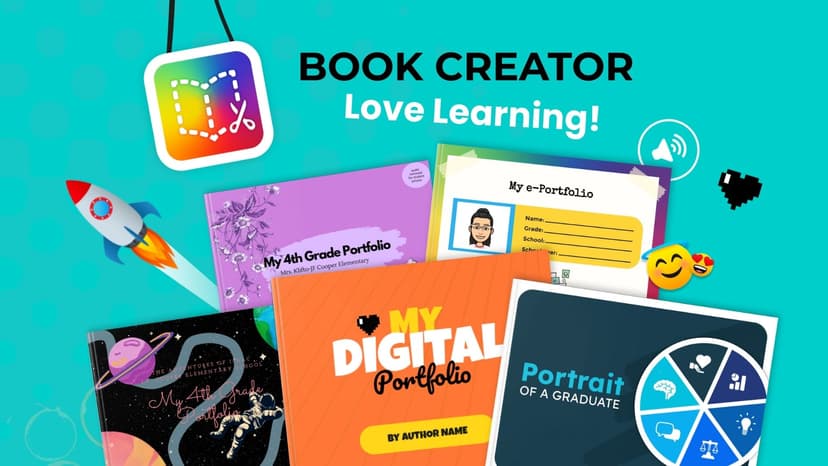
Book Creator relies on a constructionist pedagogical approach where students actively build knowledge by creating multimedia digital artifacts. Students start with a blank digital page or a basic template. They then populate their book using a combination of text, uploaded images, hand-drawn illustrations, and embedded audio or video recordings. This multimodal capability allows students to process information in ways that best suit their working memory capacity. For example, a student who struggles with writing can dictate their thoughts or record a video explaining a math concept. The platform includes real-time collaboration tools, allowing multiple students to work on the same book simultaneously to support peer-to-peer learning and distributed cognition. Teachers manage these projects through a digital library dashboard where they can monitor progress, leave comments, and eventually publish the finished books to a secure private audience. Because the app does not provide automated instruction, the learning mechanics rely heavily on the teacher prompting students to engage in retrieval practice as they recall facts to include in their books.
Strengths and tradeoffs of Book Creator
Book Creator's biggest strength is its inclusive, multimodal design that removes barriers to expression, while its biggest weakness is the complete lack of built-in instructional scaffolding. Strengths: By allowing students to use voice, video, and text interchangeably, the platform brilliantly accommodates varied cognitive loads and physical abilities. This multimodal approach aligns perfectly with the Universal Design for Learning (UDL) framework. When students explain concepts out loud or visually map a story, they engage in deep elaboration, a learning science principle that solidifies long-term memory. The platform also offers high utility across every single subject area. Weaknesses: Because it is an open-ended creation engine, it provides zero direct instruction, worked examples, or corrective feedback. If a student misspells a word or misstates a historical fact, the app will not correct them. Furthermore, the sheer variety of design options can easily lead to extraneous cognitive load. Students often become distracted by choosing fonts, colors, and layouts, taking their focus away from the core academic content. The app requires an educator to heavily structure the learning experience with rubrics, graphic organizers, and constant check-ins to ensure that creation translates into actual learning.
Who Might Benefit From Book Creator?
Book Creator is best for diverse classrooms where educators want a single, flexible platform to help students demonstrate their knowledge across multiple subjects. It serves students from prekindergarten through high school by scaling its complexity to match the user's developmental level. Young children can use it for simple phonics portfolios using audio recordings, while older students can design complex, media-rich science reports or historical zines. It is an ideal tool for project-based learning environments and schools focused on Universal Design for Learning (UDL), provided teachers are prepared to supply the necessary instructional scaffolding and grading rubrics.
Data Transparency
Does Not Meet Data Transparency Standard
Book Creator reaches Level 1 of 3 (Basic protections), below our data transparency standard. Reaching Level 2 needs the policy to document a data retention timeline and self-service deletion.
22 of 35 checks passed
Level 1 · Basic protections
Does not sell data or target ads at students, limits sharing, and lets parents see and delete their child's data.
Level 2 · Parent control (meets the standard)
Families can get their data out, know who processes it, and know how long it is kept.
Not documented: a data retention timeline, self-service deletion
Level 3 · Direct data access
Families or schools can pull their own data through an API, in a stated format.
Not documented: an API for retrieving their own data, a named export format
View all 35 checks
Parent Access6/8
Does the policy mention parents specifically?
“If you are a parent, you may request access to, or review of, your child’s records at any time by contacting your child’s school or district directly.”
Can parents view their child's data?
“If you are a parent, you may request access to, or review of, your child’s records at any time by contacting your child’s school or district directly.”
Can parents modify their child's data?
“If you would like to use any of these rights, you can either email us directly or ask your parent, guardian or teacher to email us at dpo@bookcreator.com.”
Can parents delete their child's account?
“If you would like to use any of these rights, you can either email us directly or ask your parent, guardian or teacher to email us at dpo@bookcreator.com.”
Is there a dedicated Children's Privacy section?
“## **Children’s privacy notice** Our service is designed for children under 13, teens, and their teachers.”
Does it reference COPPA compliance?
The policy does not mention COPPA.
Does it reference FERPA compliance?
“When we work with educational institutions in the US, we will work to ensure mutual compliance with the Family Education Rights and Privacy Act (FERPA).”
Is parental consent required for child accounts?
The policy says the school is responsible for any consent that "might be required" and that parents can withdraw consent, but it does not say parental consent is required for child accounts.
Data Portability2/5
Can users access their personal data?
“**Access:** You can request a copy of the personal information that we have collected about you.”
Can users download/export their data?
“**Portability:** You can ask us to give you a copy of your Account Data, or transfer it to a third party, in a commonly-used, electronic format.”
Is there a self-service data access tool?
The policy says data rights are exercised by contacting the company, and it describes no self-service data access tool beyond downloading books.
Is a specific data format mentioned for export?
The policy mentions only a "commonly-used, electronic format" and names no specific format.
Is there an API for data access?
The policy does not describe an API for users to access their data.
Data Minimization2/6
Is data collection itemized?
“More information about the specific types of data we collect, and the purposes for use, is set out in the Annex to this policy.”
Can the app be used without a real name?
The policy lists Name as Account Data that is collected.
Can the app be used without an email?
The policy collects email addresses except for "Student logins without an email" accounts, so student emails are collected in other cases.
Does it state collection is limited to what is necessary?
“We will only collect the minimum data necessary to run and manage Book Creator.”
Is IP address anonymized or truncated?
The policy says IP addresses are collected and used to work out coarse location, and it does not say they are anonymized or truncated.
Is location tracking explicitly excluded?
The policy says approximate (coarse) location is collected from IP addresses.
Third-Party Protection6/7
Does it explicitly state no selling of data?
“sell or rent your information for any purposes;”
Are third-party providers named?
“All information collected through Book Creator is stored in Google Cloud and hosted in the USA.”
Are providers contractually restricted?
“We use a third-party analytics service, which collects and processes data about how Book Creator is used so that we can understand usage and improve the service. The data processing is contractually limited to providing us an analytics service and not for other purposes.”
No-targeted-advertising commitment?
“We **do not**: - include any advertising in the product, including targeted or personalised adverts; - use your information to target advertising at you;”
Is AI/ML data sharing addressed?
The policy only rules out wholly automated decision-making and does not address sharing data for AI/ML.
Child-specific sharing restriction?
“We **do not**: - use or share your information for any type of advertising;”
Cookies/tracking limited or opt-out?
“For the avoidance of doubt, we do not use third-party cookies in our service for personalized advertising or to track users and display personalized advertisements on other third-party websites or services.”
Deletion & Retention2/5
Can users delete their account?
“Generally, we will only keep your information for as long as your account is open and you can ask us to delete your account and all associated personal data at any time.”
Self-service deletion mechanism?
The policy says deletion happens by request and describes no self-service deletion tool.
Specific data retention timeline?
The policy says data is generally kept while the account is open, gives no fixed retention period, and describes deletion after 12 months of inactivity only as a right the company may use.
Auto-deletion of inactive accounts?
The policy says the company has the right to delete books and information after 12 months of inactivity, after giving notice, but it does not commit to deleting inactive accounts automatically.
Post-deletion handling described?
“You can also ask us to provide you with written confirmation of the deletion of your data. In some cases, we may retain your data after your account has been closed in order to resolve disputes, comply with legal obligations, or otherwise. Anonymized data, which is no longer attached to you personally, may be retained for longer periods of time.”
Advertising4/4
Advertising model explicitly disclosed?
“We **do not**: - include any advertising in the product, including targeted or personalised adverts;”
Free from third-party advertisements?
“We **do not**: - include any advertising in the product, including targeted or personalised adverts;”
Children excluded from ad targeting?
“use Student data for any type of advertising or marketing;”
Ad-free option available?
“We **do not**: - include any advertising in the product, including targeted or personalised adverts;”
What This Means
The policy review did not meet our data transparency standard. The checks above show the documented findings and unknowns. A missing statement does not establish how the app handles data in practice.
About this evaluation: Based on automated analysis of App Privacy Policy and Children's Privacy Notice against 35 policy-disclosure questions, including questions adapted from the Common Sense Privacy Program's published evaluation questions. TLS is not affiliated with Common Sense Media, and this is not a Common Sense rating. Quoted text is copied from the policy; unquoted notes are our summary. Results describe what the policy documents, not the company's actual practices. Privacy policies can change: this review reflects the version we analyzed and does not determine legal compliance.
Sources and review method
TLS combines product information and editorial analysis to explain how Book Creator works, its tradeoffs, and the questions to ask before choosing it. Product features, an instructional rationale and evidence of learning outcomes are different kinds of information.
Formal Learning Standard assessment: not yet completed. Data Transparency findings are reported separately and do not establish learning effectiveness. Read our methodology.
Frequently Asked Questions About Book Creator
Is Book Creator free?
Book Creator offers a free tier that gives one teacher a single library and up to 40 books. For larger capacities, the Starter Plan costs $13 per month or $130 per year for 1,000 books and unlimited libraries. Schools and districts can purchase volume licenses.
Is Book Creator good for elementary students?
Yes, Book Creator is excellent for elementary students. Its interface is highly intuitive, relying on visual icons that do not require advanced reading skills. Young students can easily use the camera or microphone tools to record their thinking before they have mastered typing.
What does Book Creator teach?
Book Creator does not directly teach any specific academic subject. Instead, it is a content-creation platform used across all subjects. Teachers use it to facilitate project-based learning in math, science, humanities, and the arts by having students synthesize and publish what they have learned.
How does Book Creator compare to Google Slides?
While both are presentation tools, Book Creator focuses specifically on mimicking the layout of a physical book with turning pages. It offers much easier integration of audio and video recording directly within the app compared to Google Slides, making it far more accessible for younger learners or students with disabilities.
Has The Learning Standard evaluated Book Creator?
TLS has not yet completed a Learning Standard evaluation of how well Book Creator teaches. Its privacy policy has been reviewed for Data Transparency and reaches Level 1, Basic protections.
Is Book Creator COPPA compliant?
A COPPA reference was not found in the reviewed privacy policy. This does not determine whether the app complies with COPPA. Policy review note: The policy does not mention COPPA.
Is Book Creator FERPA compliant?
The reviewed privacy policy references FERPA. A policy reference alone does not establish FERPA compliance. Policy review note: The policy commits to FERPA compliance.
Does Book Creator have a children's privacy policy?
The reviewed policy includes a dedicated children's privacy section. Policy review note: The policy has a section with its own Children's privacy notice heading.
Does Book Creator sell student data?
The reviewed policy states that the app does not sell data. This is a policy statement; actual data practices were not verified. Policy review note: The policy's list of things "We do not" do includes selling or renting information.
Can you delete your data from Book Creator?
The reviewed privacy policy describes account deletion. We have not tested the deletion process. Policy review note: Users can ask for their account and data to be deleted.
Follow TLS Research
Subscribe to future TLS research updates: app reviews, findings, and what the evidence shows.
Screenshots


Take Action
For Book Creator
If you represent Tools for Schools and have a correction or new evidence, send the relevant source so we can review and update this page.
Submit a correctionDetails
- Pricing
- Every teacher gets one library and up to 40 books for FREE. For more features, the Starter Plan costs $13 per month or $130 per year and includes 1,000 books, unlimited libraries, and access to collaboration tools. We offer volume pricing for Schools and Districts, which comes with extra administrative tools, including single sign-on (SSO). These plans also include LMS integration and a Dedicated Teacher Success Manager for ongoing support.
- Platforms
- Web Browser, iPadOS (Apple tablet), Windows (Microsoft), macOS (Apple), Chrome OS (Google)
- Grade Levels
- Prekindergarten, Transitional Kindergarten, Kindergarten, 1st Grade, 2nd Grade, 3rd Grade, 4th Grade, 5th Grade, 6th Grade, 7th Grade, 8th Grade, 9th Grade, 10th Grade, 11th Grade, 12th Grade, Bachelor's degree
- Website
- Visit site