
Arduino Science Journal App
Product by Arduino Education
Facts checked: Not yet checked
Our take (not a Learning Standard rating). This label applies to learning-science judgments throughout this overview.
Our take (not a Learning Standard rating)
The Arduino Science Journal App effectively turns a device into a scientific measurement tool, enabling inquiry-based learning through real-world data collection. However, it relies heavily on external instruction or self-directed curiosity to provide pedagogical context, as the app lacks structured lessons, retrieval practice, or automated feedback mechanisms.
Pros
- Leverages built-in device sensors to facilitate authentic, inquiry-based data collection in physical science.
- Allows users to document experiments with multimodal inputs including photos, notes, and sensor readings.
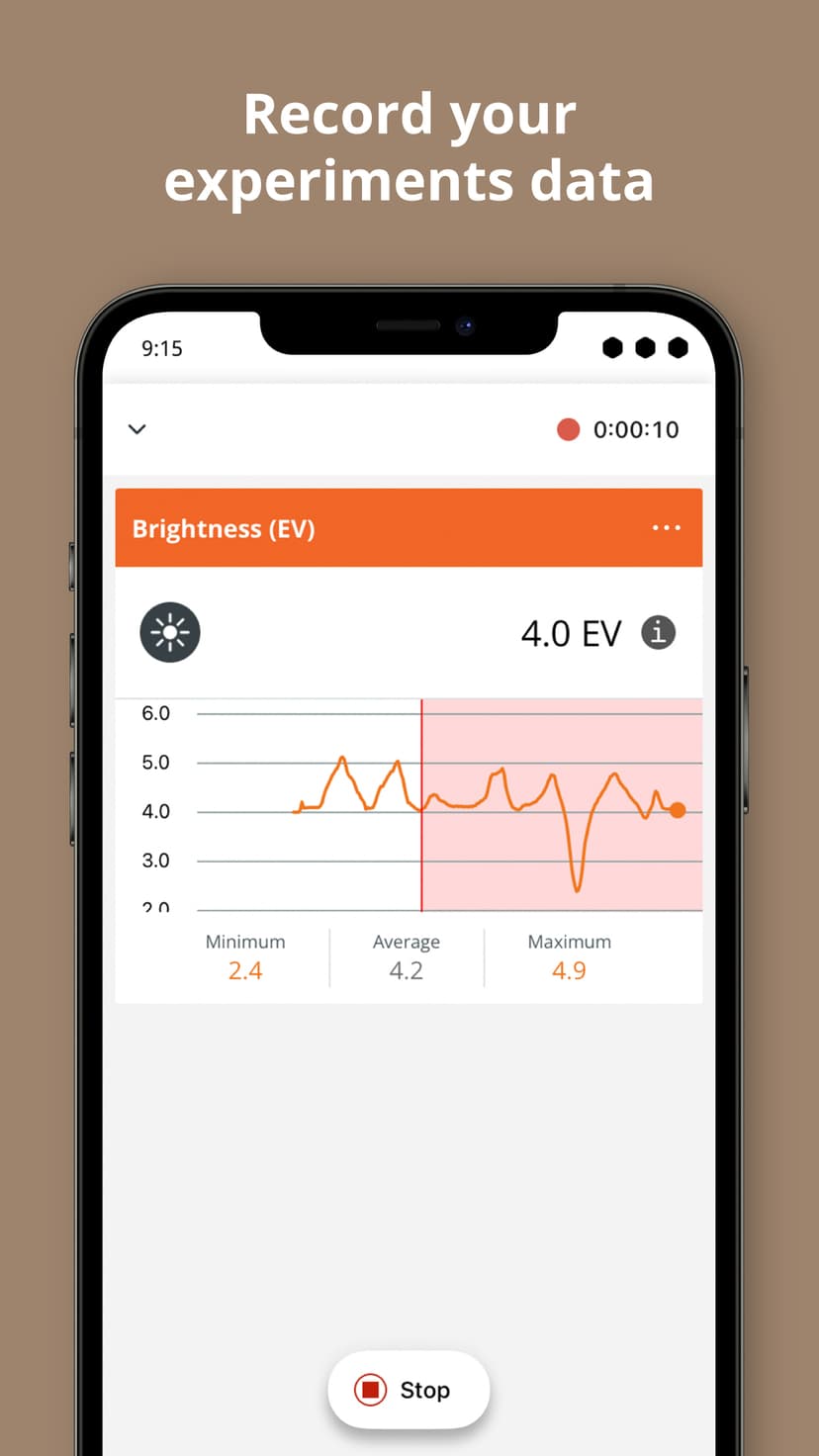
- Provides real-time graphing of data variables, which supports cognitive linking between physical events and abstract mathematical representations.
- Integrates seamlessly with external Arduino hardware for advanced data logging and electronics integration.
Cons
- Lacks built-in scaffolding or worked examples to guide novice users through the scientific method.
- Provides no automated feedback or corrective guidance on data interpretation.
- Requires high intrinsic motivation or direct educator supervision to prevent aimless measurement without hypothesis testing.
- Omits spaced retrieval practice or conceptual quizzes to solidify underlying scientific principles.
What Do We Know About Arduino Science Journal App?
The Arduino Science Journal App is highly effective as an experiential data collection tool, but it requires adult guidance to teach scientific concepts. Instead of delivering pre-packaged lessons or quizzes, this app transforms your child's smartphone or tablet into a functional pocket laboratory. By utilizing built-in hardware like the accelerometer, microphone, and light sensor, it allows your child to measure real-world phenomena like sound intensity, acceleration, and ambient light. From a learning science perspective, this facilitates inquiry-based learning and embodied cognition, as students physically interact with the variables they are measuring. However, parents must understand that the app does not teach the scientific method explicitly. There are no built-in tutorials explaining what acceleration means or how to control variables in an experiment. The app simply records and graphs the data. To make this an educational experience, you must prompt your child to form hypotheses, structure their data collection, and analyze the resulting graphs. Without this scaffolding, children may simply play with the sensors without engaging in deeper cognitive processing or conceptual learning. While The Learning Standard has not yet formally evaluated this app, its utility is undeniable for parents willing to co-create experiments alongside their children.
How Does Arduino Science Journal App Work?
The Arduino Science Journal App employs an open-ended, inquiry-based pedagogical approach centered on experiential data logging. Users begin by creating an overarching project, which serves as a digital notebook for a specific scientific question. Within a project, your child selects from available device sensors, such as the magnetometer, accelerometer, or barometer, to measure physical inputs. The app displays this data via real-time line graphs, translating immediate physical actions into dynamic mathematical visualizations. This dual coding helps bridge the gap between concrete experiences and abstract graphical literacy. Users can record specific trials, capturing data over a set duration. Crucially, the interface allows your child to annotate these data runs with text observations and photographs, encouraging comprehensive documentation. For advanced users, the app pairs via Bluetooth with external Arduino microcontrollers to log data from specialized external sensors. The mechanics are entirely user-driven, meaning the learner must independently decide when to start recording, how to manipulate the physical environment, and what conclusions to draw from the resulting data traces.
Strengths and tradeoffs of Arduino Science Journal App
The biggest strength of the Arduino Science Journal App is its capacity for authentic, hands-on data collection, while its biggest weakness is the complete absence of built-in instructional scaffolding. Inquiry-Based Exploration: By turning a common device into a multi-sensor scientific instrument, the app excels at fostering curiosity and active learning. When students physically move a device and immediately see the acceleration graph spike, they build strong mental models of physics concepts through embodied cognition. Multimodal Documentation: The ability to combine sensor graphs with written notes and photographs aligns well with cognitive load theory, allowing learners to offload working memory onto the digital notebook while synthesizing multiple streams of information. Lack of Direct Instruction: Because the app operates purely as a tool, it provides no worked examples or structured learning paths. Learning science indicates that novices require explicit guidance to master complex domains like experimental design. No Formative Assessment: The app contains no mechanisms for retrieval practice, formative assessment, or feedback loops. If your child misinterprets a data graph, the app will not correct them. Therefore, while it is a powerful instrument for data visualization, it relies entirely on the external environment, teachers, or parents to provide the necessary pedagogical framework and conceptual correction.
Who Might Benefit From Arduino Science Journal App?
This app is best for middle and high school students who need a reliable digital measurement tool for hands-on science experiments. While technically accessible to all ages, younger children will struggle to derive educational value without heavy parent or teacher facilitation. It serves perfectly as an applied science companion for students conducting physics or environmental science projects, allowing them to replace expensive lab equipment with a smartphone. Educators employing project-based learning will find it particularly useful for structuring classroom lab work, especially if they utilize the Teacher Plan integration for Google Classroom.
Data Transparency
Does Not Meet Data Transparency Standard
Arduino Science Journal App does not meet our data transparency standard. Its privacy policy does not document basic protections, including a statement that it does not sell data and a commitment against targeted advertising.
21 of 35 checks passed
Evaluated September 2026
Arduino Privacy Policy →Level 1 · Basic protections
Does not sell data or target ads at students, limits sharing, and lets parents see and delete their child's data.
Not documented: a statement that it does not sell data, a commitment against targeted advertising
Level 2 · Parent control (meets the standard)
Families can get their data out, know who processes it, and know how long it is kept.
Not documented: self-service deletion
Level 3 · Direct data access
Families or schools can pull their own data through an API, in a stated format.
Not documented: an API for retrieving their own data, a named export format
View all 35 checks
Parent Access7/8
Does the policy mention parents specifically?
“For more information on how we process the personal data of minors and their parents or legal guardians, please see Section 3, "Minors' Data" below.”
Can parents view their child's data?
“Parents may also have the right under applicable law to review or prevent further collection or use of personal data from the parent, legal guardian or the minor. To make a request, please email us at [privacy@arduino.cc](mailto:privacy@arduino.cc).”
Can parents modify their child's data?
“Parents and legal guardians of minors under the age of 14 can request that Arduino make changes to their minor's account or delete it by logging into their account.”
Can parents delete their child's account?
“Parents and legal guardians of minors under the age of 14 can request that Arduino make changes to their minor's account or delete it by logging into their account.”
Is there a dedicated Children's Privacy section?
“Please read the following information regarding the processing of personal data of minors under 18 years of age (a " **minor**" or " **minors**").”
Does it reference COPPA compliance?
“The personal data collected within the Junior Account may be considered personal information (or similar term) in certain jurisdictions, including the United States under the Children's Online Privacy Protection Act (" **COPPA**"):”
Does it reference FERPA compliance?
The policy does not mention FERPA.
Is parental consent required for child accounts?
“Minors (including students) under the age of 18 may create an account by selecting unique access credentials and getting parental or legal guardian consent.”
Data Portability2/5
Can users access their personal data?
“You have the right to confirm processing and know/access the personal information we have collected about you, including the categories of personal information,”
Can users download/export their data?
“you have the right to receive personal information you provided to us in a structured, common, and machine-readable format, and the right to request transmission of that information to another controller where this is technically feasible.”
Is there a self-service data access tool?
The policy says rights are exercised by emailing or through a request web form, not through a self-service access tool.
Is a specific data format mentioned for export?
The policy only mentions a generic "structured, common, and machine-readable format" and names no specific file format.
Is there an API for data access?
The policy does not describe an API for retrieving user data.
Data Minimization2/6
Is data collection itemized?
“The table below identifies the purposes for which we process personal data, the corresponding categories of personal data processed for each purpose, our legal basis (and special condition) for processing and how long we retain your personal data.”
Can the app be used without a real name?
The policy says Junior Accounts use randomly generated usernames, but Restricted Account users (ages 14-18) may have additional data collected under Section 1, which includes first and last names in several scenarios.
Can the app be used without an email?
The policy lists email addresses as collected for Restricted Account and Junior Account users, as well as the parent's email.
Does it state collection is limited to what is necessary?
The policy has no general commitment to collect only what is necessary; it only mentions collecting the parent information needed to activate a minor's account.
Is IP address anonymized or truncated?
“We use third party tools to mask your IP address and analyze use of our Website at the country (and not individual) level.”
Is location tracking explicitly excluded?
The policy says it collects geolocation data, with consent.
Third-Party Protection4/7
Does it explicitly state no selling of data?
The policy admits to "selling" and "sharing" personal information as defined by the CCPA and only rules out knowingly selling minors' data.
Are third-party providers named?
“In Arduino's application Science Kit Physics Lab, we embed videos from YouTube and the App is tagged for child-directed treatment with Google so that according to Google/YouTube's system design, no personal data is sent to YouTube.”
Are providers contractually restricted?
“We will take steps to ensure that your information receives appropriate safeguards in the jurisdictions in which we or our service providers process it, for example, by entering into appropriate safeguards to protect the personal information, which will include entering into approved standard contractual clauses with the recipient (where required under applicable law).”
No-targeted-advertising commitment?
The policy says adult users' data is used for profiling and targeted advertising; the no-advertising commitment covers only minors.
Is AI/ML data sharing addressed?
The policy does not address AI or machine learning.
Child-specific sharing restriction?
“we do not permit service providers to use minors' data for behavioral advertising. We do not disclose minors' personal data to other third-party operators.”
Cookies/tracking limited or opt-out?
“We honor opt-out preference signals. An opt-out preference signal is a signal that is sent by a platform, technology, or mechanism on your behalf that communicates your choice to opt-out of sharing personal information for targeted advertisements or the sale of your personal information.”
Deletion & Retention4/5
Can users delete their account?
“You have the right, in some circumstances, to request deletion or erasure of the personal information we have collected about you.”
Self-service deletion mechanism?
The policy describes deletion by request (email or web form) and does not describe a self-service deletion tool.
Specific data retention timeline?
“If you do not access your account for 24 months, we will deactivate it. When creating an account, if you do not confirm within 1 month via the link sent to you, your Arduino account will be deleted.”
Auto-deletion of inactive accounts?
“The retention period of personal data will be equal to the period of activity on the Junior Account. If the Junior Account is not accessed for 24 months, we will deactivate it.”
Post-deletion handling described?
“After your account is cancelled or terminated we delete your account and de-identify your username within the Forum and Project Hub (if you have posted/commented within them). Posts remain in Forum and Project Hub for 5 years,”
Advertising2/4
Advertising model explicitly disclosed?
“This category of personal information may be sold or shared for analytics, marketing, advertising and cross-context behavioral advertising.”
Free from third-party advertisements?
The policy discloses sharing with third-party advertising providers and does not say the product is free of third-party ads.
Children excluded from ad targeting?
“We do not knowingly sell or share the personal information of minors under the age of 18.”
Ad-free option available?
The policy does not describe an ad-free option or say the product has no advertising.
What This Means
The policy review did not meet our data transparency standard. The checks above show the documented findings and unknowns. A missing statement does not establish how the app handles data in practice.
About this evaluation: Based on automated analysis of Arduino Privacy Policy against 35 policy-disclosure questions, including questions adapted from the Common Sense Privacy Program's published evaluation questions. TLS is not affiliated with Common Sense Media, and this is not a Common Sense rating. Quoted text is copied from the policy; unquoted notes are our summary. Results describe what the policy documents, not the company's actual practices. Privacy policies can change: this review reflects the version we analyzed and does not determine legal compliance.
Sources and review method
TLS combines product information and editorial analysis to explain how Arduino Science Journal App works, its tradeoffs, and the questions to ask before choosing it. Product features, an instructional rationale and evidence of learning outcomes are different kinds of information.
Formal Learning Standard assessment: not yet completed. Data Transparency findings are reported separately and do not establish learning effectiveness. Read our methodology.
Frequently Asked Questions About Arduino Science Journal App
Is the Arduino Science Journal App free?
Yes, the core Arduino Science Journal App is completely free to download and use for individual data collection. All internal device sensors and basic digital notebook features are accessible without payment. Arduino does offer a paid Teacher Plan, which costs $7.99 per month or $64 annually, designed specifically for educators who need to integrate the app with Google Classroom for assignment tracking.
Is the Arduino Science Journal App good for elementary students?
It is only effective for elementary students if guided closely by an adult. The app lacks the direct instruction and structured worked examples that younger learners need to understand foundational scientific concepts. Parents or teachers must provide the hypotheses, explain the variables, and help younger children interpret the resulting graphs. Independent use by young children usually results in superficial play rather than rigorous scientific learning.
What does the Arduino Science Journal App teach?
The app itself does not explicitly teach scientific facts, formulas, or vocabulary. Instead, it facilitates the practice of scientific inquiry, data collection, and graphical analysis. By observing real-time data changes based on physical movement, sound, or light, your child learns how to document experiments, read line graphs, and correlate physical phenomena with quantitative measurements through active observation and embodied cognition.
How does the Arduino Science Journal App compare to Vernier Graphical Analysis?
Both apps serve as powerful data logging tools for students. The Arduino Science Journal App excels in accessibility by maximizing the use of built-in smartphone sensors for everyday exploration at no cost. Vernier Graphical Analysis is typically more integrated into formal high school and college laboratory settings, often requiring proprietary external Vernier sensors. Arduino is better for casual inquiry, while Vernier dominates structured lab curriculums.
Has The Learning Standard evaluated Arduino Science Journal App?
TLS has not yet completed a Learning Standard evaluation of how well Arduino Science Journal App teaches. Its privacy policy has been reviewed for Data Transparency and does not yet document the basic protections (Level 1).
Is Arduino Science Journal App COPPA compliant?
The reviewed privacy policy references COPPA. A policy reference alone does not establish COPPA compliance. Policy review note: The policy references COPPA for Junior Account data.
Is Arduino Science Journal App FERPA compliant?
A FERPA reference was not found in the reviewed privacy policy. This does not determine whether the app complies with FERPA. Policy review note: The policy does not mention FERPA.
Does Arduino Science Journal App have a children's privacy policy?
The reviewed policy includes a dedicated children's privacy section. Policy review note: Section 3, "Minors' Data", is a dedicated section on children's data.
Does Arduino Science Journal App sell student data?
A statement ruling out data selling was not found in the reviewed policy. This does not establish that the app sells student data. Policy review note: The policy admits to "selling" and "sharing" personal information as defined by the CCPA and only rules out knowingly selling minors' data.
Can you delete your data from Arduino Science Journal App?
The reviewed privacy policy describes account deletion. We have not tested the deletion process. Policy review note: Users can ask for their data to be deleted.
Follow TLS Research
Subscribe to future TLS research updates: app reviews, findings, and what the evidence shows.
Screenshots

Take Action
For Arduino Science Journal App
If you represent Arduino Education and have a correction or new evidence, send the relevant source so we can review and update this page.
Submit a correctionDetails
- Pricing
- The Arduino Science Journal App is free. The Teacher Plan, that allows educators to integrate the app with Google Classroom, costs $7.99 per month for a monthly subscription, or $64 for an annual subscription.
- Platforms
- iOS (Apple mobile), iPadOS (Apple tablet), Android (Google mobile), Chrome OS (Google)
- Website
- Visit site