
Almanack
Product by Almanack
Facts checked: Not yet checked
Our take (not a Learning Standard rating). This label applies to learning-science judgments throughout this overview.
Our take (not a Learning Standard rating)
Almanack does not teach students directly, but rather equips educators to design standards-aligned lesson plans and differentiated materials. Because it functions as a resource-generation tool rather than a student-facing instructional platform, its educational effectiveness depends entirely on how teachers apply its output to active learning strategies in the classroom.
Pros
- Automates the creation of differentiated materials to support students at varying readiness levels.
- Facilitates standards-aligned curriculum mapping across long-term units and daily lessons.
- Reduces administrative burden so educators can focus on direct student feedback and observation.
- Supports a wide range of subjects from early childhood education through career and technical training.
Cons
- Lacks direct student-facing instructional modules or active practice environments.
- Quality of generated resources depends heavily on initial teacher prompts and subject matter expertise.
- Offers no built-in student assessment data tracking to validate learning outcomes.
- Not yet evaluated by The Learning Standard to verify the pedagogical soundness of its lesson plans.
What Do We Know About Almanack?
Almanack is an educator-facing planning tool, meaning its effectiveness for your child relies completely on how their teacher utilizes the materials it generates. It is designed to help teachers create lesson plans, map out curriculum, and differentiate instruction for diverse learners. Rather than acting as a digital tutor that your child logs into, Almanack operates behind the scenes. Teachers use it to build customized reading passages, tiered assignments, and targeted feedback templates. From a learning science perspective, this enables teachers to more easily provide the appropriate level of challenge, helping maintain your child's engagement through optimized cognitive load. However, because The Learning Standard has not yet evaluated Almanack, we cannot verify the pedagogical quality or accuracy of the resources it produces. Parents should know that while tools like this save teachers valuable time, they do not replace direct instruction, active retrieval practice, or peer-to-peer learning in the classroom. Your child will never interact with Almanack directly, but they may benefit from the tailored worksheets and varied instructional approaches their teacher creates using the platform.
How Does Almanack Work?
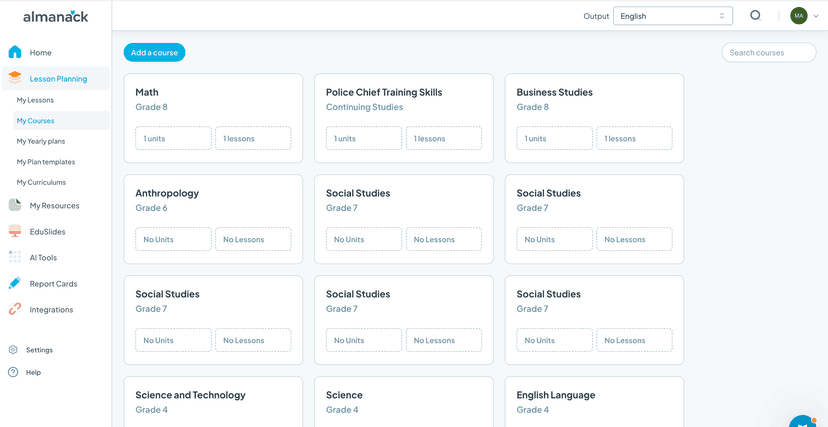
Almanack relies on algorithmic resource generation to assist teachers with curriculum mapping and instructional design. Educators input their specific grade level, subject matter, and learning standards into the platform. The system then outputs structured yearly frameworks, unit outlines, and daily lesson plans. Teachers can further prompt the tool to adjust the reading level of a text, create multiple versions of an assignment, or generate specific rubrics for formative assessment. This process theoretically supports differentiated instruction by allowing educators to rapidly produce materials that match varying student readiness levels. Because it covers all ages and nearly all subjects, the tool acts as a generalist assistant rather than a subject-specific pedagogical engine. It does not track student progress or deliver spaced repetition intervals. Instead, it provides the raw instructional materials that a teacher must manually integrate into their existing classroom workflow and learning management systems.
Strengths and tradeoffs of Almanack
Almanack's biggest strength is its ability to rapidly generate differentiated resources, while its biggest weakness is the lack of direct student engagement and learning validation. Differentiation at scale is notoriously difficult for educators, and providing materials tailored to individual student needs is a core principle of effective teaching. By automating the creation of tiered assignments, Almanack theoretically helps teachers keep students in their optimal learning zone. Furthermore, its standards-aligned curriculum mapping ensures that generated lesson plans target required educational benchmarks. However, the platform operates entirely outside the student experience. It provides no interactive practice, retrieval exercises, or spaced repetition: elements crucial for long-term memory retention. The burden of applying learning science principles falls entirely on the teacher. Additionally, because The Learning Standard has not yet rated this tool, the pedagogical rigor of its generated content remains unverified. Automated lesson plans can sometimes lack the nuance required for effective scaffolding or fail to include adequate worked examples for novice learners. Ultimately, Almanack is an administrative aid that streamlines teacher workflows rather than an active learning mechanism for students.
Who Might Benefit From Almanack?
Almanack is best for K-12 educators and curriculum coordinators who need to streamline lesson planning and quickly produce differentiated classroom materials. It serves teachers across all subjects, from early childhood education to career and technical training, by reducing the time spent on administrative drafting. While parents will not use this app at home with their children, they may appreciate educators using it to provide customized reading materials. It is ideal for school districts looking to standardize curriculum mapping while preserving instructional flexibility.
Data Transparency
Does Not Meet Data Transparency Standard
Almanack does not meet our data transparency standard. Its privacy policy does not document basic protections, including a commitment against targeted advertising, limits on sharing children's data and parents' right to see their child's data.
15 of 35 checks passed
Evaluated September 2026
Your curriculum implementation companion →Level 1 · Basic protections
Does not sell data or target ads at students, limits sharing, and lets parents see and delete their child's data.
Not documented: a commitment against targeted advertising, limits on sharing children's data, parents' right to see their child's data, parents' right to delete their child's data
Level 2 · Parent control (meets the standard)
Families can get their data out, know who processes it, and know how long it is kept.
Level 3 · Direct data access
Families or schools can pull their own data through an API, in a stated format.
Not documented: an API for retrieving their own data, a named export format
View all 35 checks
Parent Access1/8
Does the policy mention parents specifically?
The policy does not mention parents; it refers only to educators, school personnel and educational institutions.
Can parents view their child's data?
The policy does not give parents a right to view their child's data; only educational institutions may request access to student information.
Can parents modify their child's data?
The policy does not give parents a right to modify their child's data; only educational institutions may request correction.
Can parents delete their child's account?
The policy does not give parents a right to delete their child's data or account; only educational institutions may request deletion.
Is there a dedicated Children's Privacy section?
The policy has no dedicated Children's Privacy or COPPA section; its student data content sits under Student data and FERPA Compliance headings.
Does it reference COPPA compliance?
The policy does not mention COPPA.
Does it reference FERPA compliance?
“Our organization is dedicated to adhering to the U.S. Family Educational Rights and Privacy Act (FERPA), recognizing the critical need to safeguard student data.”
Is parental consent required for child accounts?
The policy does not address parental consent for child accounts.
Data Portability2/5
Can users access their personal data?
“Right of Access. This includes your right to access the personal information we gather about you, and your right to obtain information about the sharing, storage, security, and processing of that information.”
Can users download/export their data?
“Right to Portability. You have the right to receive the personal information we have about you and the right to transmit it to another party. If you want to export data from your accounts, you can do so by contacting our support team.”
Is there a self-service data access tool?
The policy says data export is handled by contacting support and describes no self-service data access tool.
Is a specific data format mentioned for export?
The policy does not name a format for exported data.
Is there an API for data access?
The policy does not describe an API that lets users or schools retrieve their own data.
Data Minimization2/6
Is data collection itemized?
“We collect limited student information including student names, course grades, and teacher feedback on performance.”
Can the app be used without a real name?
The policy states that it collects student names.
Can the app be used without an email?
The policy does not state that student email addresses are never collected.
Does it state collection is limited to what is necessary?
“Our guiding principle is to collect only what we need.”
Is IP address anonymized or truncated?
The policy says IP addresses are collected and tied to user accounts, and does not mention anonymizing or truncating them.
Is location tracking explicitly excluded?
The policy does not explicitly rule out location tracking.
Third-Party Protection5/7
Does it explicitly state no selling of data?
“We’ll never sell your personal information to third parties, and we won’t use your name or institution's name in marketing statements without your permission either.”
Are third-party providers named?
“- Stripe: Payment processing”
Are providers contractually restricted?
“These include implementing the European Commission’s Standard Contractual Clauses for transfers of personal information between our group companies and third-party providers, which require all parties to protect personal information they process from the EEA in accordance with European Union data protection law.”
No-targeted-advertising commitment?
The policy excludes only Google user data from targeted advertising and makes no such commitment for student or all user data.
Is AI/ML data sharing addressed?
“We do not use the prompts, content, or other information you submit to AI features to train Almanack's own models, and we do not permit our AI model providers to use your prompts or content to train their models.”
Child-specific sharing restriction?
The policy mentions access controls for student data but sets no specific limit on sharing children's data.
Cookies/tracking limited or opt-out?
“You can adjust cookie retention settings and accept or block individual cookies in your browser settings, although our apps won’t work and other aspects of our service may not function properly if you turn cookies off.”
Deletion & Retention5/5
Can users delete their account?
“If you choose to cancel your account, your content will become immediately inaccessible and should be purged from our systems in full within 60 days.”
Self-service deletion mechanism?
“If you choose to cancel your account, your content will become immediately inaccessible and should be purged from our systems in full within 60 days. This applies both for cases when an account owner directly cancels and for auto-canceled accounts.”
Specific data retention timeline?
“Account content is deleted within 60 days of account deletion.”
Auto-deletion of inactive accounts?
“Inactive accounts older than 12 months are purged or anonymized.”
Post-deletion handling described?
“If you delete your account, your content becomes inaccessible immediately; we remove it from active systems within 30 days and from backups within 60 days”
Advertising0/4
Advertising model explicitly disclosed?
The policy covers only Almanack's own marketing ads on third-party platforms and does not say whether the product shows ads.
Free from third-party advertisements?
The policy does not state that the product is free of third-party advertisements.
Children excluded from ad targeting?
The policy does not address excluding children from ad targeting.
Ad-free option available?
The policy does not state that the product has no ads or offer an ad-free option.
What This Means
The policy review did not meet our data transparency standard. The checks above show the documented findings and unknowns. A missing statement does not establish how the app handles data in practice.
About this evaluation: Based on automated analysis of Your curriculum implementation companion against 35 policy-disclosure questions, including questions adapted from the Common Sense Privacy Program's published evaluation questions. TLS is not affiliated with Common Sense Media, and this is not a Common Sense rating. Quoted text is copied from the policy; unquoted notes are our summary. Results describe what the policy documents, not the company's actual practices. Privacy policies can change: this review reflects the version we analyzed and does not determine legal compliance.
Sources and review method
TLS combines product information and editorial analysis to explain how Almanack works, its tradeoffs, and the questions to ask before choosing it. Product features, an instructional rationale and evidence of learning outcomes are different kinds of information.
Formal Learning Standard assessment: not yet completed. Data Transparency findings are reported separately and do not establish learning effectiveness. Read our methodology.
Frequently Asked Questions About Almanack
Is Almanack free?
Yes, Almanack is currently listed as a free tool for educators. However, as an unverified app, users should check the developer's website directly for any recent changes to pricing tiers, subscription models, or premium feature limitations.
Is Almanack good for elementary students?
Almanack is not designed for direct student use. Instead, it is highly useful for elementary teachers who need to efficiently create age-appropriate, standards-aligned lesson plans and differentiated reading materials tailored to early learners in their classrooms.
What does Almanack teach?
Almanack does not teach subjects directly to students. It is a curriculum planning tool that helps educators build structured instructional frameworks and varied lesson materials for subjects ranging from early childhood education to advanced career and technical education.
How does Almanack compare to other AI lesson planners?
While similar to other educator tools in the generative space, Almanack focuses heavily on long-term curriculum mapping and rigorous standards alignment alongside daily lesson generation. A complete, data-driven comparison will be available once evaluated by The Learning Standard.
Has The Learning Standard evaluated Almanack?
TLS has not yet completed a Learning Standard evaluation of how well Almanack teaches. Its privacy policy has been reviewed for Data Transparency and does not yet document the basic protections (Level 1).
Is Almanack COPPA compliant?
A COPPA reference was not found in the reviewed privacy policy. This does not determine whether the app complies with COPPA. Policy review note: The policy does not mention COPPA.
Is Almanack FERPA compliant?
The reviewed privacy policy references FERPA. A policy reference alone does not establish FERPA compliance. Policy review note: The policy commits to FERPA compliance.
Does Almanack have a children's privacy policy?
No dedicated children's privacy section was found in the reviewed policy. Policy review note: The policy has no dedicated Children's Privacy or COPPA section; its student data content sits under Student data and FERPA Compliance headings.
Does Almanack sell student data?
The reviewed policy states that the app does not sell data. This is a policy statement; actual data practices were not verified. Policy review note: The policy states that Almanack will never sell personal information.
Can you delete your data from Almanack?
The reviewed privacy policy describes account deletion. We have not tested the deletion process. Policy review note: Users can cancel their account and have their content deleted.
Follow TLS Research
Subscribe to future TLS research updates: app reviews, findings, and what the evidence shows.
Screenshots
Take Action
For Almanack
If you represent Almanack and have a correction or new evidence, send the relevant source so we can review and update this page.
Submit a correctionDetails
- Pricing
- Free
- Platforms
- Web Browser
- Website
- Visit site