
All The Right Type
Product by Ingenuity Works
Facts checked: Not yet checked
Our take (not a Learning Standard rating). This label applies to learning-science judgments throughout this overview.
Our take (not a Learning Standard rating)
All The Right Type teaches fundamental touch typing skills through structured repetition, but its reliance on drill-and-practice mechanics lacks the dynamic, adaptive scaffolding seen in modern learning science. While the program builds motor memory effectively through isolated finger placement exercises, it struggles to maintain student engagement over time without meaningful varied practice or targeted corrective feedback.
Pros
- Builds automaticity through systematic, repetitive motor skill practice.
- Provides teachers with detailed progress tracking for both speed and accuracy.
- Aligns instructional sequencing with standard keyboarding curriculum.
Cons
- Relies heavily on rote drill-and-practice rather than dynamic, adaptive learning paths.
- Lacks targeted corrective feedback when your child consistently misses specific key reaches.
- Fails to incorporate spaced retrieval practice for previously mastered keys during new lessons.
What Do We Know About All The Right Type?
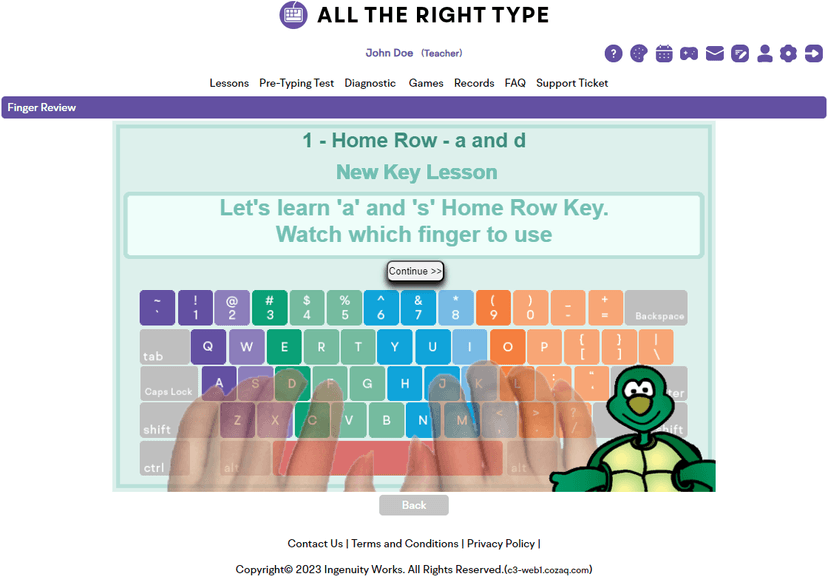
All The Right Type is a traditional, drill-based keyboarding program that builds basic motor memory but lacks modern adaptive learning features. Your child will spend their time progressing through linear lessons focused on specific finger placements and keystroke combinations. The platform uses basic repetition to build muscle memory, which is a scientifically sound way to establish initial automaticity. However, because the system does not dynamically adjust difficulty based on your child's specific error patterns, they may experience frustration if they struggle with certain key combinations. The interface includes basic games to break up the typing drills, but these act more as extrinsic rewards than integrated learning tools. Since The Learning Standard has not yet formally evaluated this application, we recommend parents monitor their child's posture and technique independently, as the software cannot correct poor physical form. The program is best viewed as a digital worksheet for typing practice rather than a responsive tutor.
How Does All The Right Type Work?
All The Right Type uses a linear, mastery-based progression model heavily rooted in behaviorist drill-and-practice pedagogy. Your child begins with home row finger placement and systematically unlocks new keys through repeated typing exercises. The learning mechanics rely on blocked practice, where students type strings of identical or similar character sequences to build isolated motor memory. After completing a sequence, the program provides immediate knowledge of results, displaying words-per-minute speed and error counts. Teachers or parents can use the management dashboard to restrict access to certain lessons until accuracy thresholds are met, enforcing a rigid mastery learning structure. The platform also includes standardized typing tests and supplementary games designed to reinforce the current lesson's target keys, though the core instructional loop remains focused on repetitive keystroke drills against a static text prompt.
Strengths and tradeoffs of All The Right Type
The biggest strength of All The Right Type is its systematic breakdown of the keyboard for isolated motor practice, while its biggest weakness is the lack of adaptive scaffolding to address individual student error patterns. From a learning science perspective, the program effectively utilizes blocked practice for initial skill acquisition. By isolating specific fingers and key reaches, your child can develop baseline automaticity without cognitive overload. The platform's granular tracking of speed and accuracy also provides clear metrics for goal setting. However, the program fails to implement interleaved practice or spaced repetition effectively. Once a lesson is complete, those specific key combinations are rarely targeted strategically in future review sessions unless the student takes a comprehensive test. Furthermore, the feedback mechanism is strictly summative. When your child makes an error, the system flags the mistake but does not offer corrective feedback or targeted mini-lessons to fix the underlying misconception or motor failure. The lack of dynamic adjustment means students must self-regulate their learning to overcome persistent typing hurdles.
Who Might Benefit From All The Right Type?
Best for elementary and middle school classrooms that need a standardized, linear curriculum for introductory keyboarding instruction. The platform serves well as a supplemental tool for teachers who want basic tracking of words-per-minute and accuracy scores across a large group of students. Because the program lacks adaptive instruction, it is best suited for highly motivated learners who can tolerate repetitive drills, or for structured lab environments where a physical instructor is present to monitor posture, correct finger placement, and provide the personalized feedback that the software lacks.
Data Transparency
Does Not Meet Data Transparency Standard
All The Right Type does not meet our data transparency standard. Its privacy policy does not document basic protections, including a statement that it does not sell data, a commitment against targeted advertising and limits on sharing children's data.
4 of 35 checks passed
Evaluated September 2026
Privacy Policy →Level 1 · Basic protections
Does not sell data or target ads at students, limits sharing, and lets parents see and delete their child's data.
Not documented: a statement that it does not sell data, a commitment against targeted advertising, limits on sharing children's data, contractual limits on service providers, a COPPA or FERPA commitment, parents' right to see their child's data, parents' right to delete their child's data, account deletion
Level 2 · Parent control (meets the standard)
Families can get their data out, know who processes it, and know how long it is kept.
Not documented: data export, named service providers, self-service deletion
Level 3 · Direct data access
Families or schools can pull their own data through an API, in a stated format.
Not documented: an API for retrieving their own data, a named export format
View all 35 checks
Parent Access0/8
Does the policy mention parents specifically?
The policy does not mention parents.
Can parents view their child's data?
The policy does not address parents viewing their child's data.
Can parents modify their child's data?
The policy does not address parents modifying their child's data.
Can parents delete their child's account?
The policy does not address parents deleting their child's data or account.
Is there a dedicated Children's Privacy section?
The policy has no section on children's privacy.
Does it reference COPPA compliance?
The policy does not reference COPPA.
Does it reference FERPA compliance?
The policy does not reference FERPA.
Is parental consent required for child accounts?
The policy requires the individual's consent but does not mention parental consent for child accounts.
Data Portability1/5
Can users access their personal data?
“Account Information Requests: We honor requests from customers for account information that we have about them.”
Can users download/export their data?
The policy does not address downloading or exporting data.
Is there a self-service data access tool?
The policy describes access only by request, not through a self-service tool.
Is a specific data format mentioned for export?
The policy does not mention an export format.
Is there an API for data access?
The policy does not mention an API for data access.
Data Minimization1/6
Is data collection itemized?
The policy refers to personal information in general terms and does not list the data it collects.
Can the app be used without a real name?
The policy does not address whether student names are collected.
Can the app be used without an email?
The policy does not address whether student email addresses are collected.
Does it state collection is limited to what is necessary?
“Limiting Collection: The collection of personal information shall be limited to that which is necessary for the identified purposes.”
Is IP address anonymized or truncated?
The policy does not address anonymizing IP addresses.
Is location tracking explicitly excluded?
The policy does not address location tracking.
Third-Party Protection0/7
Does it explicitly state no selling of data?
The policy does not state that the company does not sell data.
Are third-party providers named?
The policy does not name any third-party providers.
Are providers contractually restricted?
The policy says it takes appropriate measures with service providers but does not mention contractual restrictions.
No-targeted-advertising commitment?
The policy does not address targeted advertising.
Is AI/ML data sharing addressed?
The policy does not address AI or machine learning.
Child-specific sharing restriction?
The policy has no sharing restrictions specific to children.
Cookies/tracking limited or opt-out?
The policy does not address cookies or tracking; its only opt-out covers solicitation lists.
Deletion & Retention2/5
Can users delete their account?
The policy does not give users a way to request deletion of their account or data.
Self-service deletion mechanism?
The policy does not describe a self-service deletion mechanism.
Specific data retention timeline?
“Unless otherwise required by an applicable agreement or legal obligation, inactive accounts and associated information may be deleted after a period of two years of non-use.”
Auto-deletion of inactive accounts?
“Unless otherwise required by an applicable agreement or legal obligation, inactive accounts and associated information may be deleted after a period of two years of non-use.”
Post-deletion handling described?
The policy does not describe what happens to data after deletion.
Advertising0/4
Advertising model explicitly disclosed?
The policy does not address advertising.
Free from third-party advertisements?
The policy does not address third-party advertising.
Children excluded from ad targeting?
The policy does not address ad targeting of children.
Ad-free option available?
The policy does not address advertising or an ad-free option.
What This Means
The policy review did not meet our data transparency standard. The checks above show the documented findings and unknowns. A missing statement does not establish how the app handles data in practice.
About this evaluation: Based on automated analysis of Privacy Policy against 35 policy-disclosure questions, including questions adapted from the Common Sense Privacy Program's published evaluation questions. TLS is not affiliated with Common Sense Media, and this is not a Common Sense rating. Quoted text is copied from the policy; unquoted notes are our summary. Results describe what the policy documents, not the company's actual practices. Privacy policies can change: this review reflects the version we analyzed and does not determine legal compliance.
Sources and review method
TLS combines product information and editorial analysis to explain how All The Right Type works, its tradeoffs, and the questions to ask before choosing it. Product features, an instructional rationale and evidence of learning outcomes are different kinds of information.
Formal Learning Standard assessment: not yet completed. Data Transparency findings are reported separately and do not establish learning effectiveness. Read our methodology.
Frequently Asked Questions About All The Right Type
Is All The Right Type free?
No, the program requires a paid subscription. Pricing is not publicly listed, and schools or parents must contact the vendor directly for a quote based on the number of expected users.
Is All The Right Type good for elementary students?
Yes, the systematic, slow progression is appropriate for beginners. However, younger children may quickly lose interest due to the repetitive nature of the drill-and-practice exercises and the lack of highly engaging, modern gamification mechanics.
What does All The Right Type teach?
The program teaches touch typing, focusing on correct finger placement, keystroke reaches, typing speed measured in words per minute, and typing accuracy. It focuses purely on motor skills and does not teach word processing or digital citizenship.
How does All The Right Type compare to Typing Club?
While both teach keyboarding, Typing Club offers a more modern interface with adaptive learning paths that adjust directly to student errors. All The Right Type relies on a more traditional, linear progression of isolated typing drills without dynamic adjustment.
Has The Learning Standard evaluated All The Right Type?
TLS has not yet completed a Learning Standard evaluation of how well All The Right Type teaches. Its privacy policy has been reviewed for Data Transparency and does not yet document the basic protections (Level 1).
Is All The Right Type COPPA compliant?
A COPPA reference was not found in the reviewed privacy policy. This does not determine whether the app complies with COPPA. Policy review note: The policy does not reference COPPA.
Is All The Right Type FERPA compliant?
A FERPA reference was not found in the reviewed privacy policy. This does not determine whether the app complies with FERPA. Policy review note: The policy does not reference FERPA.
Does All The Right Type have a children's privacy policy?
No dedicated children's privacy section was found in the reviewed policy. Policy review note: The policy has no section on children's privacy.
Does All The Right Type sell student data?
A statement ruling out data selling was not found in the reviewed policy. This does not establish that the app sells student data. Policy review note: The policy does not state that the company does not sell data.
Can you delete your data from All The Right Type?
Account deletion was not documented in the reviewed privacy policy. This does not establish whether deletion is available. Policy review note: The policy does not give users a way to request deletion of their account or data.
Follow TLS Research
Subscribe to future TLS research updates: app reviews, findings, and what the evidence shows.
Screenshots
Take Action
For All The Right Type
If you represent Ingenuity Works and have a correction or new evidence, send the relevant source so we can review and update this page.
Submit a correction