Reading Progress
Product by Microsoft
Facts checked: Not yet checked
Our take (not a Learning Standard rating). This label applies to learning-science judgments throughout this overview.
Our take (not a Learning Standard rating)
Reading Progress functions as an effective formative assessment tool rather than a standalone instructional program. It accurately tracks reading fluency metrics like words per minute and miscue rates, allowing educators to target interventions, but relies entirely on teachers to provide the actual reading instruction and remediation based on its data.
Pros
- Automates the collection of reading fluency data, including omissions, insertions, and mispronunciations.
- Allows students to record reading passages in a low-pressure environment, reducing performance anxiety.
- Visualizes individual and class-wide phonics gaps to help educators implement targeted interventions.
- Provides deliberate practice opportunities where students can review their own audio recordings and identified errors.
Cons
- Offers no direct instruction or phonics remediation to the student.
- Speech recognition artificial intelligence frequently struggles to accurately assess regional accents or speech impediments.
- Functions strictly within the Microsoft Teams ecosystem, limiting accessibility for schools using other learning management systems.
- Relies completely on the teacher to select appropriate reading passages and design follow-up instruction.
What Do We Know About Reading Progress?
Reading Progress is an effective assessment tool for tracking reading fluency, but it does not teach a child how to read. Your child will use this tool to record themselves reading passages assigned by their teacher. The software analyzes the recording using artificial intelligence to identify skipped words, mispronunciations, and reading speed. This gives educators a clear, data-driven picture of your child's reading development without requiring time-consuming manual testing during class. While it lacks direct instructional components like interactive phonics games or structured lessons, it serves a critical role in formative assessment. By identifying exact phonetic patterns your child struggles with, it empowers the teacher to deliver highly targeted intervention. You will not find direct feedback or instruction provided by the app itself; the effectiveness relies entirely on how the educator uses the generated data. Because it operates within Microsoft Teams, parents cannot use this as a standalone home learning app. It is strictly a school-based tool designed to streamline fluency checks and facilitate better teacher-student feedback loops.
How Does Reading Progress Work?
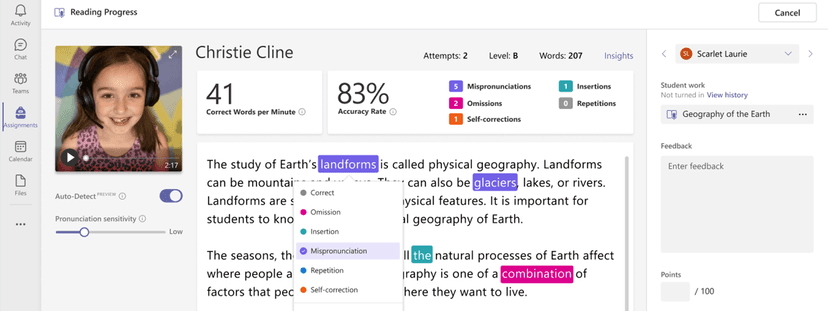
Reading Progress utilizes deliberate practice and automated formative assessment to measure and track reading fluency. Teachers upload reading passages or select them from a provided library and assign them to students via Microsoft Teams. Your child opens the assignment, activates their camera and microphone, and reads the text aloud at their own pace. As they read, the software records the session. Once submitted, Microsoft's speech recognition technology analyzes the audio file against the text. It generates an immediate report for the educator detailing words correct per minute and specific errors like omissions, insertions, repetitions, and mispronunciations. Teachers review this AI-generated analysis, make manual corrections if the AI misjudged an accent or speech pattern, and return the feedback to the student. The system then aggregates this data into an Education Insights dashboard, highlighting overarching class trends and individual phonics struggles over time, driving data-informed instructional decisions.
Strengths and tradeoffs of Reading Progress
Reading Progress excels at automating time-consuming fluency assessments but fails to provide any direct remediation or instruction for struggling readers. Automated data collection is the primary strength. By capturing audio and using AI to flag reading miscues, it frees educators from conducting one-on-one running records during class time. This allows for more frequent fluency checks, creating a robust longitudinal data set of a student's reading trajectory. It also utilizes deliberate practice by allowing students to hear their own recordings and see their specific errors when teachers return the assignment. However, the system's lack of instructional feedback is a significant weakness. The app diagnoses reading issues but does not teach the missing skills. Furthermore, the reliance on speech recognition artificial intelligence introduces accuracy issues. The AI can falsely flag words as incorrect if a student has a strong regional accent or a speech impediment, requiring careful manual review by the teacher to prevent inaccurate data collection. Its utility depends entirely on the educator's ability to analyze the dashboard and alter their teaching accordingly.
Who Might Benefit From Reading Progress?
Best for K-12 educators and schools already utilizing the Microsoft Teams ecosystem who need a streamlined method for conducting regular reading fluency checks. The tool supports students across all grade levels by allowing teachers to assign appropriately leveled texts. It provides a highly controlled, low-pressure environment for students who suffer from reading anxiety when performing live in front of a teacher. However, it is not designed for parents seeking a standalone app to teach their child reading at home, nor is it suitable for districts operating outside of Microsoft 365.
Sources and review method
TLS combines product information and editorial analysis to explain how Reading Progress works, its tradeoffs, and the questions to ask before choosing it. Product features, an instructional rationale and evidence of learning outcomes are different kinds of information.
Formal Learning Standard assessment: not yet completed. Data Transparency findings are reported separately and do not establish learning effectiveness. Read our methodology.
Frequently Asked Questions About Reading Progress
Is Reading Progress free?
Reading Progress is entirely free for educators and students who have access to Office 365 for Education. It functions as a built-in feature of Microsoft Teams for Education rather than a standalone purchase. Schools must have an active Microsoft 365 license to access the platform, which may involve tiered annual subscription costs at the district level. However, there are no individual consumer fees, subscriptions, or hidden in-app purchases required for parents or teachers to utilize the tool.
Is Reading Progress good for early elementary students?
Yes, Reading Progress is highly effective for early elementary students who are actively developing foundational reading skills. Teachers can easily assign decodable texts that perfectly align with their daily phonics instruction. However, parents should know that young students will need initial guidance on how to navigate the Microsoft Teams interface, activate their microphone, and submit their recordings properly before they can use the tool independently.
What does Reading Progress teach?
Reading Progress does not directly teach new concepts or phonics rules to students. Instead, it assesses reading fluency, reading accuracy, and overall prosody. The software tracks words correct per minute and categorizes specific reading errors such as mispronunciations, omissions, repetitions, and insertions. This detailed analysis provides teachers with the exact data needed to target their classroom reading instruction and assign appropriate interventions for struggling readers.
Reading Progress vs Flipgrid: Which is better?
Both are Microsoft education tools utilizing student video recording, but they serve entirely different pedagogical purposes. Reading Progress functions strictly as an assessment tool, utilizing artificial intelligence and speech-to-text analysis to track specific reading fluency metrics. Alternatively, Flipgrid is a video discussion platform designed for peer collaboration, social learning, and open-ended responses. Flipgrid does not provide automated reading analysis, while Reading Progress does not support peer-to-peer video sharing.
Does Reading Progress correct students while they read?
No, Reading Progress does not interrupt or correct the student while they are reading aloud. This intentional design prevents frustration and allows the student to practice reading naturally without the anxiety of constant automated corrections. All feedback and instructional guidance are provided after the teacher reviews the artificial intelligence report and returns the assignment with their own personalized notes and targeted remediation steps.
Has The Learning Standard evaluated Reading Progress?
TLS has not yet completed a Learning Standard evaluation of how well Reading Progress teaches. TLS has not published a Data Transparency result for its privacy policy.
Follow TLS Research
Subscribe to future TLS research updates: app reviews, findings, and what the evidence shows.
Screenshots
Take Action
For Reading Progress
If you represent Microsoft and have a correction or new evidence, send the relevant source so we can review and update this page.
Submit a correctionDetails
- Pricing
- Reading Progress is available to teachers and students for free and is included in Microsoft Teams, also available to educators and students for free as part of Office 365 for Education. Microsoft 365 licenses that include additional products are available to schools as part of a tiered annual license subscription.
- Platforms
- Web Browser, iOS (Apple mobile), iPadOS (Apple tablet), Android (Google mobile), Windows (Microsoft), macOS (Apple), Other
- Grade Levels
- Preschool, Prekindergarten, Transitional Kindergarten, Kindergarten, 1st Grade, 2nd Grade, 3rd Grade, 4th Grade, 5th Grade, 6th Grade, 7th Grade, 8th Grade, 9th Grade, 10th Grade, 11th Grade, 12th Grade
- Website
- Visit site